MAINTENANCE
DC BATTERY REPLACEMENT
HySecurity provides a one year warranty from the
date of shipment for all batteries supplied with
the SlideSmart operator.
Indicators of a low battery include:
LOW BATTERY or DEAD BATTERY appears on
the Smart DC Controller display which may or
may not be indicative of normal discharge.
ALERT 18 CHANGE BATTERY appears on the
Smart DC Controller display. The operator
emits an audible chirp every minute to indicate
a problem exists.
AP (#) AC LOSS appears on the Smart DC
Controller display. Gate operation is affected
by AC power loss depending on customer
preferences and the conguration set by the
installer in the AP (#) AC LOSS User Menu.
Symptoms of a low battery may include:
Gate remains locked in the open position
Gate remains locked in the closed position
Gate opens ve seconds after AC power loss
and locks open
NOTICE
For detailed information about the AP AC
LOSS conguration, refer to Setting AC Power
Loss Gate Function.
CAUTION
Before replacing the batteries, turn off all
power switches. Use only AGM batteries
as replacements (8Ah - MX002008, 50Ah -
MX002013). The batteries supplied in the
SlideSmart operator are state-of-the-art AGM
batteries. Do NOT use ooded cell batteries as
damage may occur to the unit. Wear protective
clothing while working with batteries.
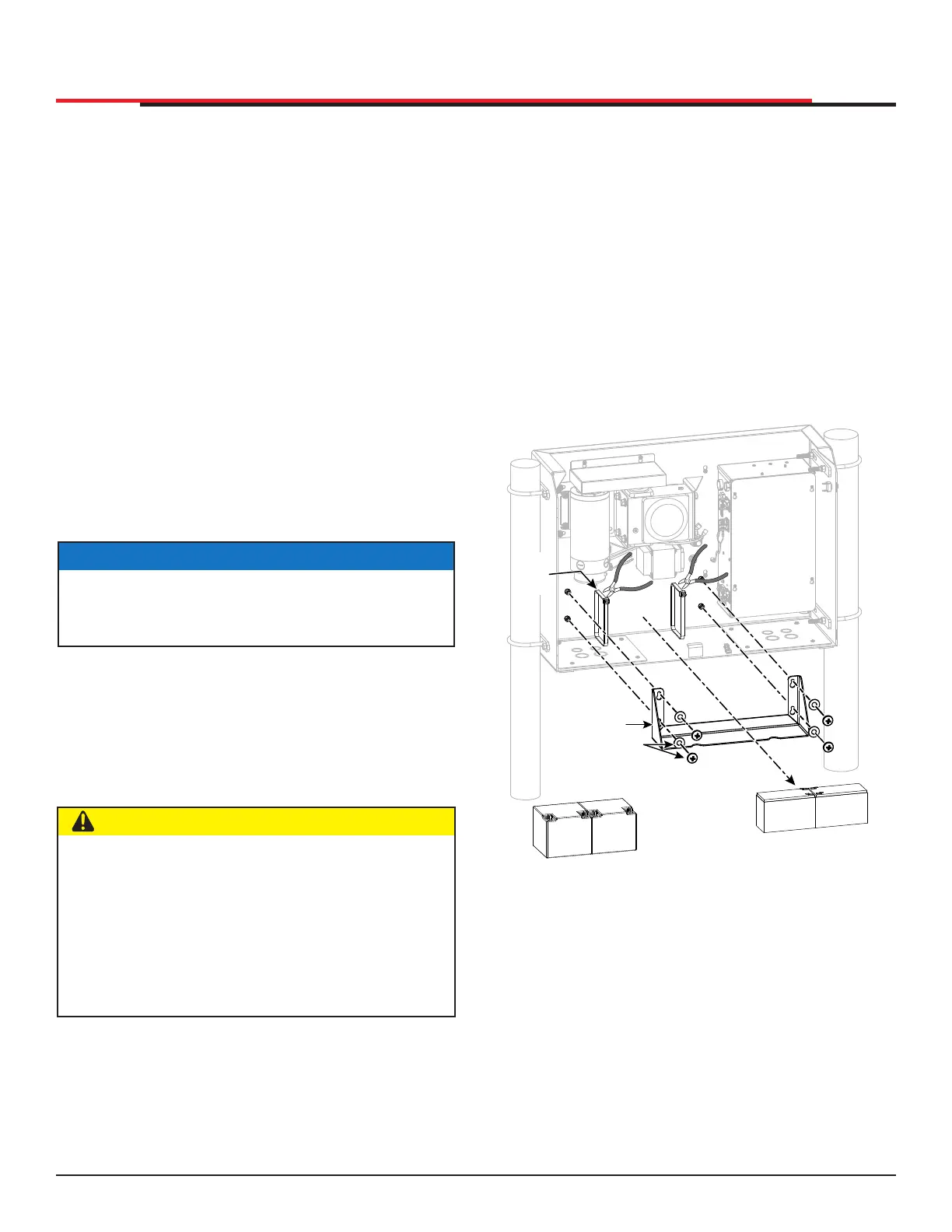
The two 8Ah batteries are accessible within the
operator on a tray behind the control box.
To replace the batteries, take the following steps:
1. Take off the SlideSmart cover and turn off the
DC and AC power switches.
2. To access the 8Ah batteries and disconnect
its wires, cut the two black wire ties and slide
the 8Ah batteries through the access window.
See Figure 76.
3. Disconnect the black, blue, and red wires as
you slide the batteries through the access
window.
Figure 76. DC Battery Replacement
50Ah
Battery
50Ah
Battery
8Ah
Battery
8Ah
Battery
CUT
WIRE
TIES
BATTERY TRAY
MOUNTING
HARDWARE
BATTERY TRAY
SlideSmart HD Programming and Operations
109109
MX4435 Rev.G ©2022



 To Next Page