CONCRETE PAD MOUNT
Install the operator, by taking the following steps:
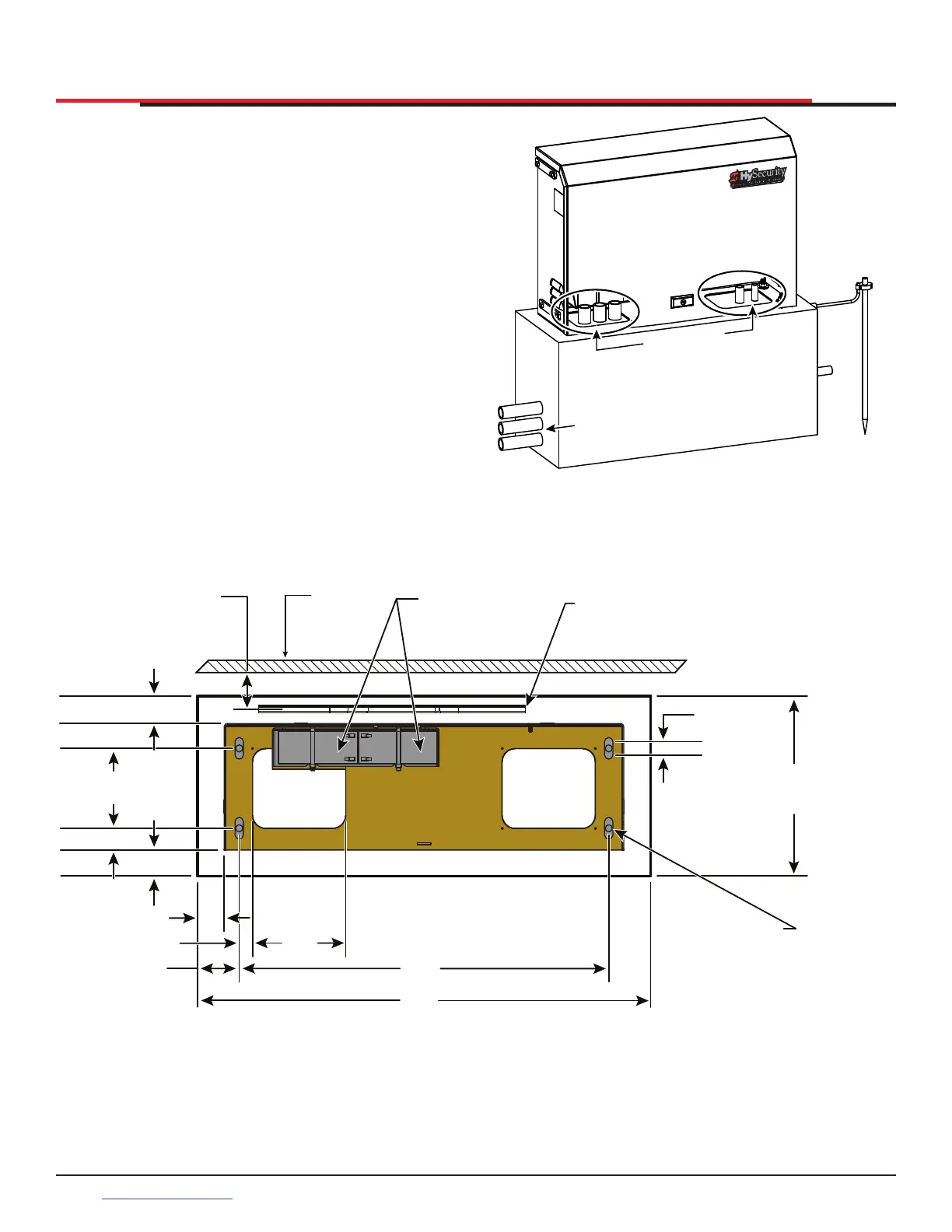
1. Place the operator on the concrete pad base
to best suit the conduit area cut outs as shown
in Figure 8 and Figure 9. Use the operator or
the template provided on the packaging box
as a template and center it on the pad. The
chain path must be parallel with the gate.
2. Assess any limitations in the chain path (i.e.
gate support posts). Adjust the operator’s
location as required. Mark the mounting
locations based on gate, operator, and chain
requirements. See Figure 8 and Figure 9.
3. Route conduits through concrete pad base
and SlideSmart HD operator. See Figure 5 and
Figure 8.
4. For additional types of mounting options, refer
to the Appendix.
INSTALLATION
Figure 8. Pad Mounting
CONDUIT ROUTING
CONCRETE PAD
CONDUIT
CUT OUTS
(7 x 6”) (18 x 15 cm)
Figure 9. Concrete Pad Dimensions and Overhead Gate View
Area cut out
for conduit
7 x 6”
(18 x 15 cm)
Area cut out
for conduit
7 x 6”
(18 x 15 cm)
3.25” (8.3 cm)
2.50” (6.4 cm)
Chain to Gate
Gate
Standard Batteries
Shown
Chain, #40 Roller
2.0” (5 cm)
1.0” (2.5 cm)
ADJUSTABLE
13.5”
(34.29 cm)
MIN. Pad Size
34.0”
(86.4 cm)
MIN. Pad Size
27.75”
(70.5 cm)
7.0”
(18 cm)
3.13” (8 cm)
1.0” (2.5 cm)
2.0” (5 cm)
2.0” (5 cm)
1.6” (4 cm)
6.0”
(15 cm)
Provisions for QTY 4
1
/
2
”
-13 X 3
1
/
2
”
(M12 X 9 cm)
Concrete Anchors
(
1
/
2
inch (1.3 cm) slot in either direction)
SlideSmart HD Programming and Operations
2020
support.hysecurity.com



 To Next Page