3. Place the two 50Ah batteries on the chassis.
See Figure 25.
4. Attach the blue wire from the red terminal on
one 50Ah battery to the black terminal on other
50Ah battery. See Figure 25.
5. Run the red and black wires (disconnected
from the 8Ah batteries) through the hole in
the control box. See Figure 25.
6. Using the wires supplied in the 50Ah battery
kit, attach the red wire to the red positive
terminal on the 50Ah battery. Connect its
opposite end to the control box DC power
switch. See Figure 25.
7. Connect the black wire to the black negative
terminal on the 50Ah battery. Connect its
opposite end to the control box DC power
switch. See Figure 25.
Figure 25. Wired Extended Battery Backup Kit
DANGER
Make sure both the left and right 8Ah DC
battery wires are disconnected. Never mix
battery sizes, types, or brands. HySecurity
strongly recommends that only sealed AGM
style batteries be used. If you plan to remove
the batteries from the operator, properly store
or discard them. Refer to Hazardous Materials
and Proper Disposal on page 12.
50Ah
Battery
50Ah
Battery
BLUE
(+)
BLACK
(─)
BLUE
(─)
RED
(+)
POWER
INSTALLING THE 50AH BATTERIES
HySecurity offers an extended DC power back up
option with two 50Ah batteries.
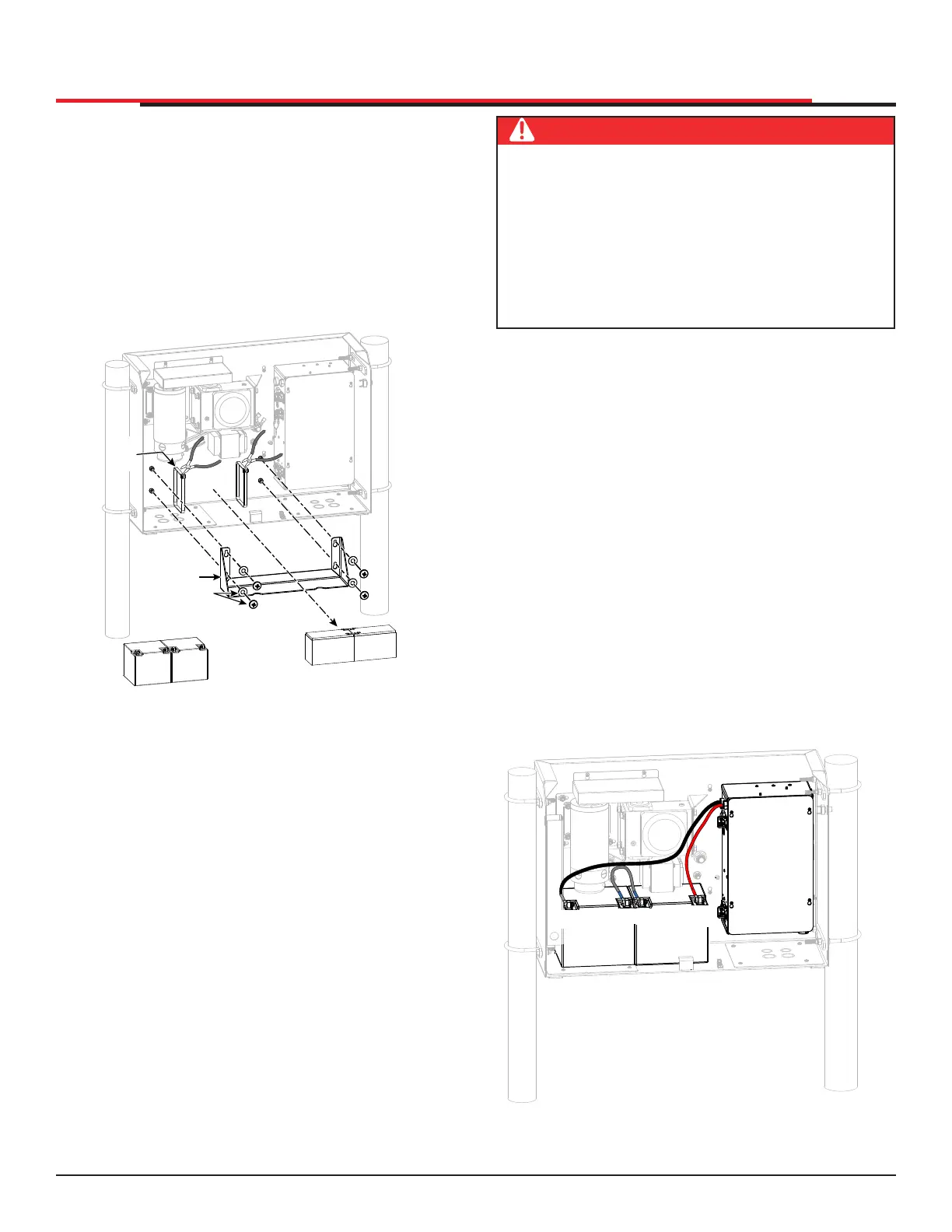
1. Turn off DC and AC power switches.
2. To access the 8Ah batteries and disconnect
its wires, cut the two black wire ties and slide
the 8Ah batteries through the access window.
See Figure 24.
Figure 24. 8Ah Battery Removal
50Ah
Battery
50Ah
Battery
8Ah
Battery
8Ah
Battery
CUT
WIRE
TIES
BATTERY TRAY
MOUNTING
HARDWARE
BATTERY TRAY
SlideSmart HD Programming and Operations
3333
MX4435 Rev.G ©2022



 To Next Page