POWER
WIRING 208/230VAC POWER
For the 208/230VAC power connection:
z Verify AC power supply wires and low voltage
(12V & 24V accessory power wires) run through
two separate conduits as discussed in "Wiring
115VAC Power" on page 30.
z Maximum gate operator current draw is 1.5
Amps on a dedicated 208/230VAC circuit (20A
dedicated circuit is recommended).
z Make sure proper wire size is used. Refer to
Table 5.
Table 5. 208/230VAC Wire Gauge versus Run
AC
Power
14 ga.
wire
12 ga.
wire
10 ga.
wire
One
operator
230V
2095 ft
(639 m)
3350 ft
(1021 m)
5300 ft
(1615 m)
Two
operators
230V
1465 ft
(446 m)
2350 ft
(716 m)
3750 ft
(1143 m)
To connect to 208/230VAC power, take the
following steps:
1. Make sure the AC power is turned off at its
source and the DC and AC power switches on
the operator are in the off position.
2. Remove the high voltage protection cover by
unscrewing the two Phillips-head screws that
secure it. See Figure 22.
CAUTION
All SlideSmart operators are shipped from the
factory as 115VAC units. When connecting to
208/230VAC power, the voltage selector switch
on the AC power board must be moved to the
230V position or damage to the operator will
occur and void the Limited Warranty.
NOTICE
Table 5 assumes a dedicated circuit with an
accessory power load up to 2A. Additional
loads require that the wire size be increased
or the distance of the run be decreased.
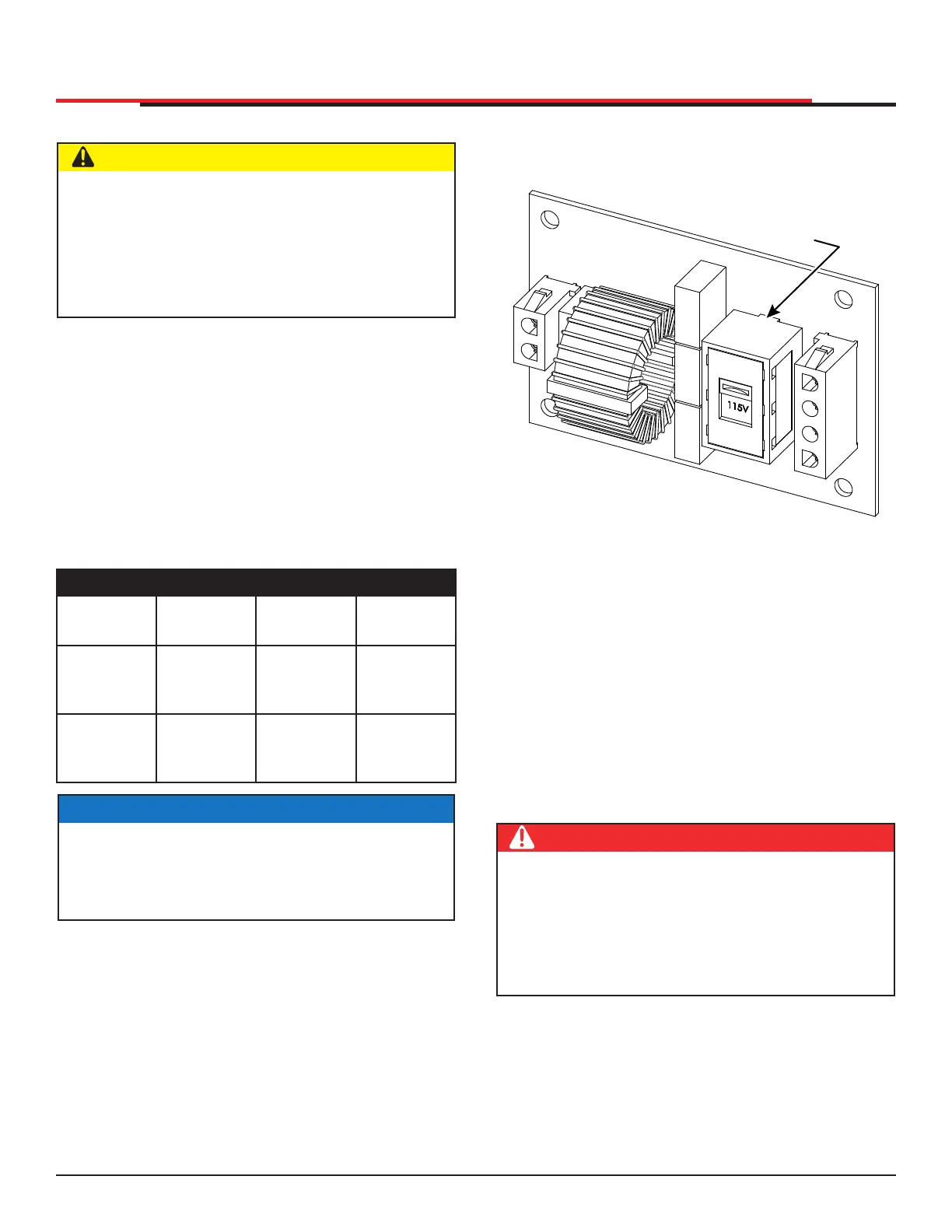
3. Toggle the voltage selector switch from 115V
to 230V. Replace the high voltage cover and
secure it. See Figure 23.
Figure 23. 208/230VAC Voltage Selector Switch
4. Access the input power wires by removing the
two Phillips-head screws that secure the high
voltage junction box cover. See Figure 22.
5. Wire nut or crimp bond the power supply wires
to the black and white lead wires coming from
the AC power switch (no label).
6. Wire nut or crimp bond the equipment ground
wire to the green ground wire in the junction
box.
7. Neatly organize all wire connections and
secure the high voltage junction box cover
with the two Phillips-head screws.
8. Place the 230V 1Ø label on the high voltage
junction box cover over the 115V 1Ø label.
Voltage selector
switch set
to 115V
DANGER
Do not connect the 115VAC service outlet to
208/230VAC power supply wires. To use the
service outlet with 208/230VAC supply power, a
separate neutral wire (white) must be run from
the power source. Follow guidelines according
to the National Electrical Code Article 250.
SlideSmart HD Programming and Operations
3131
MX4435 Rev.G ©2022



 To Next Page