The Computer
5-104 Manual # 42-02-1P28 A3
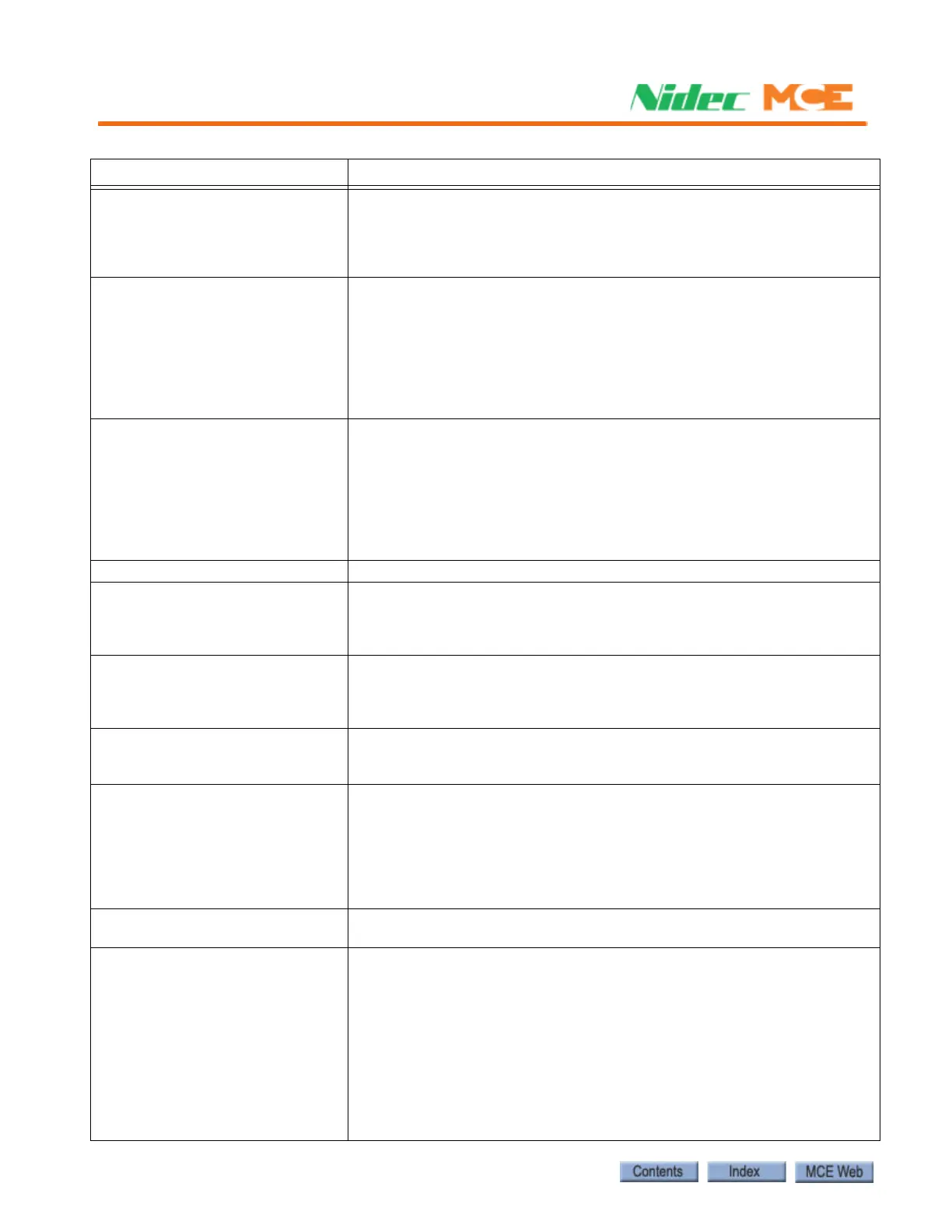
UNL AND DNL ARE LOW (132) Description: The controller sees that the car is both at the top and bottom
of the hoistway at the same time. This means one of the terminal inputs is
mis-wired.
Troubleshooting:
Check inputs status for UNL and DNL.
UP NORMAL LIMIT OPEN (614) Description: This message indicates that the car has traveled beyond the
top terminal landing and has opened the up normal (directional) terminal
switch.
Troubleshooting:
1. Check the location of the car.
2. Check the voltage at terminal UNTD.
3. Check the limit switch connections.
4. Replace the HC-DVR board.
UP TERM LIMIT FAILURE (612) Description: Both the Up Slow Limit and Up Emergency Limit switches
have been detected to be in opposite states. These switches should open/
close simultaneously, meaning that the voltage at these terminals should
always be identical.
Troubleshooting:
1. Check the connections to terminals USL1 and USL2.
2. Check the limit switches for proper operation.
3. Replace the HC-DVR board.
UPDATED PARAMETERS (816) Description: Parameters have been updated.
USE/BR STUCK OFF (128) Description: The Up Slow Enable/Brake Contactor output is stuck off.
Troubleshooting:
Verify status of output.
Check connection of Up Slow valve at terminal USE/BR.
USE/BR STUCK ON (127) Description: The Up Slow Enable/Brake Contactor output is stuck on
Troubleshooting:
Verify status of output.
Check connection of Up Slow valve at terminal USE/BR.
USL1 IS LOW (269) Description: Informational. USL1 input is low.
Troubleshooting:
If in error, verify function of switch (if physical) and/or input.
USL1 POSITION LOW (299) Description: The car encountered the USL1 switch at a position lower than
that learned during the hoistway learn operation. The car will perform an
emergency slowdown then proceed at correction speed to the landing.
Troubleshooting:
Verify position of switch (software or physical).
Repeat hoistway learn operation (Utils > Landing System Utilities > Termi-
nal Switch Learn).
WAITING FOR IN-CAR SW (336) Informational. The car is at a recall floor with doors open awaiting activa-
tion of the current mode of operation in-car switch.
USL (x) and DSL (x) are Low (8) Description: Named Up and Down Slow Limit switches are low. The car will
perform an emergency stop and will not be allowed to move. All calls will be
canceled. If in a door zone the doors will be cycled to allow passengers to
exit. Fault-bypassed in Construction.
System Verifies:
- Limit inputs USL and DSL low.
- 2 bus has power.
Troubleshooting:
Verify switches mechanically and electrically.
Verify input connections.
View System IO > System Inputs, USL and DSL for correct status.
Table 5.10 Touch Screen Event Listings
Event Description












 To Next Page