Troubleshooting
6-20 Manual # 42-02-1P28 A3
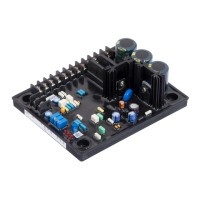
Switches
Switches are ONLY checked by the board processor on start-up. Press the processor RESET
button after any change to switches.
•DIP SW2:
• Switches 1 through 6 = Board ID
• Switches 7 & 8 = Baud rate
• Switch 9 = Input levels
• Sw1: RST - Processor reset
Jumpers
• JP1: Internal CAN Network Termination
• JP2 - JP9: Pull Inputs 1 - 8 up to voltage at PS1 when set to I/O
• JP10 - JP17: Pull Inputs 9 - 16 up to voltage at PS2 when set to I/O
• JP18: Selects voltage reference
• A = External power supplied by J3 (default)
• B = 24Vdc power supplied by CAN bus
Line voltage can be present on jumpers. Move only with power off.
Test Points
• GND: Digital Ground - 0 V
• +5V: +5 Vdc measured between this test point and TP GND.
• 1: 1 Bus (common)
Indicators
• CPU ON: The micro controller is executing its program.
• I/O1 - I/O16: Indicates the state of the input or output, active or inactive. Blinking indi-
cates overload condition (resets automatically after 5 seconds/processor reset/ or power
cycle). page 6-22.
Terminals
• J1: Used to program the micro controller (IDC connector).
• J2: Internal CAN signal and power (RJ12 connector).
• J3: 1 bus and 2 bus. Weidmuller connector.
• J4: Pull up voltages
• J5: I/O1 - I/O16



 To Next Page