165
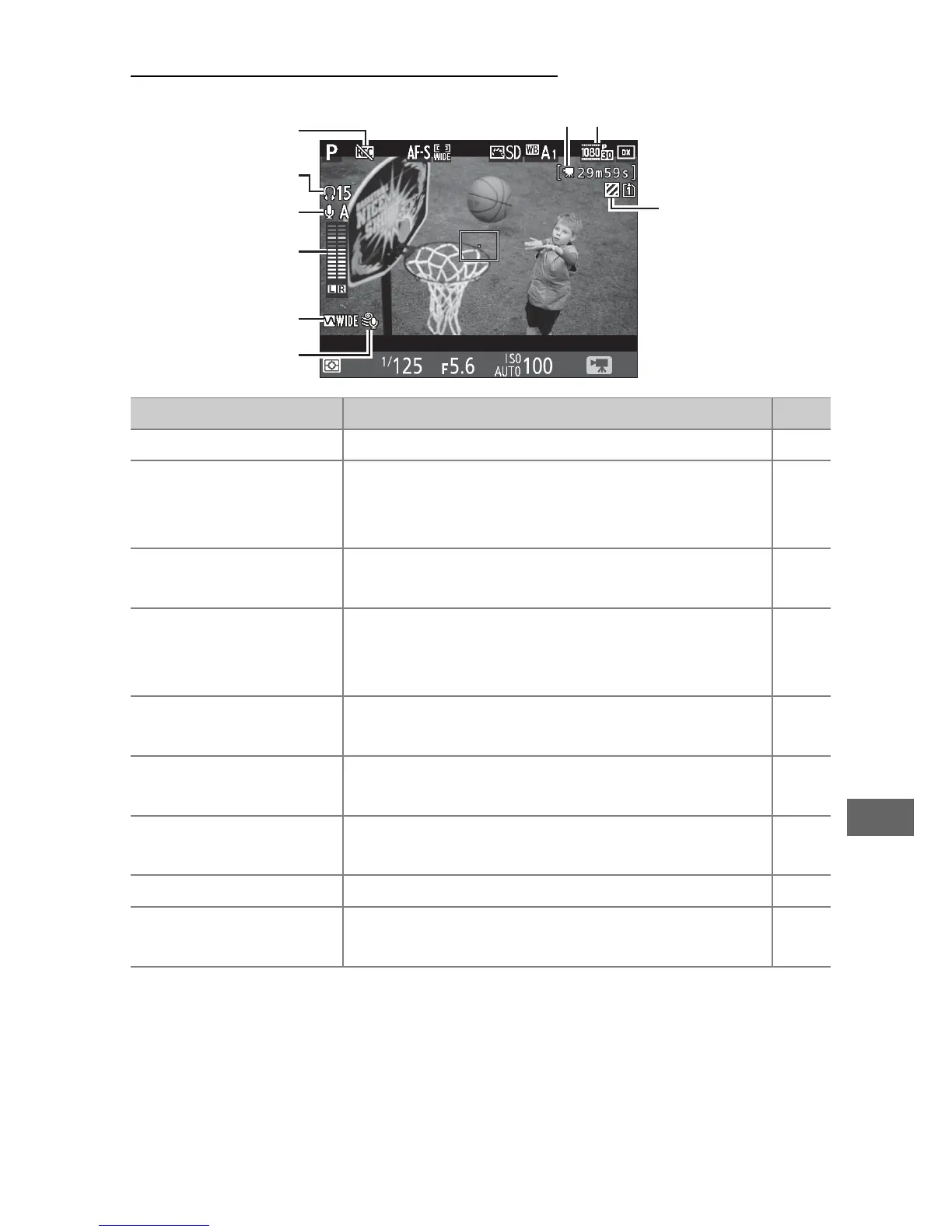
The Live View Display: Movies
Item Description 0
q
“No movie” icon Indicates that movies can not be recorded. —
w
Headphone volume
Volume of audio output to headphones.
Displayed when third-party headphones
are connected.
193
e
Microphone
sensitivity
Microphone sensitivity.
192,
273
r
Sound level
Sound level for audio recording.
Displayed
in red if level is too high; adjust
microphone sensitivity accordingly.
—
t
Frequency response The current frequency response.
192,
274
y
Wind noise
reduction
Displayed when wind noise reduction is
on.
192,
274
u
Time remaining
(movie live view)
The recording time available for movies. 163
i
Movie frame size The frame size for movie recording. 166
o
Highlight display
indicator
Appears when highlight display is enabled. 193
q
w
e
t
y
r
i
u
o



 To Next Page