110
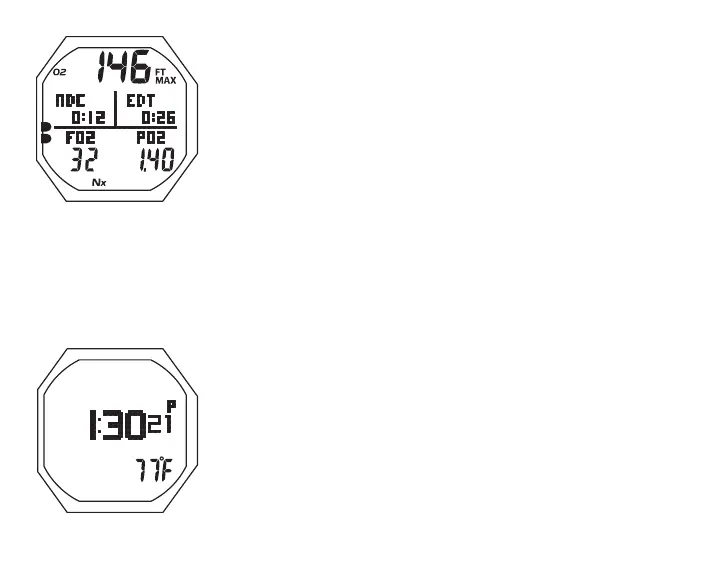
Fig.102-PO2ALARMALT1
Fig.103-PO2ALARMALT2
PO2 Alarm Alt 1, information includes (Fig. 102) -
> Max Depth with MAX and FT (or M) icons
> DTR (hr:min) with graphic NDC (or OTR if less), 0:00 if
PO2 is 1.60
> Graphic EDT with Elapsed Dive Time (hr:min)
> Graphic FO2 with Set Point for Gas in use
> Graphic PO2 with current value (ATA)
> Nx icon
> O2BG with O2 icon
• A (< 2 sec) to access ALT 2
• Revert to Main in 5 sec, if A not pressed
PO2 Alarm Alt 2, information includes (Fig. 103) -
> Time of Day (hr:min sec), with A (or P) if 12 Hour
> Temperature with ° icon and graphic F (or C)
• 5 sec or A (< 2 sec), revert to Main
PO2 during Deco
The PO2 alarm setting does not apply when in Deco.
> If PO2 reaches 1.60 while at a Deco Stop, the PO2
value (1.60) with graphic PO2 will alternate with Deco
Stop Depth/Time once each minute with PO2 on for 10
seconds, Deco on for 50 seconds until PO2 decreases
below 1.60, then PO2 will not be displayed.



 To Next Page