122
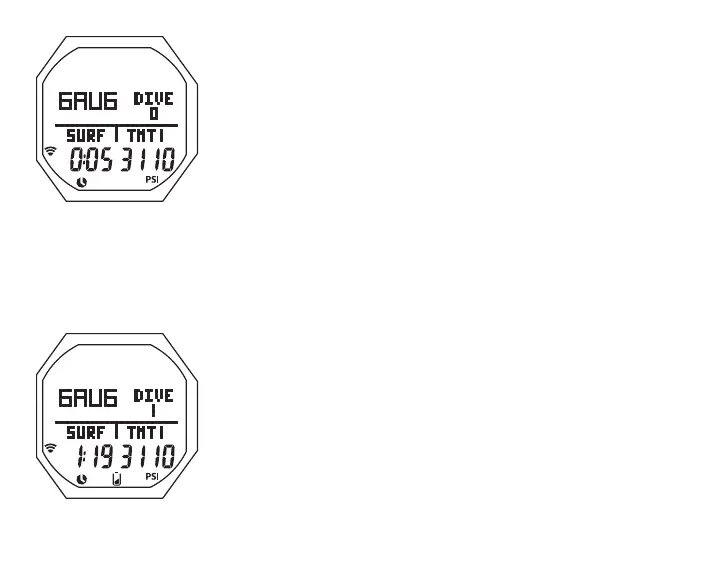
GAUG SURF MAIN, information includes (Fig. 115A/B):
> Graphic GAUG
> Graphic DIVE and number of dives completed during that
operating period, up to 24 (0 if no dive made yet)
> Graphic SURF and SI (hr:min) with Time (clock) icon; if no
dive yet, this is time since access to GAUG
> Graphic TMT 1 (or 2 or 3), one in use
> Tank Pressure with PSI (or BAR) icon, if the Receiver is
successfully Linked with an active TMT (Transmitter), 000
flashing after 15 seconds of lost Link
> Link icon, if the Receiver is successfully Linked with a TMT,
flashing after 15 seconds of lost Link. (Note that this is the
same icon used in Watch Mode to signify that the Daily
Alarm is set On.)
> Battery icon, if voltage is low
• A < 2 sec to access ALT 1 (ALT 2 if no dive yet)
• M < 2 sec to access GAUG Menu
• M 2 sec to access Watch Mode
• S 2 sec to access Compass**
• L (on closure) to activate Backlight
Fig.115B-GAUGSURF
MAIN(afterdive1)
Fig.115A-GAUGSURF
MAIN(nodiveyet)
** Compass can only be accessed from Main.



 To Next Page