35
The CDT will run in the background, while in Watch mode, until
it counts down to 0:00, or it is set OFF, or DC Mode is accessed
or a Dive is started in which case the CD will terminate and
revert to OFF.
When a set Countdown Time reaches 0:00, the Audible Alarm
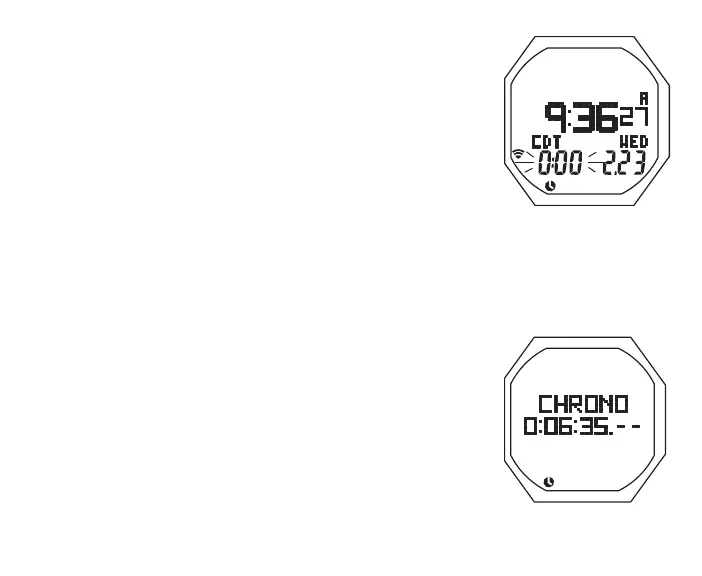
will sound during which time the graphic CDT will be displayed
on the watch Default Time screen with 0:00 flashing (Fig. 14).
FREE Dive Mode has a separate (min:sec) CDT.
CHRONOGRAPH (Stop Watch/Lap Timer)
Upon access from the Menu, the Status screen is displayed
> OFF solid and 0:00, if no time was previously set
> ON and the remaining Countdown Time (hr:min), if running
> OFF flashing and the time previously set, if it has ended
Chrono Status, information includes (Fig. 15):
> Graphic CHRONO
> Elapsed time if running, or 0:00:00.00 (hr:min:sec .01 sec)
> Time (clock) icon
• S (< 2 sec) to start Timer counting up from 0:00:00.00
to 9:59:59.99 max (hr:min:sec .01 sec) in increments of
.01 (1/100th sec). After first 4.99 seconds, the .01 digits
display 2 dashes (. - - ).
Fig.14-WATCHMAIN
(duringCDTAlarm)
Fig.15-CHRONO
(started,running)



 To Next Page