32
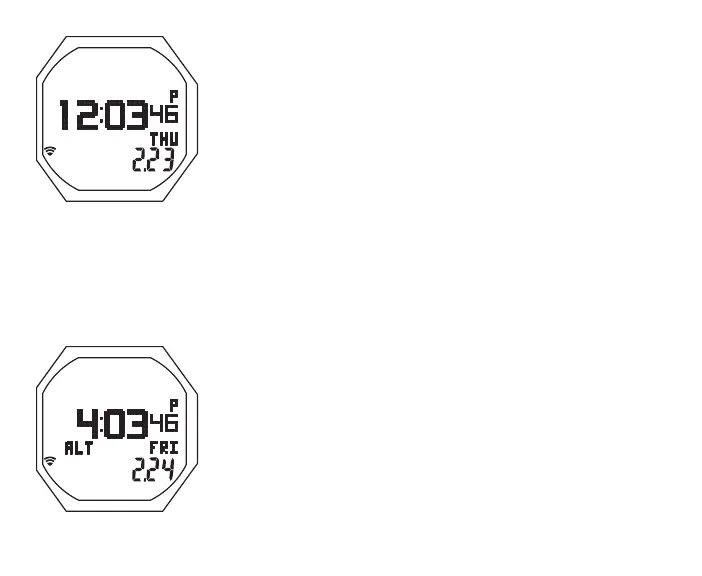
Default Time, information includes (Fig. 8):
> Time of Day (hr:min:sec), Home (or Alternate if selected)
> Day of Week graphic MON, TUE, WED, THU, FRI, SAT, or
SUN
> Graphic ALT, if Alternate Time is selected as Default
> Month.Day (or Day.Month)
> Battery icon, if a Low Battery
> Alarm (speaker) icon, if Daily Alarm is set On
> TLBG, if any after NORM/FREE dives
• A < 2 sec to access Watch ALTs
• M < 2 sec to access Watch Menu
• M 2 sec to access DC (Dive Computer) Mode
• S < 2 sec to silence Daily Alarm
• S 2 sec to access Compass
• L (on closure) to activate Backlight
Alt 1, information includes (Fig. 9):
> Time of Day (hr:min:sec), Alternate (or Home if selected)
> Day of Week graphic MON, TUE, WED, THU, FRI, SAT, or
SUN
> Graphic ALT, blank if Home Time is displayed
> Month.Day (or Day.Month)
> Battery icon, if a Low Battery
> Alarm (speaker) icon, if Daily Alarm is set On
> TLBG, if any after NORM/FREE dives.
Fig.8-DEFAULTTIME
Fig.9-WATCHALT1



 To Next Page