Browsing Your Records 8
88
8 Browsing Your Records
Insulin Delivery Records
You can view basal and bolus insulin delivery records as a (1) combined summary
or (2) day-by-day list of individual events.
Combined basal and bolus summary
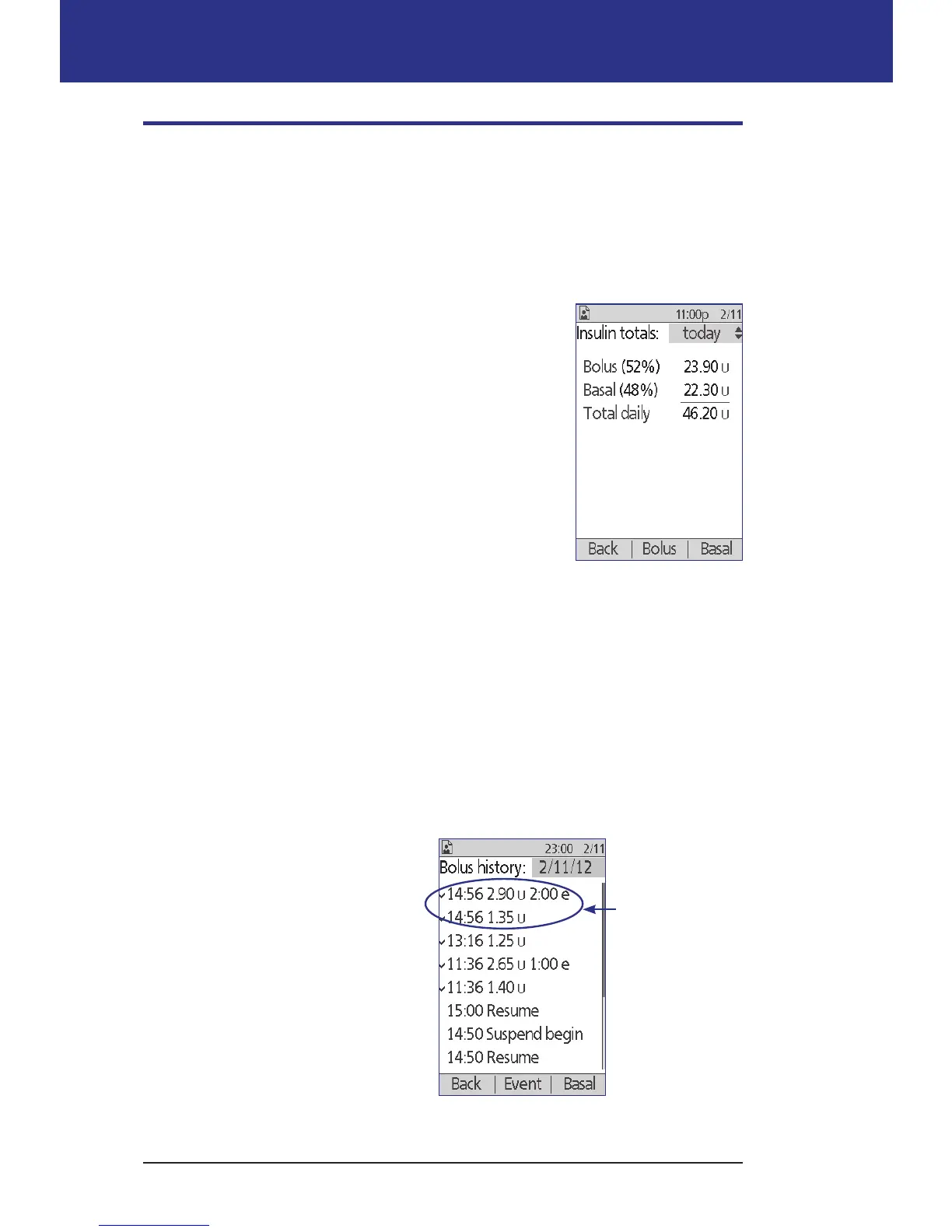
1. To see a summary of your daily basal and bolus
insulin delivery, navigate to:
Home > My records > Insulin delivery
e screen shows the total number of units of
insulin delivered via boluses and via the basal rate.
e percentage of each is also listed.
2. To see the summary for a dierent day, use the Up/
Down button to change the date listed in the upper
right corner of the screen.
Note: e PDM does not display insulin totals for any
day containing "lost" records. is is because it cannot
calculate how much insulin was actually delivered on that day. (See "Meaning of
icons used on record screens" on page 87.)
Bolus history
e bolus history screen displays a day-by-day list of the time and units of insulin
delivered for each bolus. If a portion of a bolus was extended, the immediate
portion and the extended portion (marked with an "e") are displayed on two
separate lines. An extended bolus entry lists the duration as well as the units and
start time. If a bolus was canceled, only the amount delivered before cancellation
is shown.
1. To see your bolus records for a
single day, navigate to:
Home > My records > Insulin
delivery > Bolus
2. Use the Up/Down button to
view bolus data from dierent
dates or to scroll through the
items listed on the screen (see
"Selecting list items or dates" on
page 86).
A single bolus
started at 14:56.
The extended
portion is listed
on the upper line;
the immediate
portion is listed
below.



 To Next Page