Modifying Basal Insulin Delivery 6
58
6 Modifying Basal Insulin Delivery
Cancel a temp basal
A temp basal stops automatically at the end of its time
period. To cancel a running temp basal:
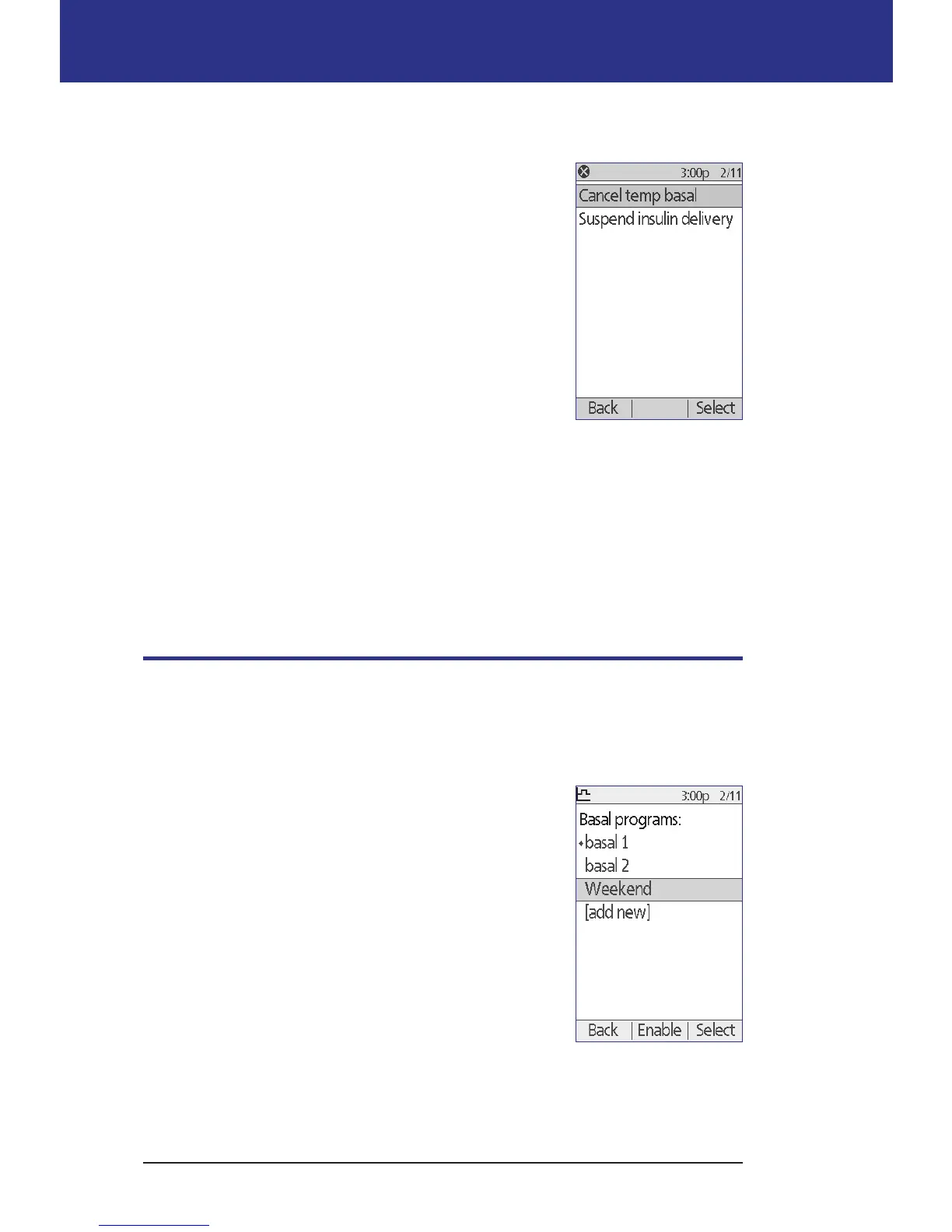
1. From the Home screen, select Suspend/cancel.
2. Highlight Cancel temp basal and press Select.
3. Press Conrm.
e PDM cancels the temp basal and restarts the active
Basal Program.
Use beeps to monitor temp basal progress
You can, optionally, have the PDM or Pod beep at the beginning and end of a
temp basal (see "Condence reminders" on page 80). You can also, optionally,
have the Pod beep every 60 minutes while a temp basal is running (see "Program
reminders" on page 80).
Switching to a Dierent Basal Program
Some days have dierent routines than others, and so the PDM lets you create
dierent Basal Programs to match the dierent routines. For example, you may
use one Basal Program on weekdays and a dierent one on weekends.
To switch to a dierent Basal Program:
1. Navigate to:
Home > Settings > Basal programs
e active Basal Program is marked with a small
diamond (◆).
2. Use the Up/Down button to highlight the Basal
Program that you would like to activate.
3. Press Enable.



 To Next Page