Understanding PDM and Pod Function 12
140
12 Understanding PDM and Pod Function
Temp basal settings: Units per hour (U/hr) or percent (%)
Temp basals can be set using percent (%) or units per hour (U/hr).
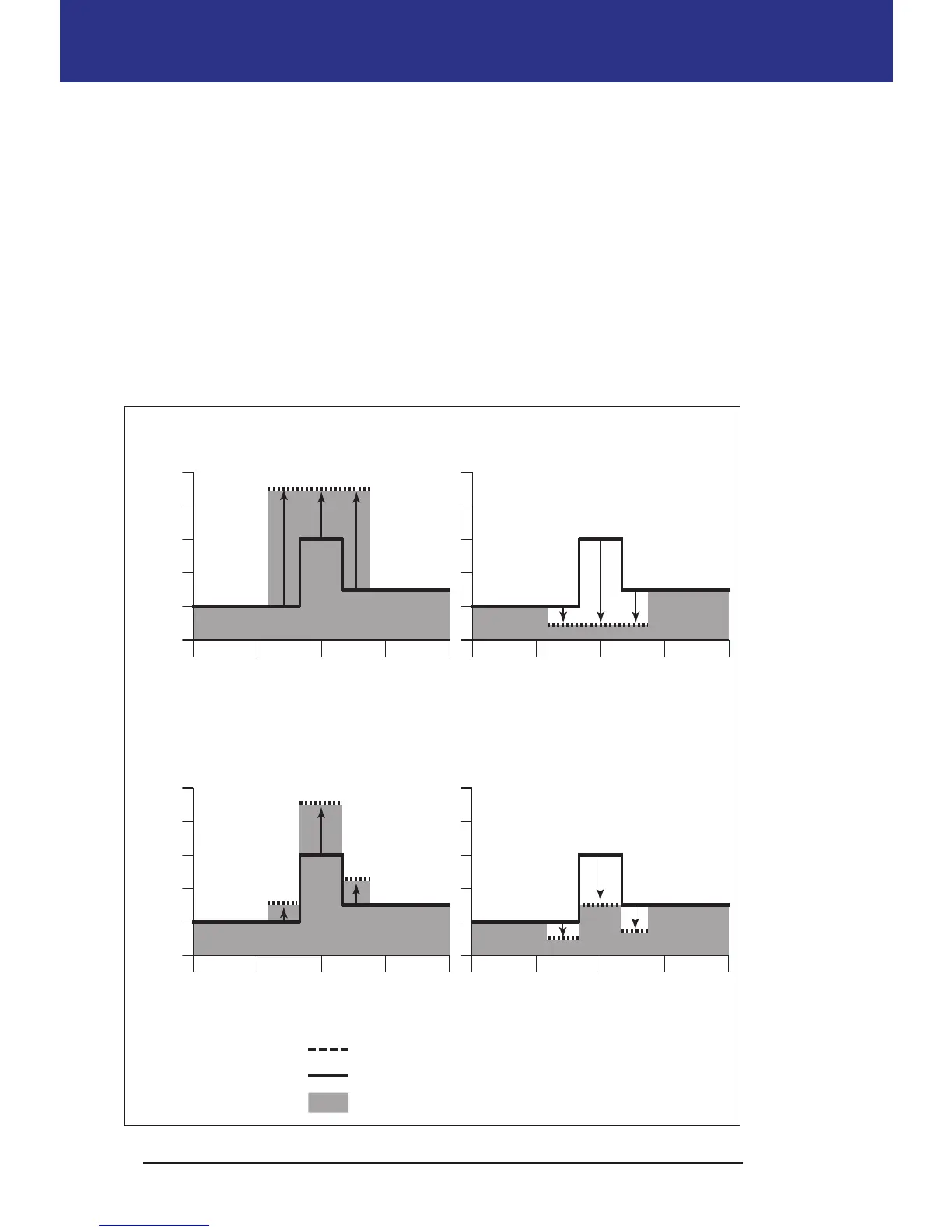
Setting temp basals to units per hour (U/hr) means that the Pod delivers insulin
at a at rate for the duration of the temp basal. In other words, the details of the
currently scheduled Basal Program are ignored during these temp basals (see the
upper two graphs in the following gure).
Setting temp basals to percent (%) means insulin delivery follows the pattern
dened by the currently scheduled Basal Program, but increases or decreases the
insulin delivery by the specied percentage. For example, the following gure
shows that a 50% increase raises the Basal Program's insulin delivery by 50%,
while a 50% decrease lowers the Basal Program's insulin delivery by 50%.
Temp basal from 7AM to 4:30PM
Basal Program
Actual insulin delivered



 To Next Page