1-38 MicroHAWK Engine Integration Guide
Save Configuration in ESP
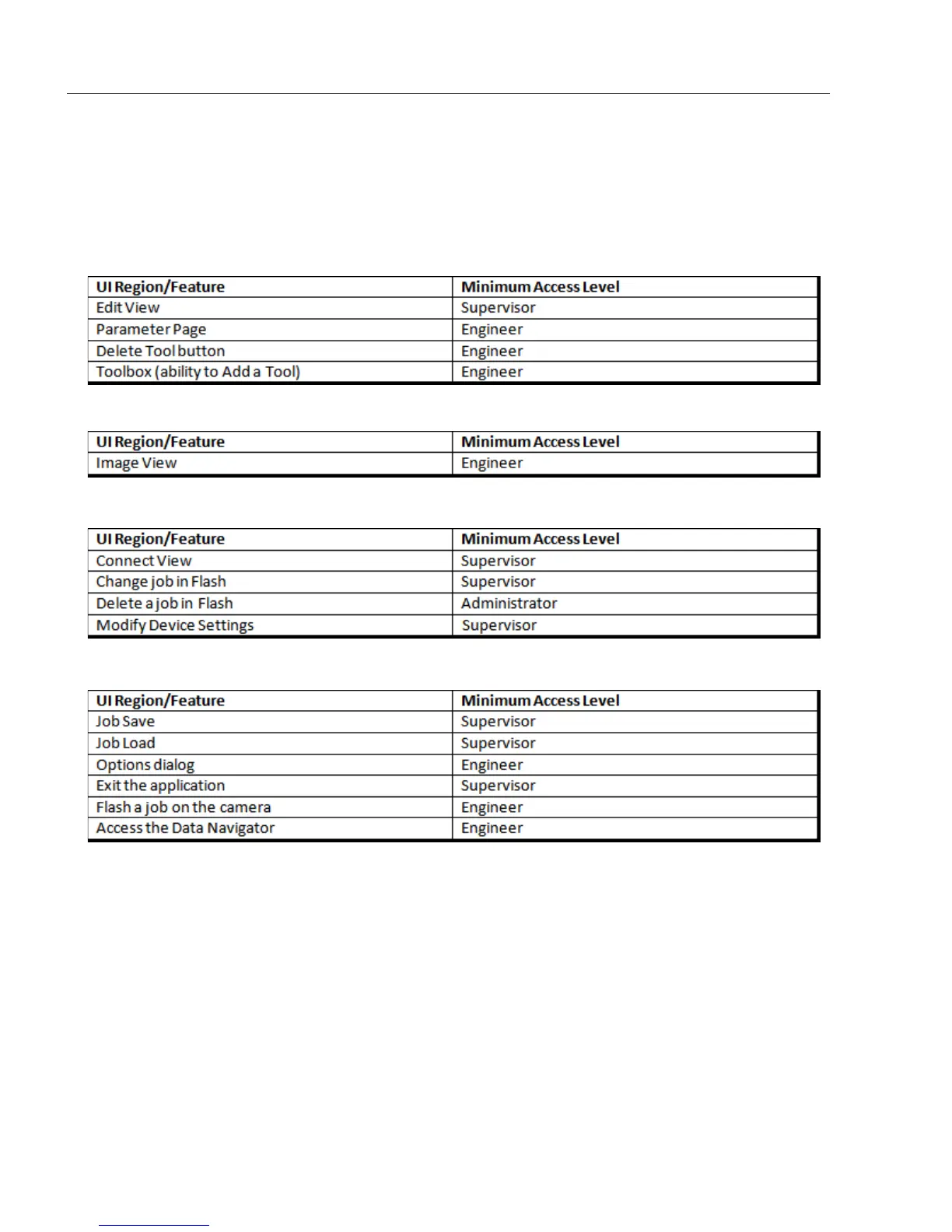
Minimum Access Levels
AutoVISION defines the minimum access level for the various regions of the user interface
and for several features of the software. The following tables show the securable areas of
AutoVISION and the minimum access level required for each.
Edit View
Image View
Connect View (Device Selection View)
Application-Wide Options
If You Forget the Administrator Password
If are the Administrator but have forgotten the password, you can reset it to default by
deleting the UserSettings.xml file in this folder:
C:\Users\[your user name]\AppData\Roaming\Microscan\AutoVISION
Note:
The
AppData
folder in Windows is hidden by default. To make the AppData folder visible,
click
Tools
in the Windows Explorer toolbar and select
Folder options...
from the dropdown
menu. In the Folder Options dialog, click the
View
tab. Under
Files and Folders > Hidden files
and folders
, select
Show hidden files, folders, and drives
and then click the
Apply
and
OK
buttons. The AppData folder will now be visible in
C:\Users\[your user name]
.














 To Next Page