3-15
Note Besuretosetn177forparameterread-prohibitselectionto1sothattheparame-
ters can be read.
H Copying the Data in the EEPROM of the Digital Operator to
another Inverter (CPy)
·To copy the parameter set values to another Inverter from the EEPROM of the Digital
Operator, set n176 for parameter copy function selection to CPy.
·Whentheparametersetvalueshavebeenread,turnOFFtheInverterandremovethe
Digital Operator. Refer to 2-1-3 Removing and Mounting the Covers for details.
·Mount the Digital Operator to the Inverter to which the parameters are copied. Then
turn ON the Inverter.
·Checkthatn001forparameterwrite-prohibitselection/parameterinitializationis setto
4 in the Inverter (i.e., values can be set in n001 through n179). If n001 is not set to 4,
take the steps described above and set n002 to 4.
Note The above procedure is possible provided that the Inverters are the same in
power supply specification and control mode (i.e., V/f or vector control).
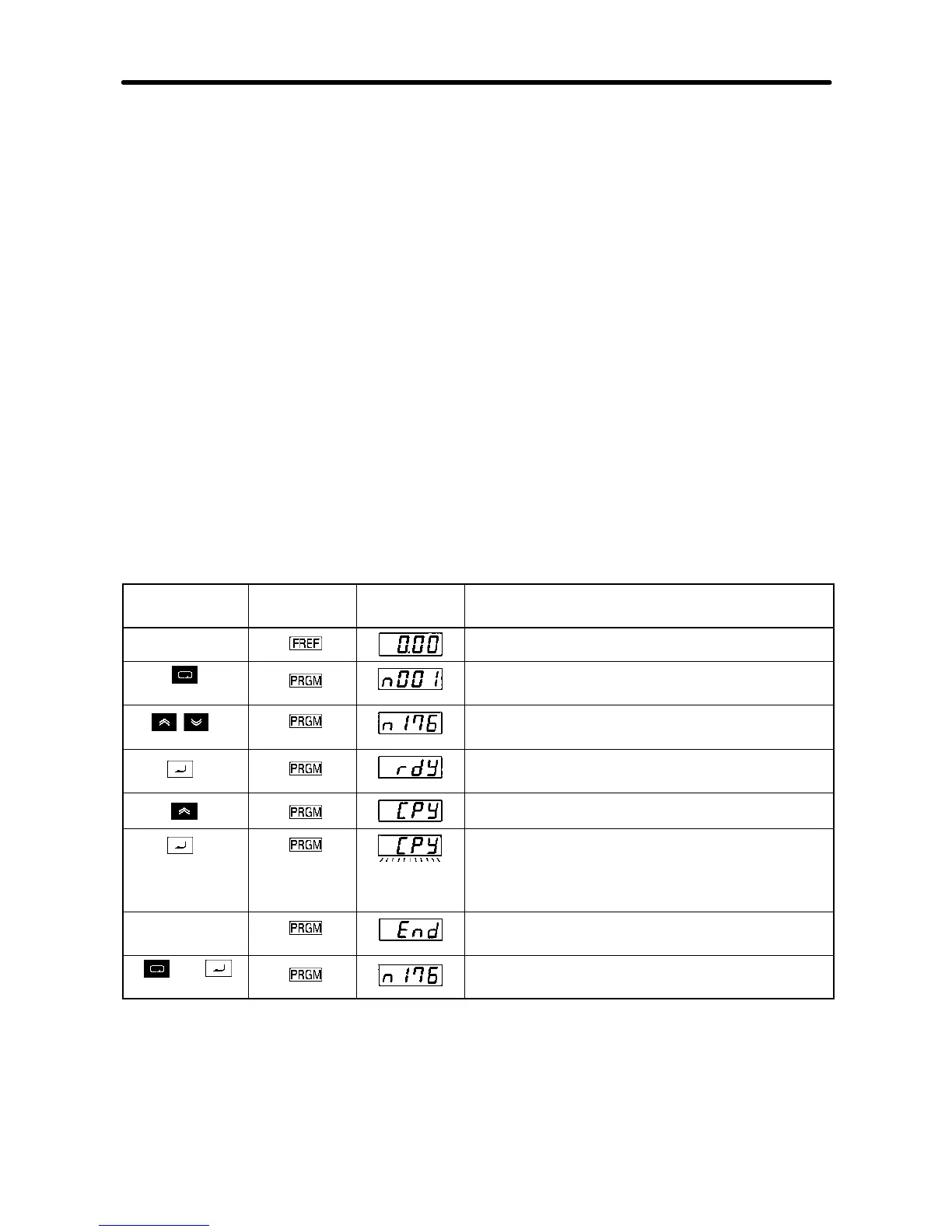
D Procedure to Copy the Parameter Set Values
Key
sequence
Indicator Display
example
Explanation
Power ON
Press the Mode Key repeatedly until the
PRGM indicator is lit.
Use the Increment or Decrement Key to
display “n176.”
Press the Enter Key. Then “rdy” will be
displayed.
Use the Increment Key to display “CPy.”
Press the Enter Key so that the parameter
set values in the EEPROM of the Digital
Operator will be copied to the Inverter, during
which the display flashes.
Completes When the set values have been all copied,
“End” will be displayed.
or
Press the Mode or Enter Key. The parameter
number (n176) will be displayed again.
Note 1. Checkandverifytheset ranges and set values of the parameters written to the
Inverter.Ifanyerrorisfoundasaresult,alltheparameterset valueswillbepro-
hibited and the previous values will be reset.
Preparing for Operation and Monitoring Chapter 3













 To Next Page