Operator’s Manual – OPTI CCA-TS 5-11
5 SAMPLE HANDLING AND PATIENT TESTING
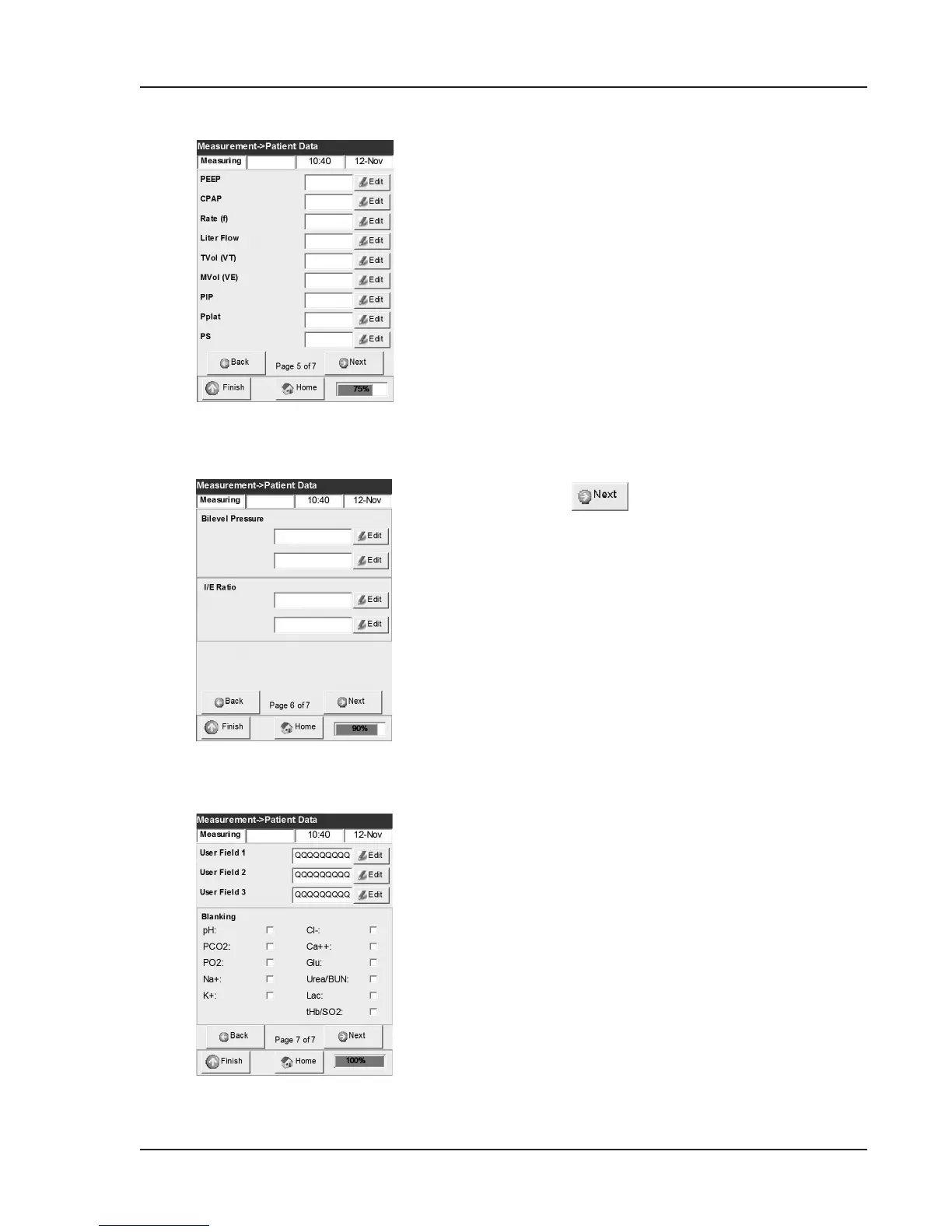
Fig. 5-19 Edit patient data (6)
Fig. 5-20 Edit patient data (7)
Fig. 5-18 Edit patient data (5)
14. The next set of patient data contains the
following information (Fig. 5-18):
• PEEP (default value 0)
• CPAP (default value 0)
• Rate (f) (default value 0 bpm)
• Liter Flow (default value 000.00 Lpm)
• TVol (VT) (default value 0 mL)
• MVol (VE) (default value 0 L)
• PIP (default value 0)
• Pplat (default value 0)
• PS (default value 0)
15. Press again and select the following
(Fig. 5-19):
• BiLevel Pressure (default value 0.00/0.00)
• I/E Ratio (default value 0)
16. The last set of patient data contains the
following information (Fig. 5-20):
• User Field 1 (9 alphanumeric characters)
• User Field 2 (9 alphanumeric characters)
• User Field 3 (9 alphanumeric characters)
• Blanking
NOTE: Parameter blanking will omit a parameter
from the printout. (See Section 3.3.2.2 for
detailed description).
17. If no value is entered, a default value will be
used and printed.



 To Next Page