Operator’s Manual – OPTI CCA-TS 4-11
4 CALIBRATION AND QUALITY CONTROL
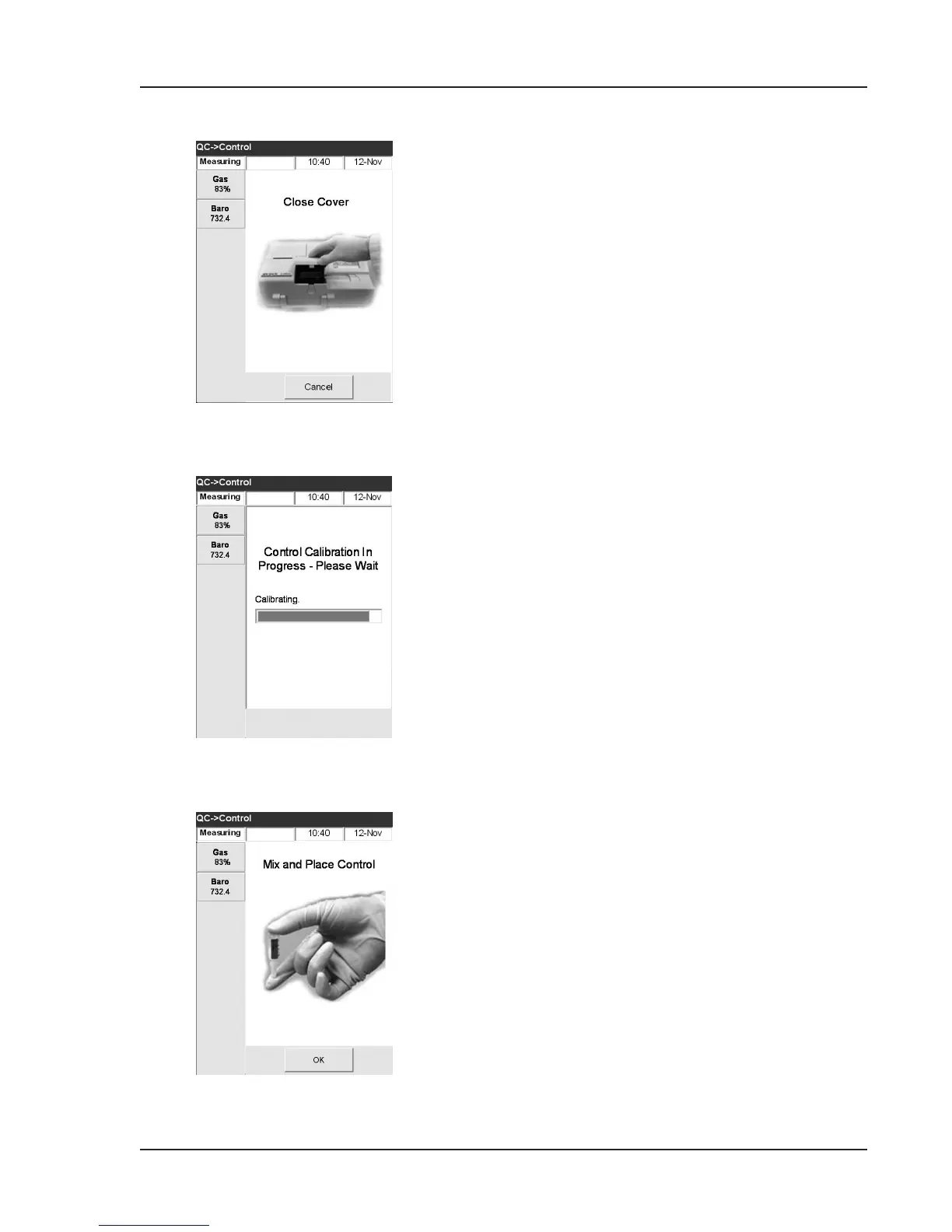
Fig. 4-22 Place Control
Fig. 4-20 Close Cover
Fig. 4-21 Control Calibration
10. Close the SMC cover (Fig. 4-20).
11. The system starts to calibrate (Fig. 4-21).
The green status light is now lit, indicating that
a measurement is occurring and that the sample
chamber cover should not be opened.
NOTE: Ifthesamplemeasurementchambercover
isopenedwhilethegreenstatuslightis
blinking,thecassettecalibrationwill
becancelledandthecassettemustbe
discarded.
12. Calibration is complete and it is time to place a
sample (Fig. 4-22).
• Remove an ampoule from the box of
controls and invert gently to resuspend the
scattering particles, being careful not to heat
it with your hands.
NOTE: Donotshakeampoulevigorously.
Excessivebubbleformationmayaffect
results.
• Gently tap the head of the ampoule with
your ngernail to remove any liquid.
• Carefully open the ampoule by breaking off
the top.
NOTE: Protectyourngersbyusingglovesortissue
whilebreakingampoule.



 To Next Page