Operator’s Manual – OPTI CCA-TS 5-9
5 SAMPLE HANDLING AND PATIENT TESTING
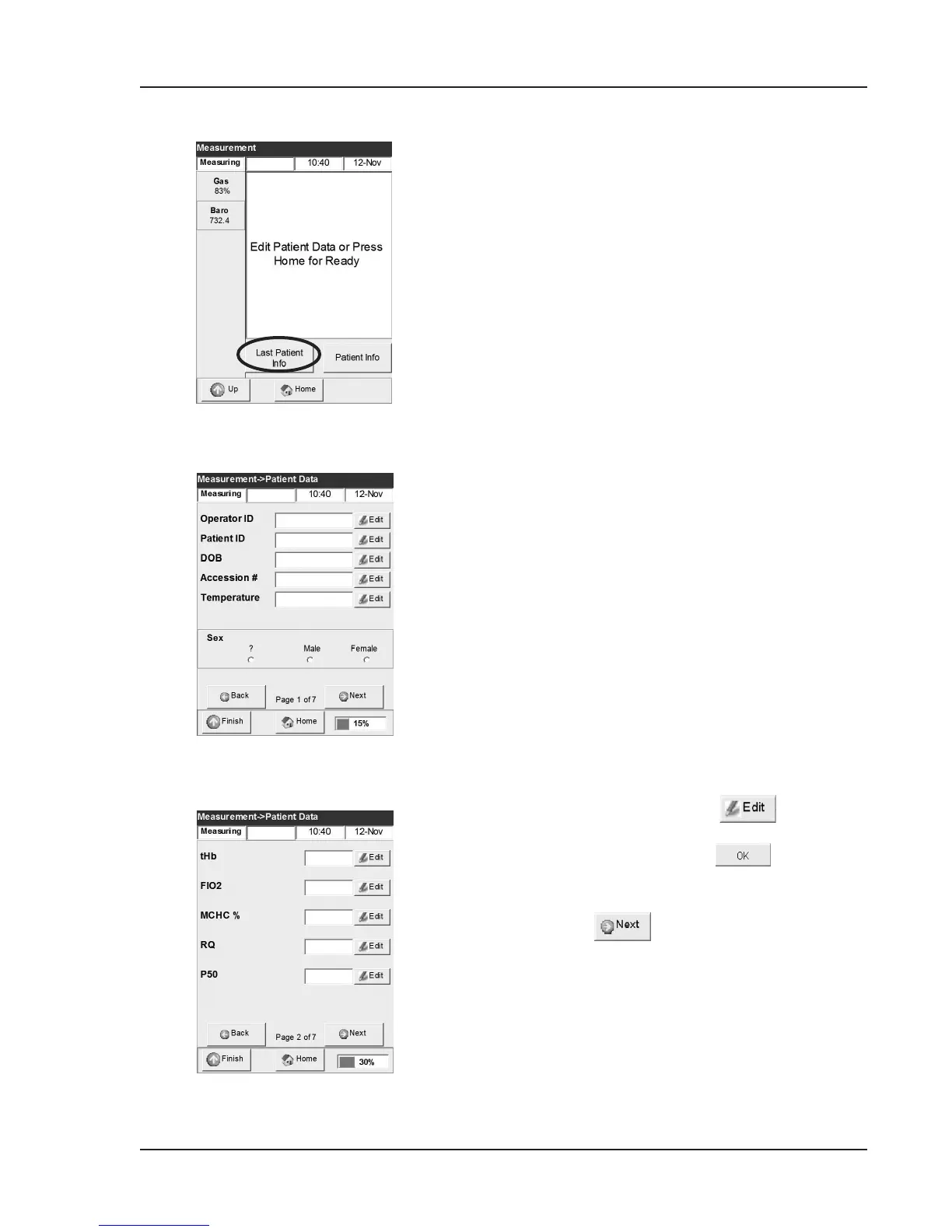
Fig. 5-15 Edit patient data (2)
Fig. 5-14 Edit patient data (1)
• Press the <Last Patient Info> button
(Fig. 5-13) to use the last patient info as the
default for the current patient info.
•
This option will populate all patient info
elds with the last patient data including
patient ID and operator ID numbers.
If operator ID security is enabled, the
operator ID eld will display the operator
ID of the last patient sample. All patient
information used as the default can be
edited.
•
Verify that patient ID, operator ID, and all
other input parameters are correct for every
patient sample measurement.
•
Press the <Patient Info> button to enter
new patient info or to not use the last patient
info as the default.
9. The rst patient data entry screen contains the
following information (Fig. 5-14):
• Operator ID (11 alphanumeric characters)
• Patient ID (15 alphanumeric characters)
• Accession No. (12 alphanumeric characters)
• Date of Birth (DOB)
• Temperature (default value 37.0 °C)
• Sex (unknown, male or female)
NOTE: Patient and Operator IDs and Accession
Nos. may be entered using the bar code
scanner.
10. To enter patient data, press .
Use the alphanumeric keypad to type in the
desired information. Press to save the
information entered.
11. Pressing will access subsequent patient
data entry screens (Fig. 5-15):
• tHb (default value 15.0 g/dL)
• FIO
2
(default value 0.21)
• MCHC (default value 33.3%)
• RQ (default value 0.84)
• P
50
(default value 26.7 mmHg)
Fig. 5-13 Edit Patient Data



 To Next Page