26
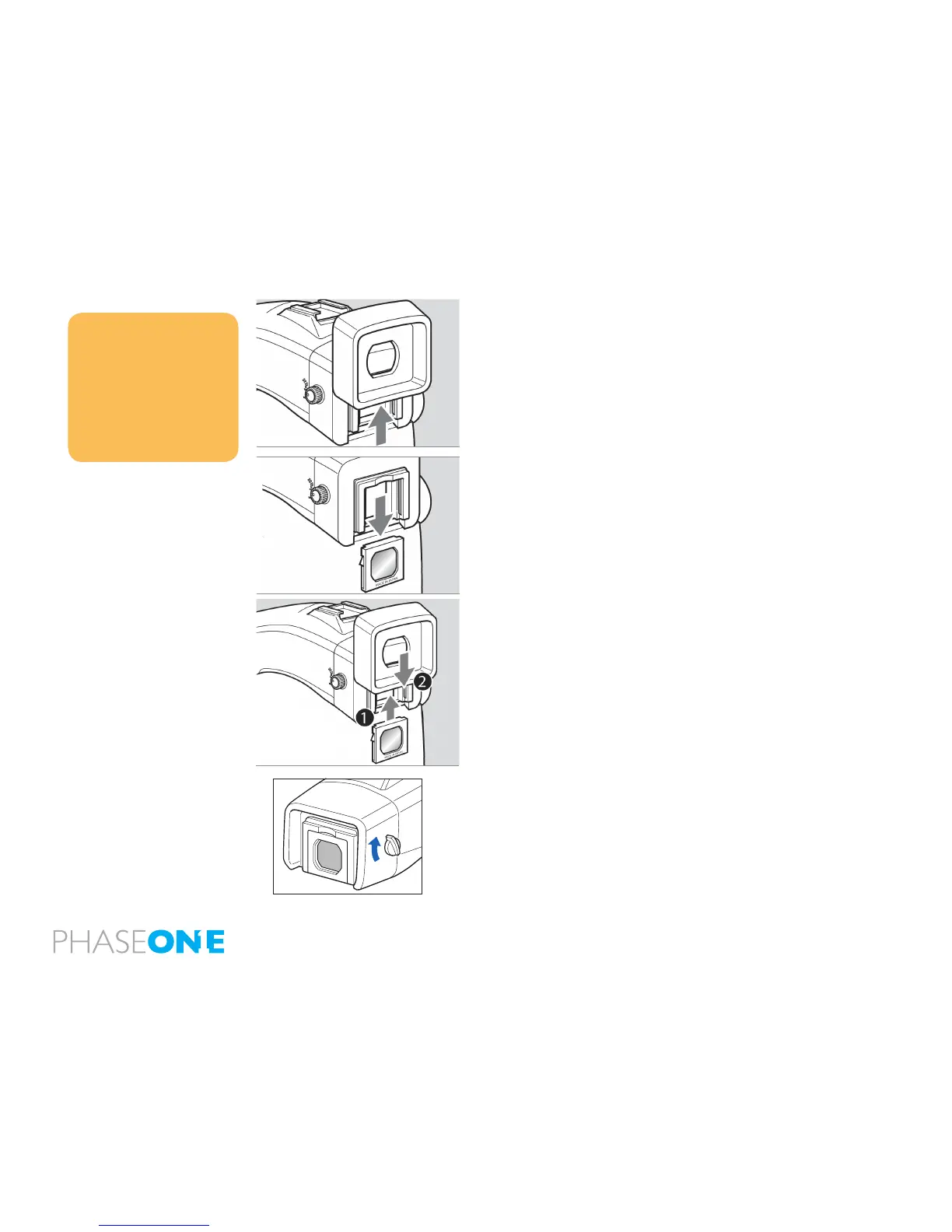
Replacing the Diopter Correction Lens
1. Press the Eyepiece Lock, which is located in a gap between the Eyepiece
and the Diopter Correction lens. (Turn the camera upside down to gain easy
access to it). Now remove the rubber Eyepiece by sliding it upwards
2. Remove the lens supplied with the nder by pulling it downward.
3. Remove the existing diopter by sliding downwards using the ngernail
groove and detach. Insert a new diopter by aligning it to the base of the
diopter holder and sliding it upwards into place. Finish by reattaching the
rubber eyecup.
Notice:
If there is dirt or dust on the lens surface,
remove it with a blower or sweep it o
gently with a lens brush
If there are ngerprints or dirt on the
lens surface, wipe them o with a piece
of clean, soft gauze
Using solvents could discolor the
discolor correction lens frame
2.17 Eyepiece Shutter
Close the eyepiece shutter when there is a strong light source behind the
camera or when pressing the shutter release button without looking through
the viewnder. (This prevents exposure error due to light entering from the
viewnder.)
Turn the eyepiece shutter lever in the direction of the arrow.



 To Next Page