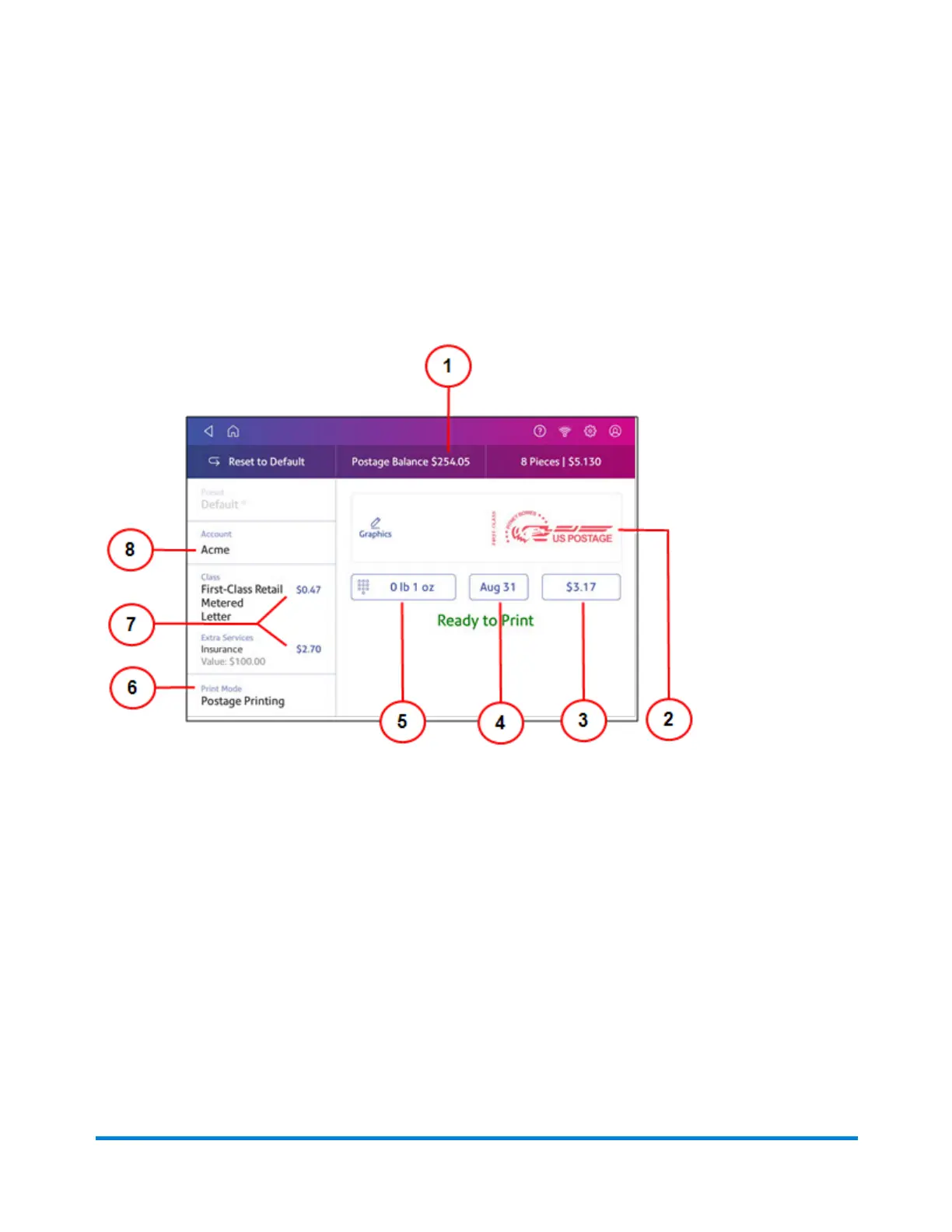
Navigating the Envelope Printing app
The Envelope Printing app is the starting point for printing postage on an envelope or a tape. It also
allows you to change what you print.
To open the Envelope Printing app, tap Envelope Printing.
On this screen, you can:
1. View Postage Balance - View the balance of funds you have left in your device.
2. Preview or add Graphic - Tap Graphic to preview or add graphics.
3. View Total postage amount - View the total postage amount.
4. View Date -Tap the date to view the date options.
5. View Weight to view the weighing options. You can enter the weight manually or use a scale.
6. View Print Mode - View the available printing modes such as printing a graphic only, printing
the date and time, or seal envelopes without printing postage.
7. View Class - Tap Class to view available postal classes and any extra services.
8. View Account - Tap Account to charge back postage to departments or clients. Run reports
showing how you spent your postage over specific time periods. If you did not purchase
Accounting, you will not see the Accounting option.
Printing on envelopes
Pitney Bowes Operator Guide April 2022 138












 To Next Page