Setup & User Guide
| 108
DOC-246-GDE-Pivot3 Acuity 2.3 Setup & User Guide-v1.0.docx
Now the new roles created need to have Users assigned to them. Navigate back to vCenter Home to continue role and
user setup.
CRITICAL: When an Active Directory (AD) group is added to the vSphere SSO Administrators group, the Plugin will treat all
members of the AD group as Pivot3 Administrators regardless of the role applied to the AD group.
Managing Users
CRITICAL: When adding a user to a custom role, ensure this is done directly on the Pivot3 permissions folder.
Propagation from a parent object may not provide expected results. Assigning users to roles on a parent level is
not supported and may not behave as expected.
After roles have been defined through the vCenter Web Client, users must be created and paired into the newly created
roles as necessary.
NOTE:
These changes can only be made while logged in as Administrator at the Administrator level.
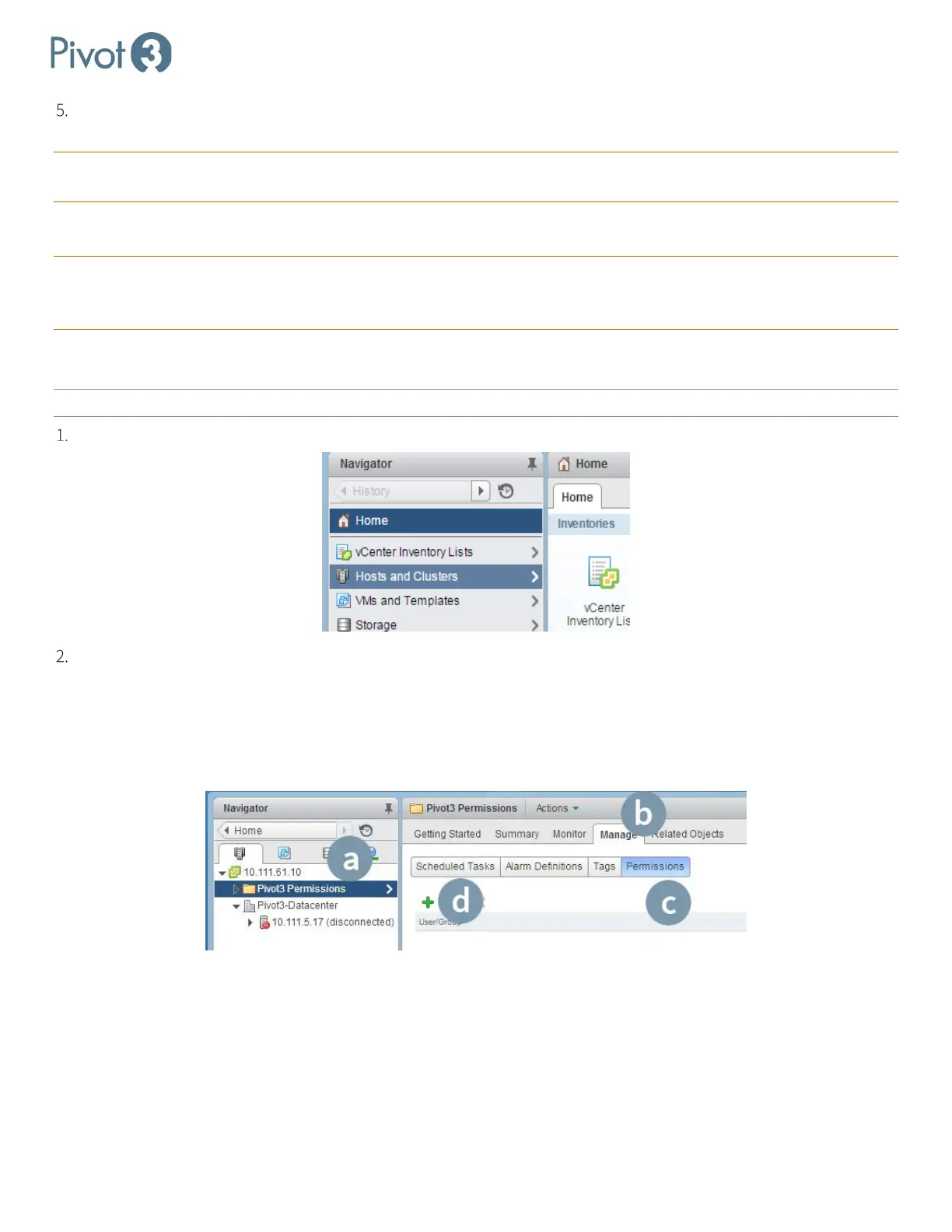
On the Home screen of the vSphere Web Client, select Hosts and Clusters on the left pane.
On the next screen:
a. Select the Pivot3 Permissions Folder on the left pane.
b. Click the Manage tab
c. Click the Permissions category
d. Click the green
+ to add a user.



 To Next Page