X-Series Hyperconverged Nodes Powered by Acuity
Setup & User Guide, v1.0
15
|
DOC-246-GDE-Pivot3 Acuity 2.3 Setup & User Guide-v1.0.docx
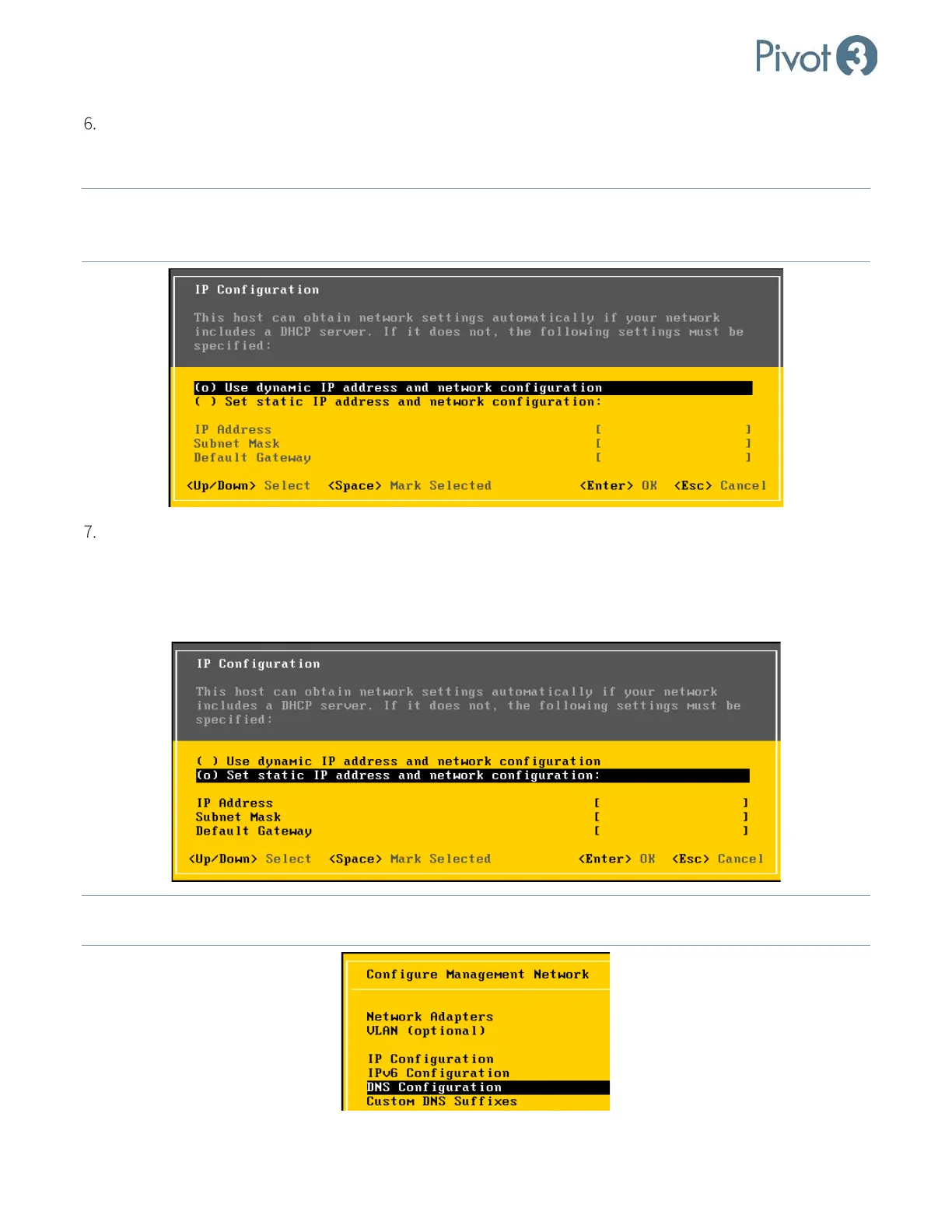
If there is a DHCP server on the VMware Management Network, select the top option in the display dialog, Use
dynamic IP address & network configuration. The values for IP Address, Subnet Mask, and Default
Gateway will be set dynamically by the DHCP server. Make a note of the IP address for this host.
NOTE: If using Use dynamic IP address & network configuration,
ensure that the IP address of the ESXi host does
not change on reboot. If the host IP changes on reboot, VMware management tools will not be able to
auto-connect to the ESXi host.
If there is not a DHCP server on the VMware Management Network, the values for IP Address, Subnet Mask,
and Default Gateway must all be manually entered. Select the second option on the display console, Set
static IP address and network configuration, and complete the manual entry of values for IP Address,
Subnet Mask, and Default Gateway. Make a note of this host’s IP address. Once completed, press <Enter> to
return to the Configure Management Network screen.
NOTE: If the VMware Management Network is using DNS, on the Configure Management Network
screen, select
DNS Configuration. Press <Enter>.



 To Next Page