X-Series Hyperconverged Nodes Powered by Acuity
Setup & User Guide, v1.0
| 16
DOC-246-GDE-Pivot3 Acuity 2.3 Setup & User Guide-v1.0.docx
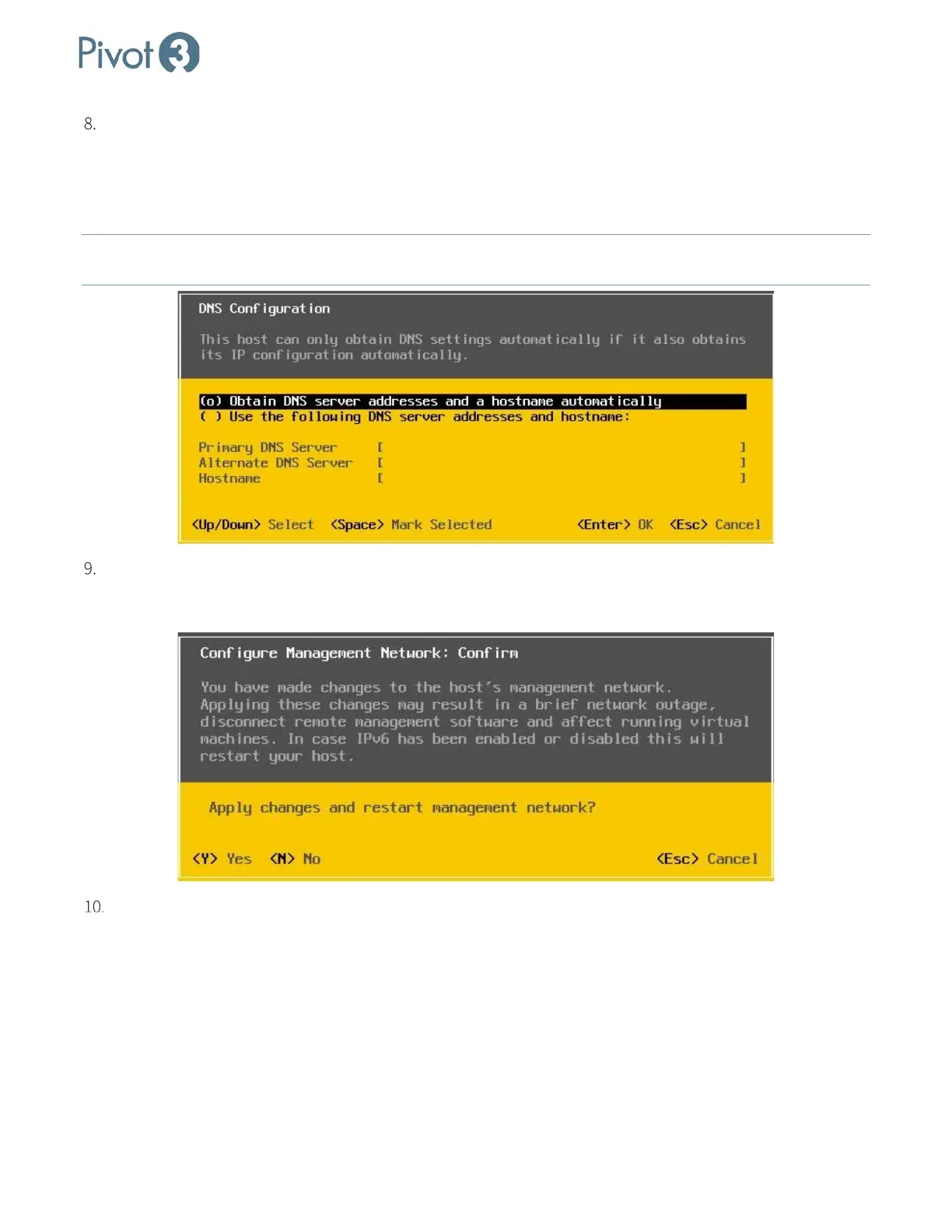
With a choice of Obtain DNS server addresses and a hostname automatically, the selection task will be
completed automatically. Simply press the Enter key to move through this screen. The other available option,
Use the following DNS server addresses and hostname, requires that the information be entered manually
and connected to host name that is unique on the network. Once complete, press <Enter> to return to the
Configure Management Network screen.
NOTE: For vCenter to communicate with the host, the hostname must be resolvable on the network
from vCenter,
ESXi host in cluster, client PC, and any 3rd party tool that references the host by hostname.
Press <Esc> to return to the System Customization screen. If any changes were made to the Management
Network settings, a confirmation prompt will appear. Press <Y> to apply the changes and restart the
management network.
Repeat Steps 1-8 for each node.



 To Next Page