X-Series Hyperconverged Nodes Powered by Acuity
Setup & User Guide, v1.0
29
|
DOC-246-GDE-Pivot3 Acuity 2.3 Setup & User Guide-v1.0.docx
CRITICAL: If Pivot3_vCenter_Plugin_10.3.0.####.tar.gz does not show up in this list command, begin the process
again from Step 4 of this section.
Create a new directory so that the file has a fresh location to extract to:
Localhost:~# mkdir plugin10.3.1.xx
Navigate to the new directory created for file extraction:
Localhost:~# cd tmp/
Now that the Plugin installer file has been correctly placed and identified, open the .tar.gz file as follows:
localhost:~# tar xvf Pivot3_vCenter_Plugin_10.3.1.[####].tar.gz
List directory contents once more to ensure the files p3vcenterplugin-installer.sh and P3VMwarePlugin-
10.3.1.xx.zip have been extracted.
Change the permissions for the installation file to make it executable:
localhost:~# chmod 777 p3vcenterplugin-installer.sh
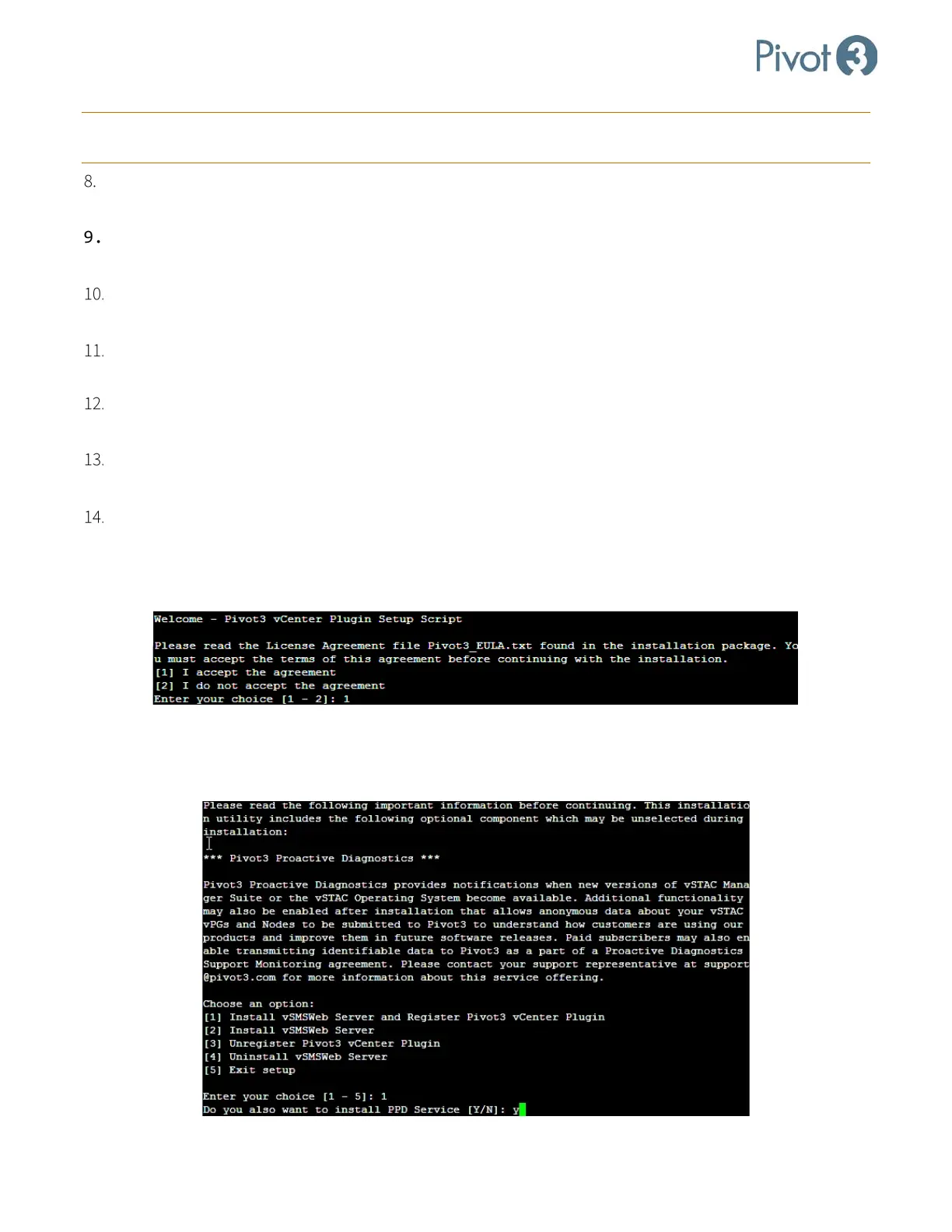
Run the installation file and answer the wizard’s questions as prompted with desired information:
Localhost:~# ./p3vcenterplugin-installer.sh
At this point, the Linux CLI installation aligns closely with the Windows installation options. For each question,
choose the desired variables to enter for each of the information requests:
a. Read the License Agreement file Pivot3_EULA.txt that was sent with the installation package. To accept
the License Agreement, press 1.
b. Read the Pivot3 Proactive Diagnostics blurb, and press 1 to install vSMS Web Server and Register Pivot3
vCenter Plugin.
c. Press Y to install PPD Service.



 To Next Page