E-11
MacBAT 5 – USER GUIDE. Version 1.0
To setup the limits in the device:
• Go to Main menu by pressing Enter
• Navigate to menu Configuration → Limits
• Choose limit to set basing on the category
Available limits:
• Pressure 1 – pressure used for PTZ calculation
• Pressure 2 – secondary pressure used for pressure regulator monitoring
• Temperature – temperature used for PTZ calculation
• Limits of flow – nominal and base flow limits
• C limits – limits for conversion factor
• Peak limits – limits for hourly increments of volume and energy
• User conf. limits - user defined parameters for parameters not included in list above
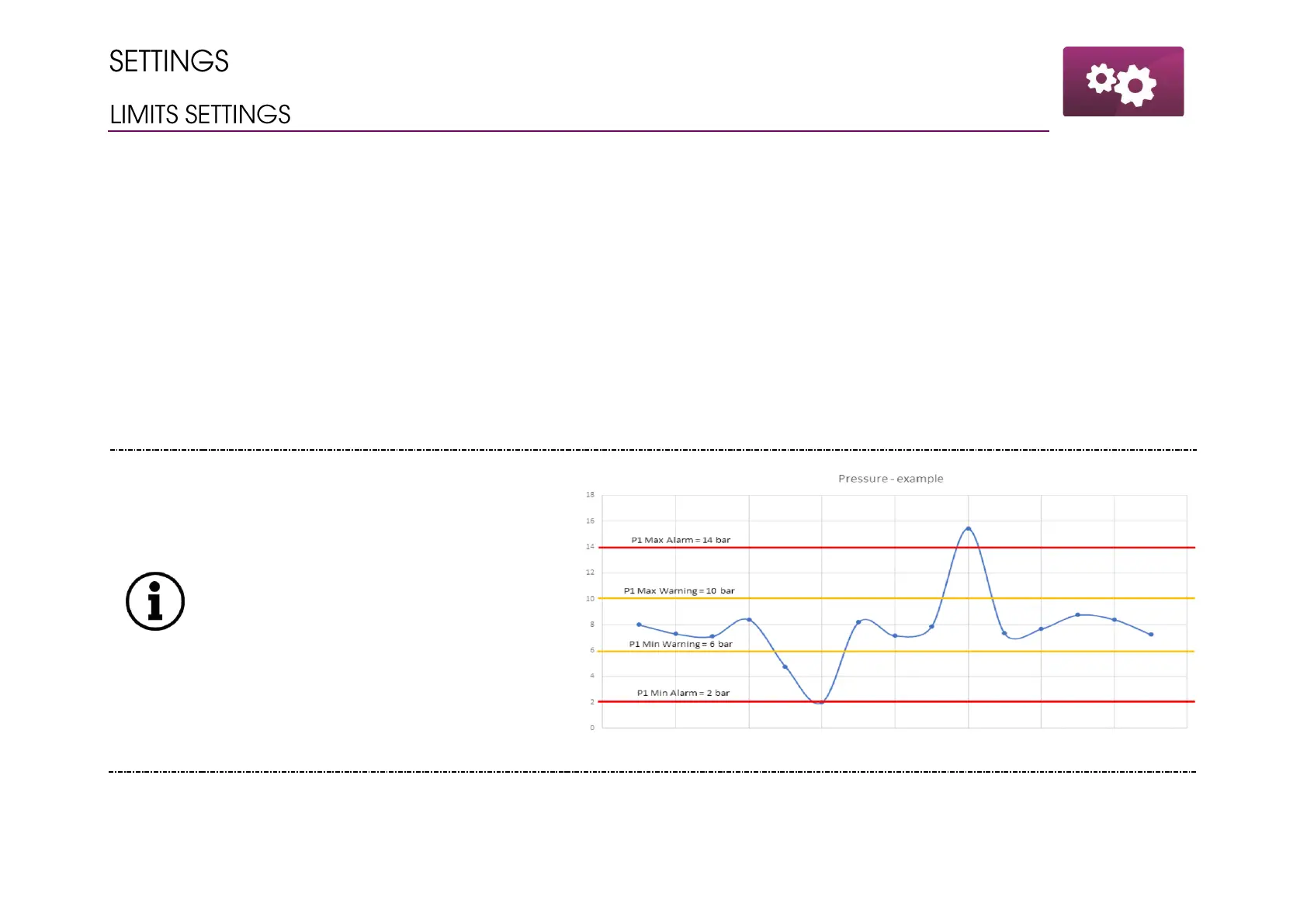
Every value except for Pressure 1/2 has one
low and high threshold for the limits.
Pressure 1 has warning and alarm thresholds
which are explained in given picture.
Warning – exceeding having not significant
impact on gas station work. To monitor, not
to react.
Alarm – exceeding of this threshold should
indicate gas station supervisors it is time for
immediate reaction.



 To Next Page