C-16
MacBAT 5 – USER GUIDE. Version 1.0
Connection of the circuits is done using the terminals preventing from tearing out the cable. The wires must be ended with the insulated
sleeves as it was mentioned in previous section of this document. After placing the wire in the terminal pull it out slightly to check if it is
properly crimped and inserted.
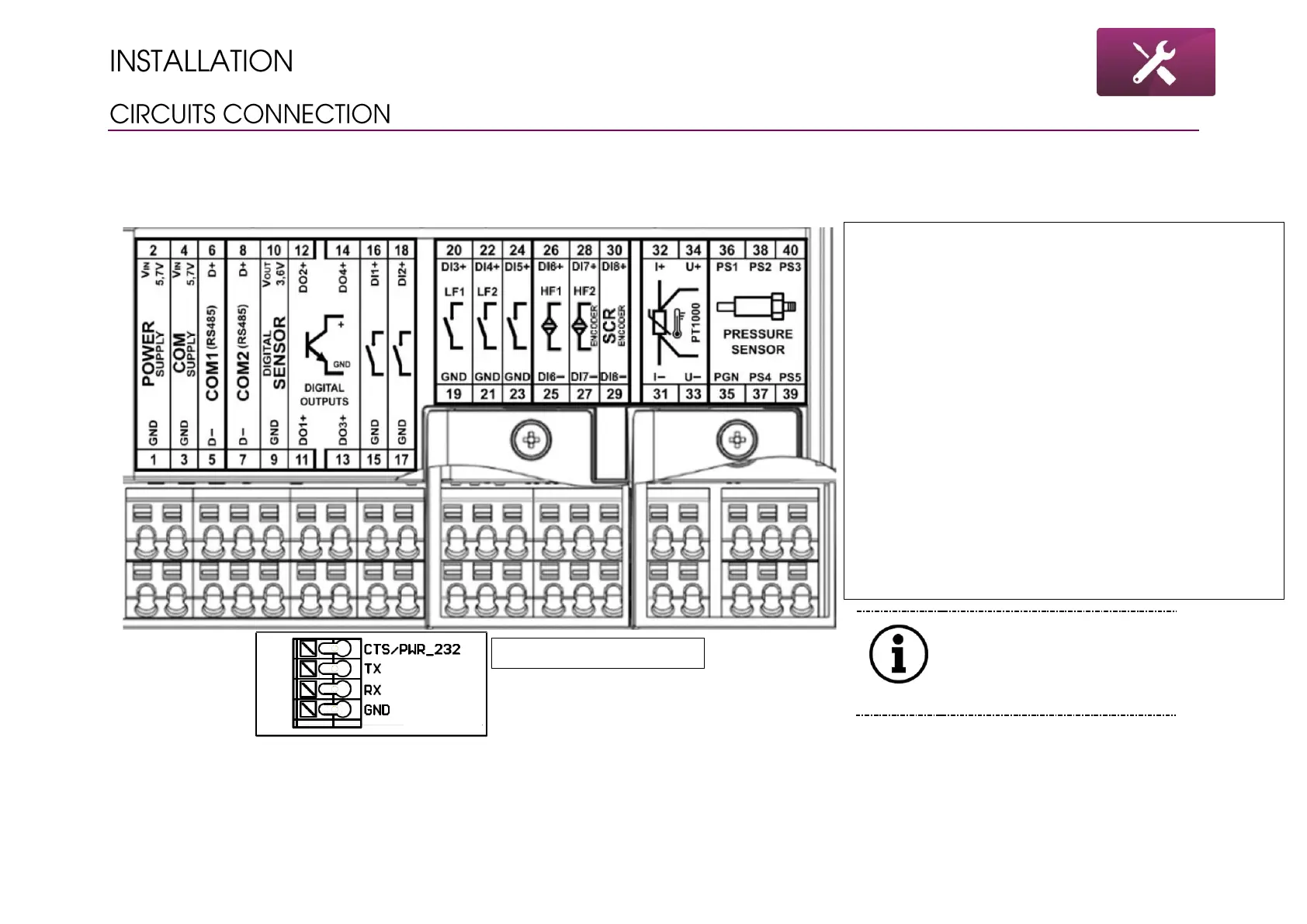
1-2 – external power supply terminals – dedicated
INT-S3
3-4 – external COM ports power supply
5-8 – serial ports transmission terminals
9-10 – digital sensor power supply – currently
unavailable
11-14 – DO – digital outputs connection
15-18 – DI – binary inputs 1 and 2
19-22 – pulse inputs LF1 and LF2 shared with binary
inputs 3 and 4
23-24 – tamper switch shared with binary input 5
25-26 – pulse input HF1 from gas meter, shared with
NAMUR digital input
27-28 – pulse input HF2 from gas meter, shared with
NAMUR digital input and Encoder input
29-30 – SCR encoder input
31-34 – PT1000 4-wires input
35-40 – EPS pressure sensor input



 To Next Page