PLX32-EIP-MBTCP-UA ♦ Multi-Protocol Gateway OPC UA Server
User Manual
ProSoft Technology, Inc. Page 119 of 156
March 8, 2018
7.2.6 Creating and Signing a New Certificate
Initially, the PLX32-EIP-MBTCP-UA has a self-signed certificate that is used as
its OPC UA Application Instance Certificate. The purpose of this self-signed
certificate is for the initial secured communication with the PSW-UACM. In order
to enable access to variables, the device’s certificate must be replaced by a
certificate signed by a CA Certificate. This process is called provisioning. Once
the device is provisioned, its variables become available in OPC UA address
space.
By default, only the most secured endpoint is enabled. If less-secure endpoints
are required, they must be enabled before provisioning starts.
To support all possible endpoints, 2 certificates are required. First, the certificate
with type 2048 bit SHA256 must be created, then type 2048 bit RSA128 can be
created.
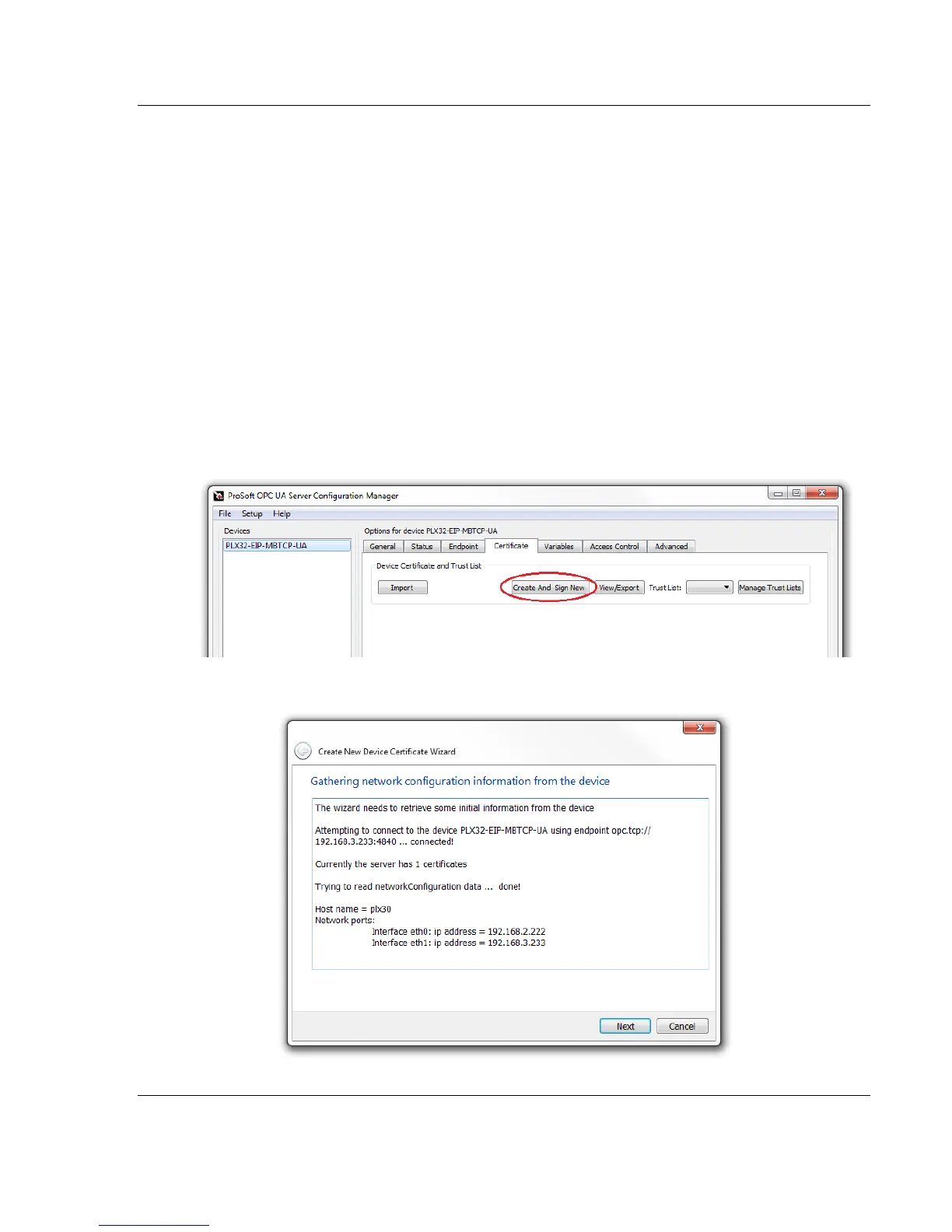
1 From the Certficate tab in PSW-UACM, click on CREATE AND SIGN NEW
button.
2 Upon connection, click NEXT.



 To Next Page