OPC UA Server PLX32-EIP-MBTCP-UA ♦ Multi-Protocol Gateway
User Manual
Page 126 of 156 ProSoft Technology, Inc.
March 8, 2018
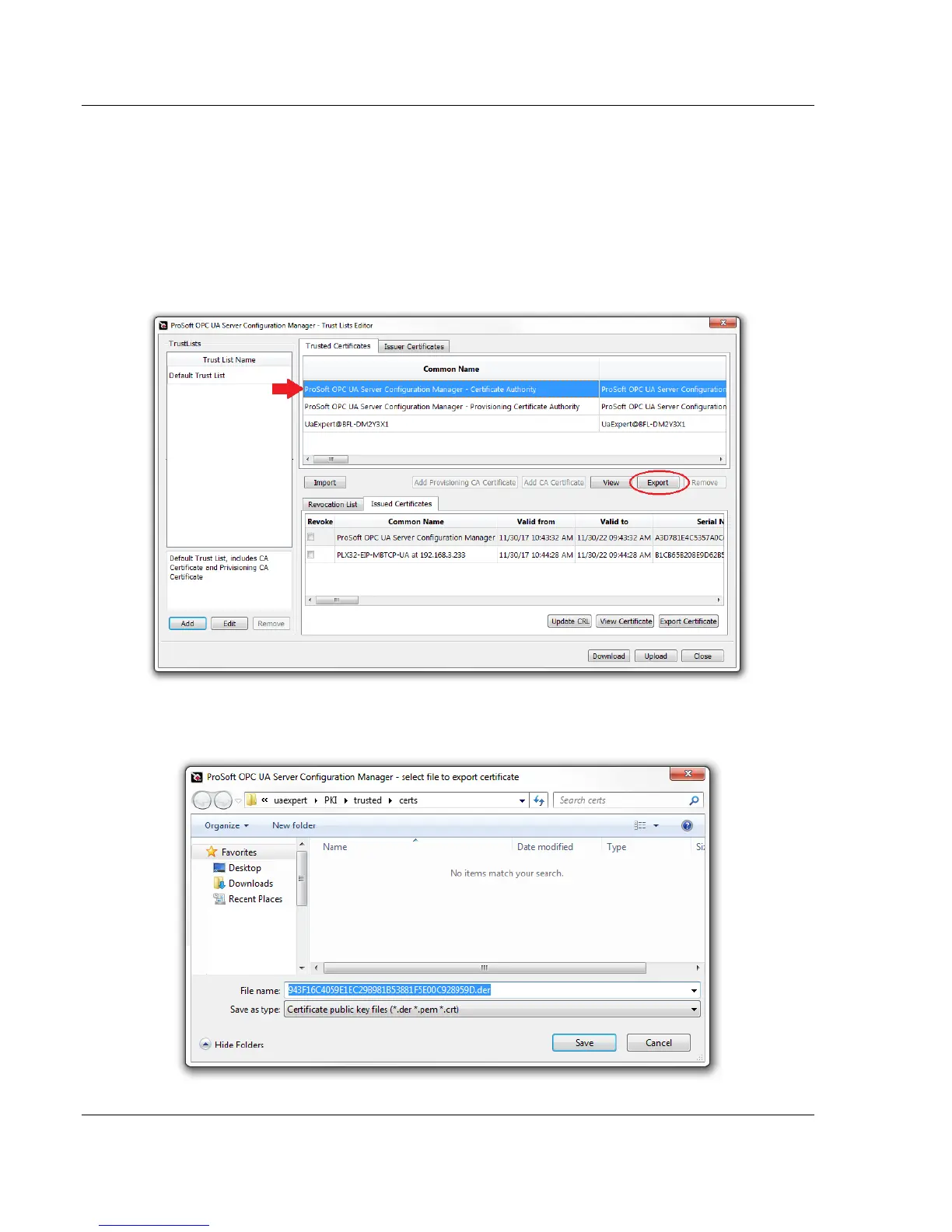
7.4 Exporting the CA Certificate to the OPC Client
To provide a full certificates chain available for an OPC UA client, the Certificate
Authority (CA) Certificate must be added to the Trusted Certificates list of the
OPC Client.
1 In the Trust Lists Editor dialog box, under the Trusted Certificates tab,
click and highlight the ProSoft OPC UA Server Configuration Manager –
Certificate Authority. Click the EXPORT button.
2 Browse to the proper OPC Client trusted certificates folder location and
save the PLX32-EIP-MBTCP-UA CA Certificate *.der file. Click SAVE.



 To Next Page