EIP Protocol PLX32-EIP-MBTCP-UA ♦ Multi-Protocol Gateway
User Manual
Page 48 of 156 ProSoft Technology, Inc.
March 8, 2018
5.2.2 Configuring EIP Class 1 Connection
Use the EIP Class 1 Connection in ProSoft Configuration Builder when the
gateway acts as an EIP adapter transferring data to and from a PLC (the EIP
scanner) using a direct I/O connection. Direct I/O connections can transfer large
amounts of data quickly.
The PLX32-EIP-MBTCP-UA can handle up to eight I/O connections (depending
on the model), each with 248 words of input data and 248 words of output data.
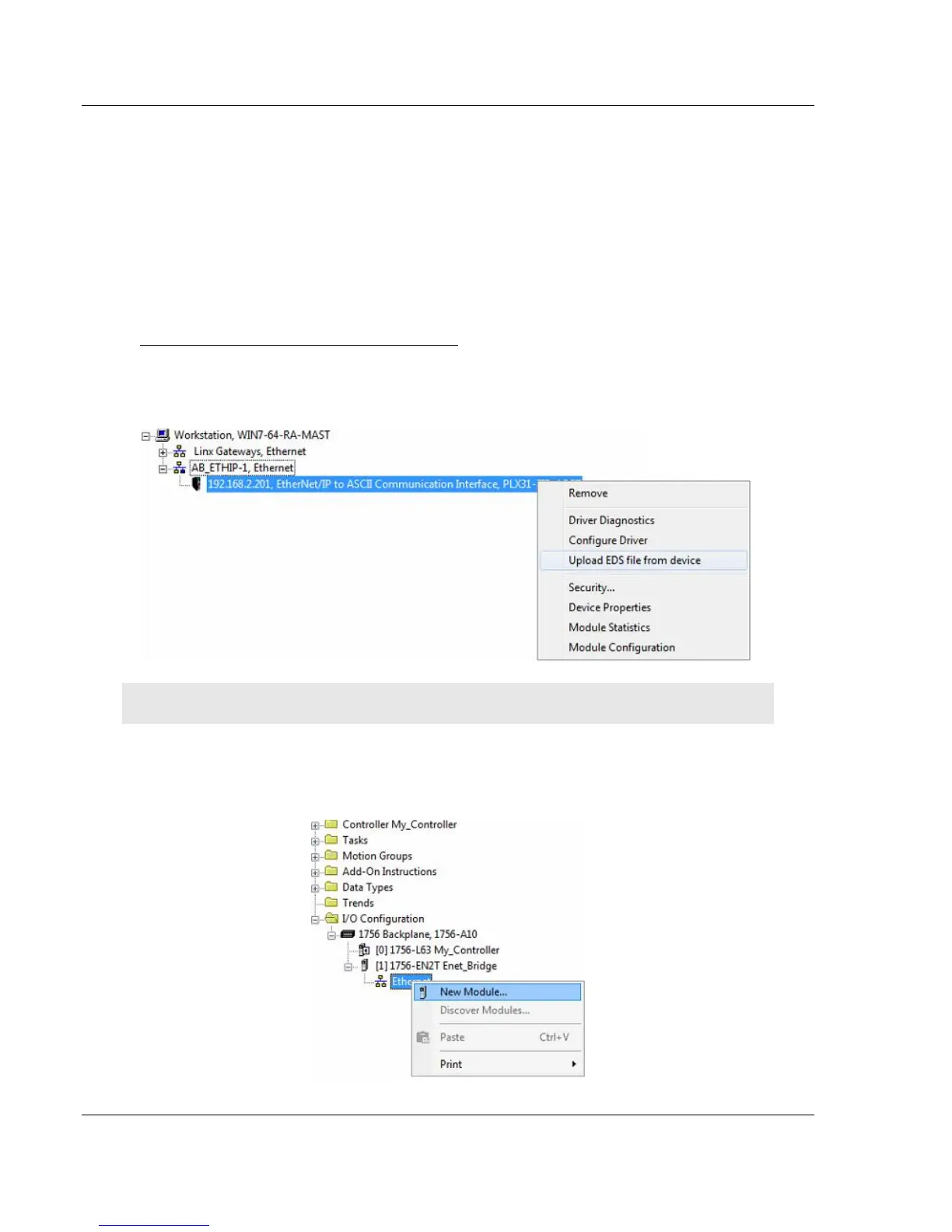
Adding the Gateway to RSLogix5000 v.20
1 Start Rockwell Automation RSLinx and browse to the PLX32-EIP-MBTCP-
UA.
2 Right-click the gateway and then choose UPLOAD EDS FROM DEVICE.
Note: RSLogix5000 may need to be restarted in order to complete the EDS installation.
3 After you restart RSLogix 5000, open the desired RSLogix 5000 project.
4 In the Controller Organizer, right-click the EtherNet/IP bridge in the I/O tree
and choose NEW MODULE.



 To Next Page