PLX32-EIP-MBTCP-UA ♦ Multi-Protocol Gateway MBTCP Protocol
User Manual
ProSoft Technology, Inc. Page 93 of 156
March 8, 2018
Modbus Message Routing: Port 2001
When Modbus messages are sent to the PLX32-EIP-MBTCP-UA over the
TCP/IP connection to port 2001, the messages are routed by the gateway
directly out the serial communication port (Port 0, if it is configured as a Modbus
master). The commands (whether a read or a write command) are immediately
routed to the slave devices on the serial port. Response messages from the
slave devices are routed by the gateway to the TCP/IP network to be received by
the originating host.
6.2 MBTCP Configuration
6.2.1 Configuring MBTCP Servers
This section contains database offset information used by the PLX32-EIP-
MBTCP-UA MBTCP server when accessed by external clients. You can use
these offsets to segment the database by data type.
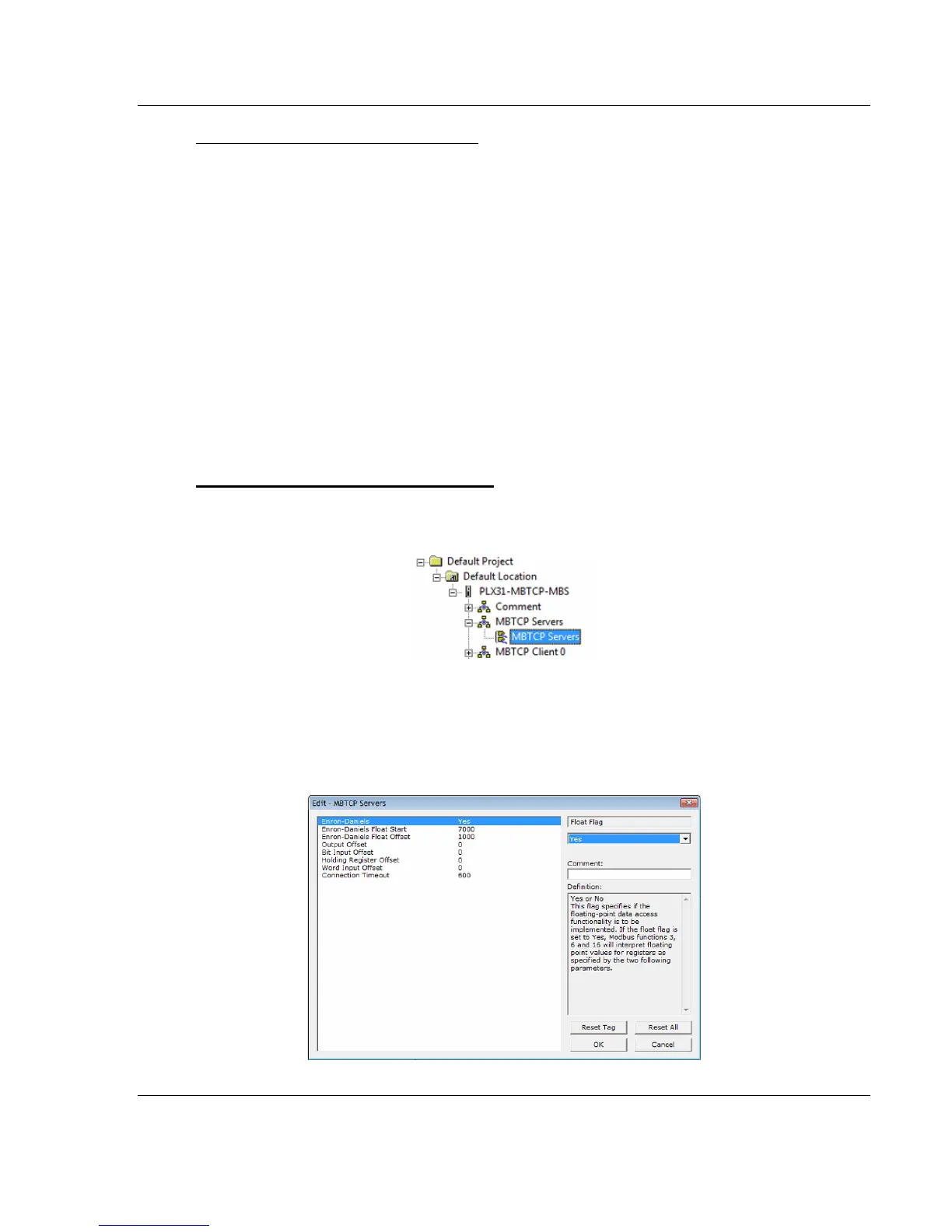
To configure the MBTCP Servers in PCB
1 In ProSoft Configuration Builder, click the [+] next to the gateway, then click
the [+] next to MBTCP Servers.
2 Double-click the second MBTCP Servers to display the Edit - MBTCP
Servers dialog box.
3 In the dialog box, click a parameter and then enter a value for the parameter.
Note that the Float Start and Float Offset parameters only appear if you set
Float Flag to Yes.



 To Next Page