EIP Protocol PLX32-EIP-MBTCP-UA ♦ Multi-Protocol Gateway
User Manual
Page 44 of 156 ProSoft Technology, Inc.
March 8, 2018
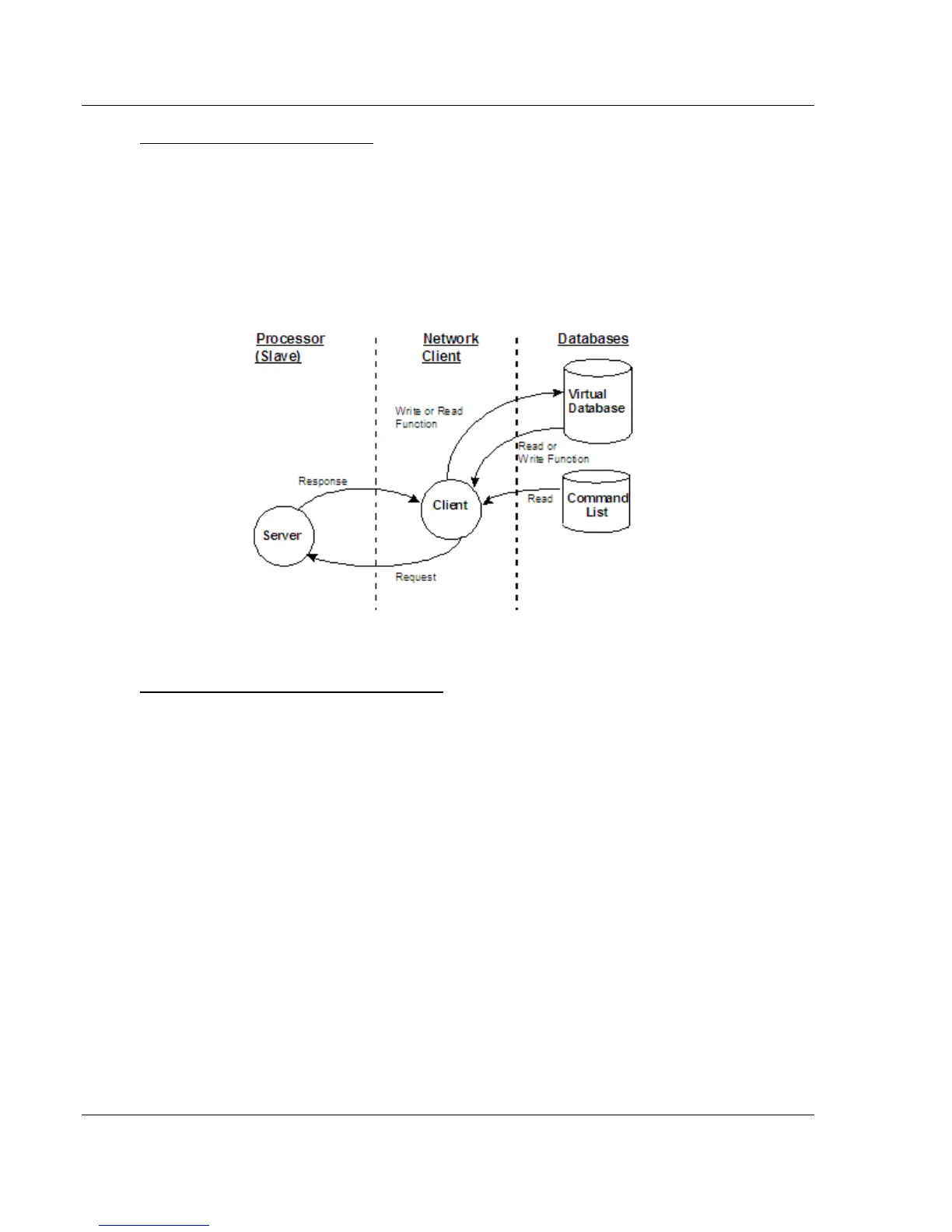
EIP Client Access to Database
The client functionality exchanges data between the gateway's internal database
and data tables established in one or more processors or other server based
devices. The command list that you define in ProSoft Configuration Builder
specifies what data is to be transferred between the gateway and each of the
servers on the network. No ladder logic is required in the processor (server) for
client functionality, except to assure that sufficient data memory exists.
The following illustration describes the flow of data between the Ethernet clients
and the internal database.
Multiple Server Access to EIP Database
Server support in the gateway allows client applications (such as HMI software
and processors) to read from and write to the gateway’s database. The server
driver is able to support multiple concurrent connections from several clients.
When configured as a server, the user data area of the internal database in the
gateway is the source for read requests and the destination for write requests
from remote clients. Access to the database is controlled by the command type
received in the incoming message from the client.
The gateway must be correctly configured and connected to the network before
any attempt is made to use it. Use a network verification program, such as
ProSoft Discovery Service or the command prompt PING instruction, to verify
that the gateway can be seen on the network. Use ProSoft Configuration Builder
to confirm proper configuration of the gateway and to transfer the configuration
files to and from the gateway.



 To Next Page