PLX32-EIP-MBTCP-UA ♦ Multi-Protocol Gateway EIP Protocol
User Manual
ProSoft Technology, Inc. Page 79 of 156
March 8, 2018
Encapsulated PCCC Write Message
Write commands transfer data from the processor to the gateway. The gateway
supports the following encapsulated PCCC commands:
PLC2 Unprotected Write
PLC5 Typed Write
PLC5 Word Range Write
PLC Typed Write
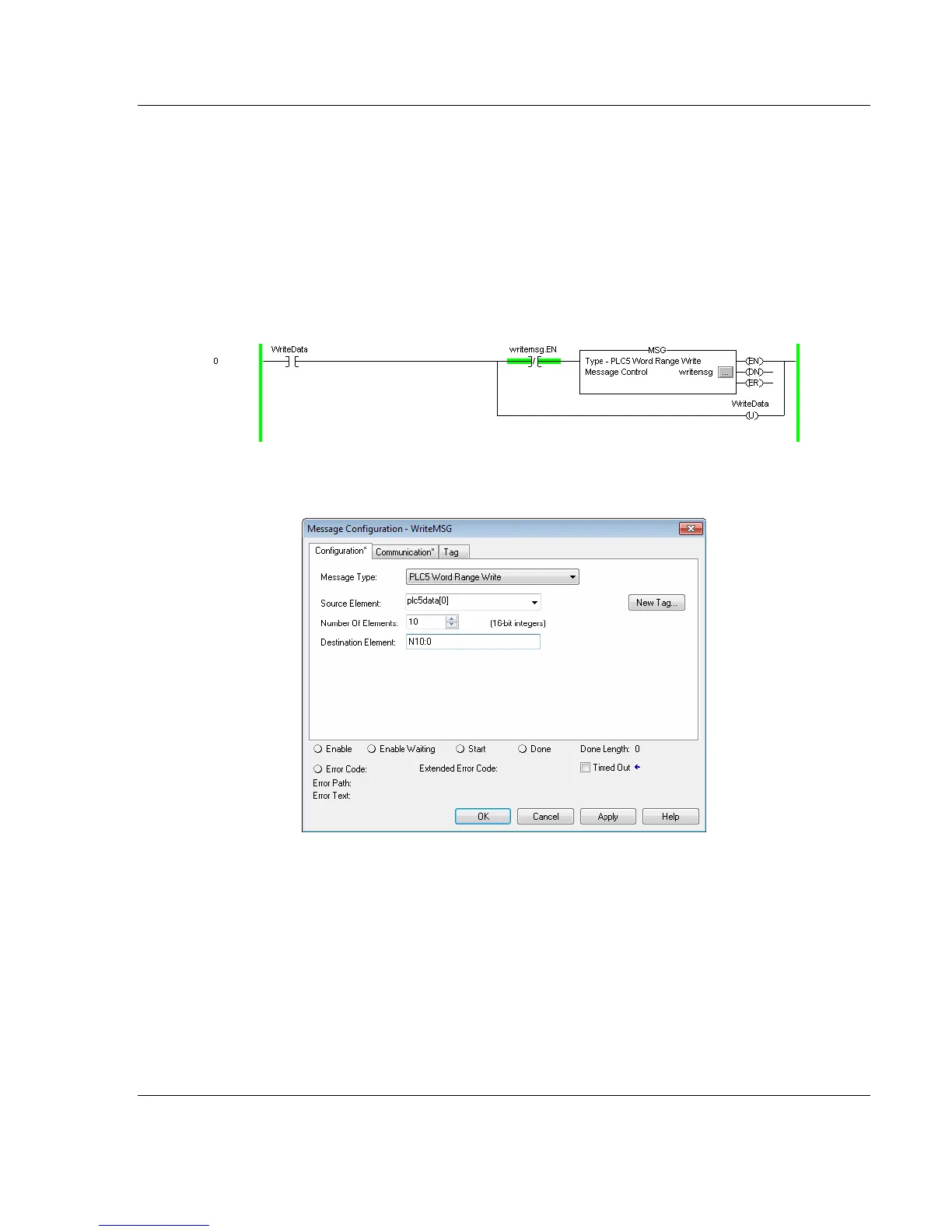
The following diagram shows an example rung that executes a write command.
1 In the Message Configuration dialog box, define the data set to be transferred
from the processor to the gateway as shown in the following image.
2 Complete the dialog box for the data area to be transferred.
o For PLC5 and SLC messages, set the DESTINATION ELEMENT to an
element in a data file (such as, N10:0).
o For the PLC2 Unprotected Write message, set the DESTINATION ELEMENT
to the address in the gateway’s internal database. This cannot be set to a
value less than ten. This is not a limitation of the gateway but of the
RSLogix software.
o For a PLC2 Unprotected Write or Read function, enter the database
address in octal format.



 To Next Page