HandKey II Installation and Operation Manual
Page 36 Revision 2.0
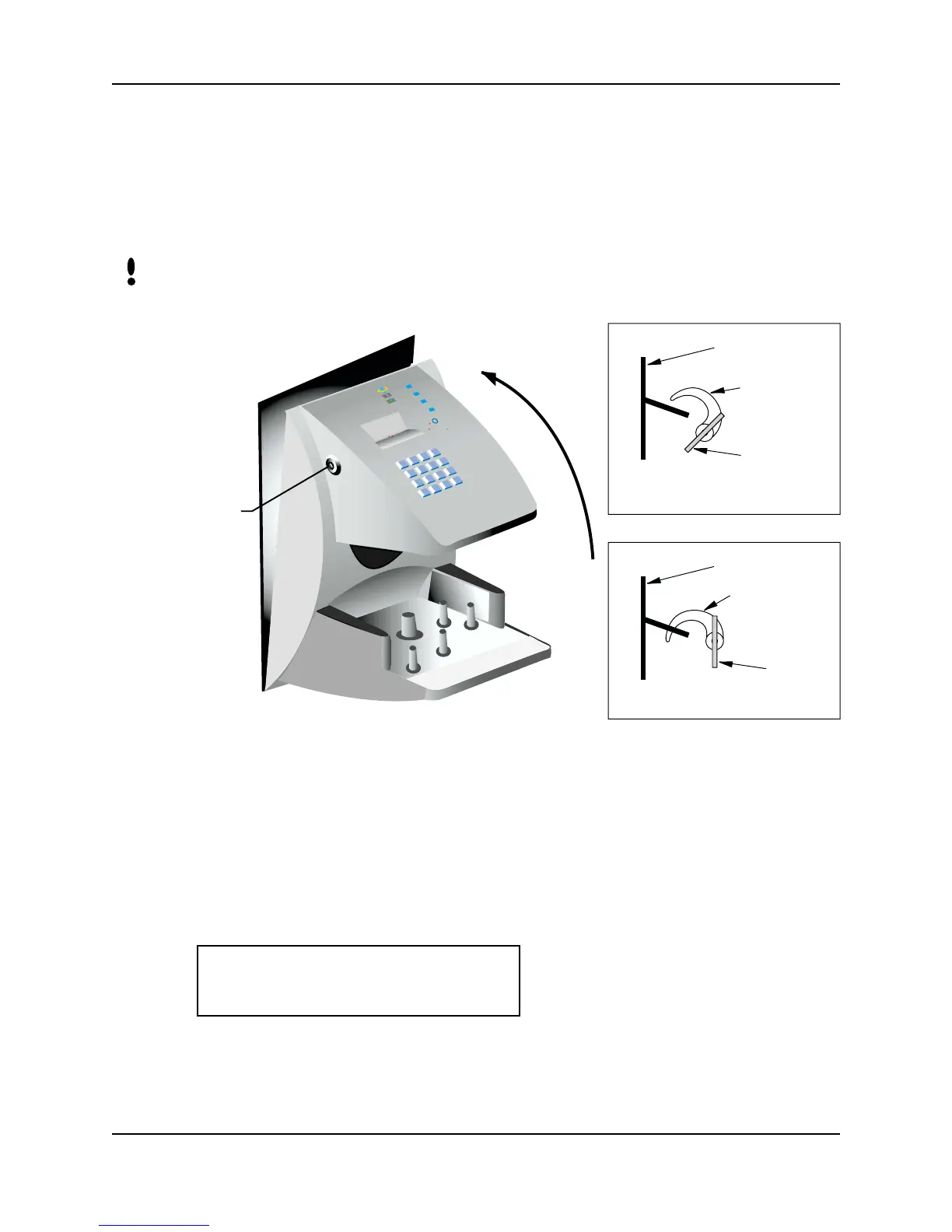
Closing the Hand Reader
Before closing the Hand Reader, ensure dip switches 4 and 5 are OFF (refer to Figure
3-11). With the wall mount latch in the unlocked position, swing the body of the Hand
Reader up and lock the latch into place with the key provided with the Hand Reader
(see Figure 3-12).
Do not force the Hand Reader onto the wall mount latch when the latch is in the locked
position.
Figure 3-12: Closing the Hand Reader
Powering the Hand Reader
The Hand Reader is powered through the cabling run to the Hand Reader. Apply
power via this cabling. The Hand Reader’s display lights up. After a several second
delay the Hand Reader’s display shows the following information.
If the display remains blank, verify the power connections made to the Hand Reader.
NOTE
N
o
R
e
c
o
g
n
itio
n
S
y
s
te
m
s
I
n
c
.
LOCK
Key
Latch
Wall Plate
Key
Latch
Wall Plate
Unlocked Position
Locked Position
- READY -
TIME DATE



 To Next Page