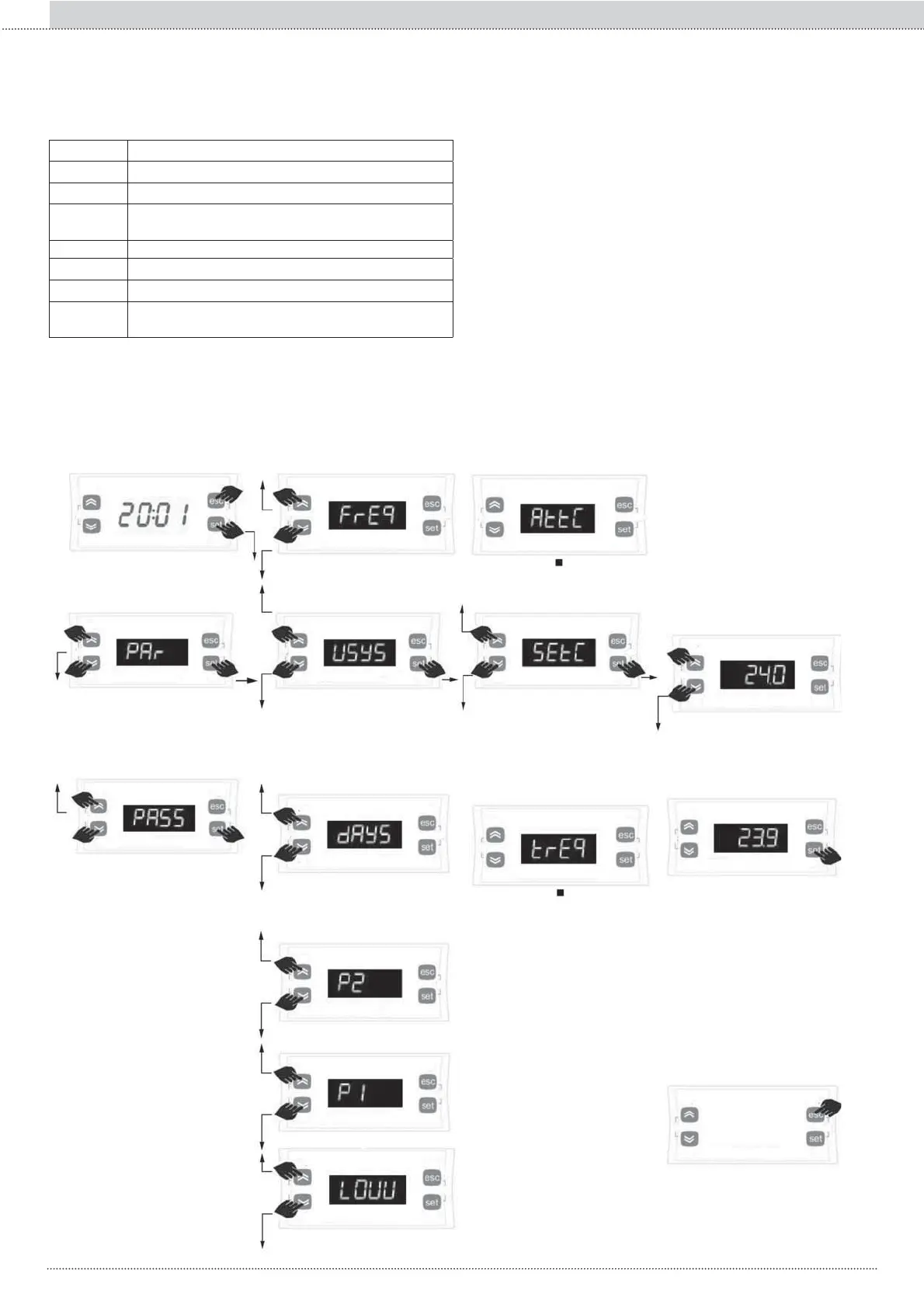
2. Menu “Prg”
le menu “Prg” est subdivisé en autres menus internes:
$FFqVHWPRGL¿FDWLRQGHVSDUDPqWUHVGXPHQX³3UJ´
Sur la page-écran principale,
appuyer ensemble les tou-
ches set et esc pour accéder
à la liste menu “Prg””
Appuyer sur la touche set pour
accéder à la liste des pa-
UDPqWUHVGXPHQXDI¿FKp
Appuyer sur les touches haut ou
basSRXUIDLUHGp¿OHUjOpFUDQ
les différents menus.
Appuyer sur la touche set pour
accéder
DXSDUDPqWUHDI¿FKp
Appuyer sur les touches haut ou
basSRXUIDLUHGp¿OHUjOpFUDQOHV
différents paramètres.
Appuyer sur les touches
haut ou basSRXUPRGL¿HUOH
paramètre.
Appuyer sur les touches haut
ou basSRXUDI¿FKHU³3DU´
Appuyer sur la touche set pour
DFFpGHUjODFRQ¿JXUDWLRQGX
mot de passe
Appuyer sur la touche esc
pour revenir en arrière d'un
QLYHDX
Appuyer sur la touche set pour
FRQ¿UPHUODPRGL¿FDWLRQ
Menu label Description
USYS Paramètres courbes climatiques
FrEq Paramètres fréquence inverseur
LOUU Paramètres vanne basse température pour circuit
radiant
AFr Antigel paramètres
P1 3UR¿OWUDQFKHVKRUDLUHV2Q2II
P2 3UR¿OWUDQFKHVKRUDLUHV2Q2II
dAYS $VVLJQDWLRQSUR¿OWUDQFKHVKRUDLUHV2Q2IIDX[GLIIpUHQWV
jours de la semaine
Appuyer sur la touche set pour
accéder à la liste menu “Par”
Appuyer sur les touches haut ou
basSRXUDI¿FKHU³3$66´
128
Section I :: Utilisateur
FR



 To Next Page