Chapter 3 Getting To Know the Cash Register
15 Alpha 710ML User’s Guide
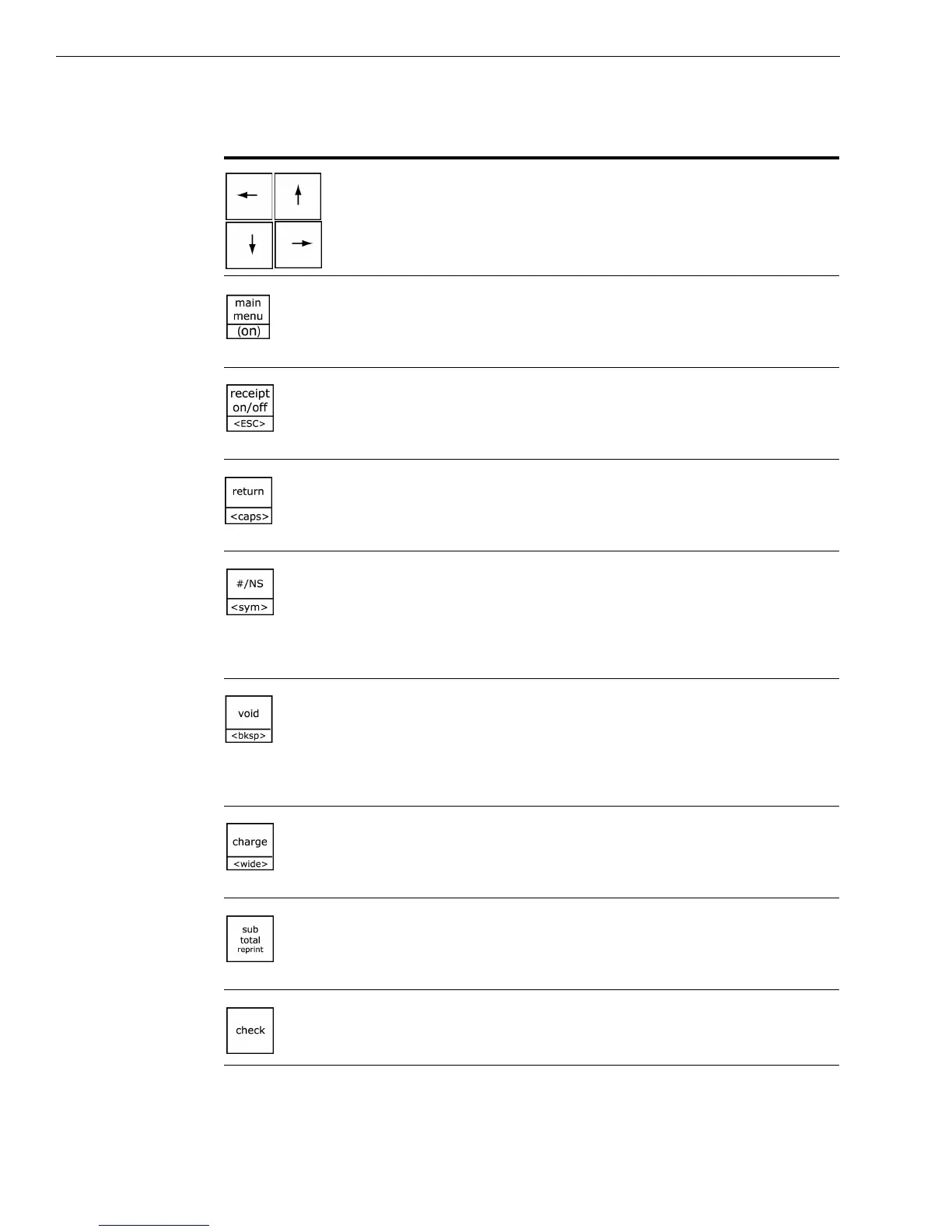
• select items from the menus in the clerk display
• move the cursor on the screen
• go directly back to the Main menu from any point in
the cash register menus
• turn the cash register on
• turn the receipt printer on or off
• exit the current screen and go back to the previous
screen
• process a returned item as a credit sale
• use caps key for typing capital letters or lower-case
letters using the alphabet on the Department keys
• enter a descriptive or reference number during a sale,
such as an invoice number or product serial number
• open the cash drawer and ring a No-Sale transaction
• see the symbol and international character set screen
• void a line item in a sales transaction or
• ring an entire voided sale transaction
• backspace and delete one character at a time during
text and description entries in Programming mode
• end a sale as a Charge sale paid for by a credit card
• enter a character as double-wide during text and
description entries in Programming mode
• subtotal a sales transaction
• reprint the sales receipt for the previous sales
transaction before another transaction is started
• end a sale paid for with check or money order
Table 1 Navigating keyboard
Use this key... To do this...



 To Next Page