Configuring the DVR
3–18 700-0042 R004
3.2.7. Using the Signals Menu
The EX4 DVR using the Smart-Link module has the ability to record various
signals from the vehicle. For example, when the brakes are applied, the text
BRK
can be recorded on the camera picture.
Use the Signals menu to configure ten different character strings to be displayed
when an external analog signal or CAN message has been sent.
To view the Signals menu:
1. On the main menu, turn the
JOG wheel to highlight SIGNALS.
2. Press the
ENTER button.
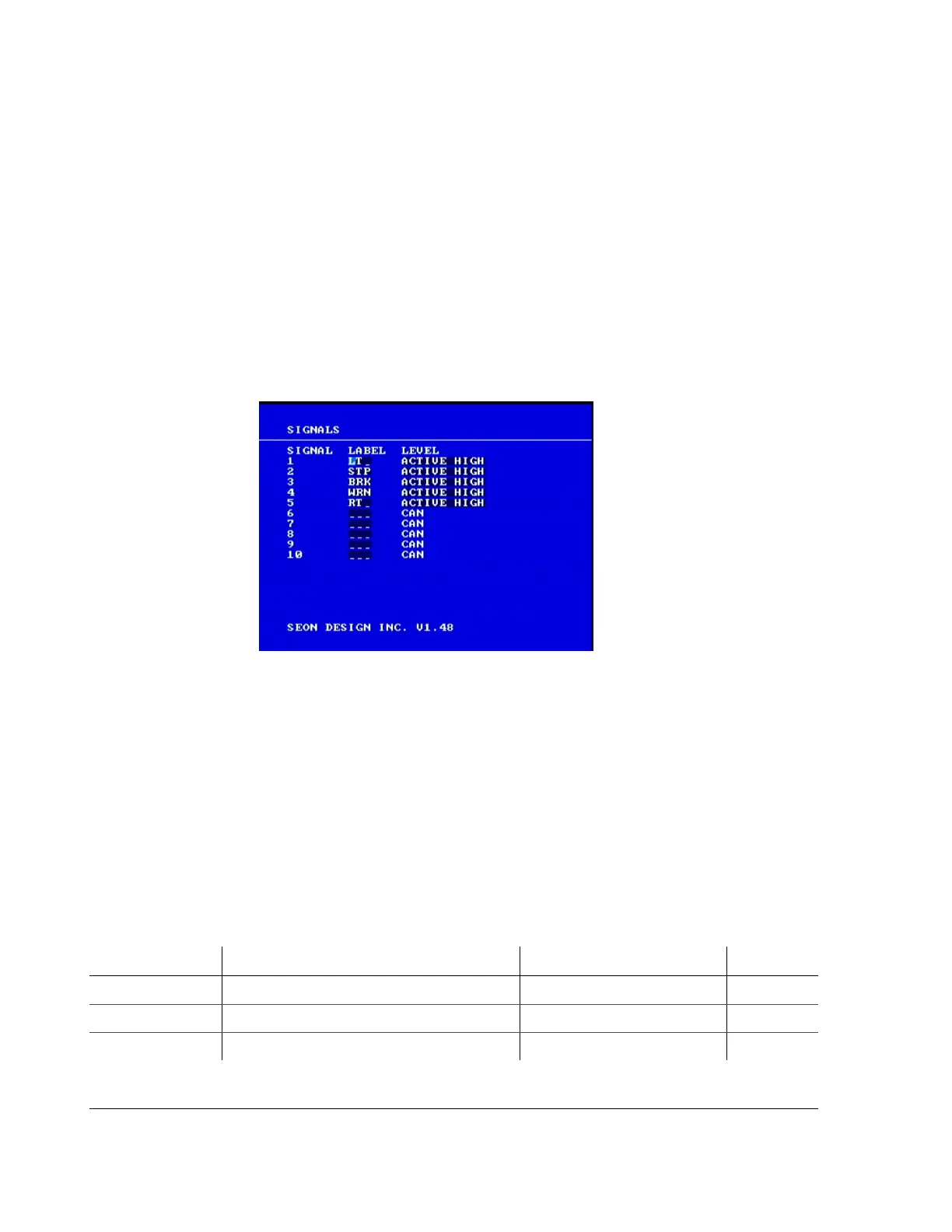
The Signals menu appears as shown in Figure 3-9.
To change a setting on the sub-menu:
1. Turn the
JOG wheel clockwise or counter clockwise to change the value.
2. Press the
LOCK > button to advance through the fields.
3. Press the
DISPLAY < button to move back through the fields.
The selected menu item is highlighted with a pale blue background.
4. Press the
CLEAR button to reload the default value into a field.
5. To exit the menu, press the
MENU button.
6. Repeat these steps to set the Label and Level. See Table 3-13.
Figure 3-9
Signals menu
Table 3-13
Signal configuration items
Menu Item Description Values Default
LABEL (1) LT (Left) LT
2 STP (Stop) STP
3 BRK (Brake) BRK



 To Next Page