Introduction
700-0042 R004 1–3
• Ten different input signals, including CAN signals
• Driver’s indicator panel
• 4 different event alarm inputs
1.3. EX4 DVR
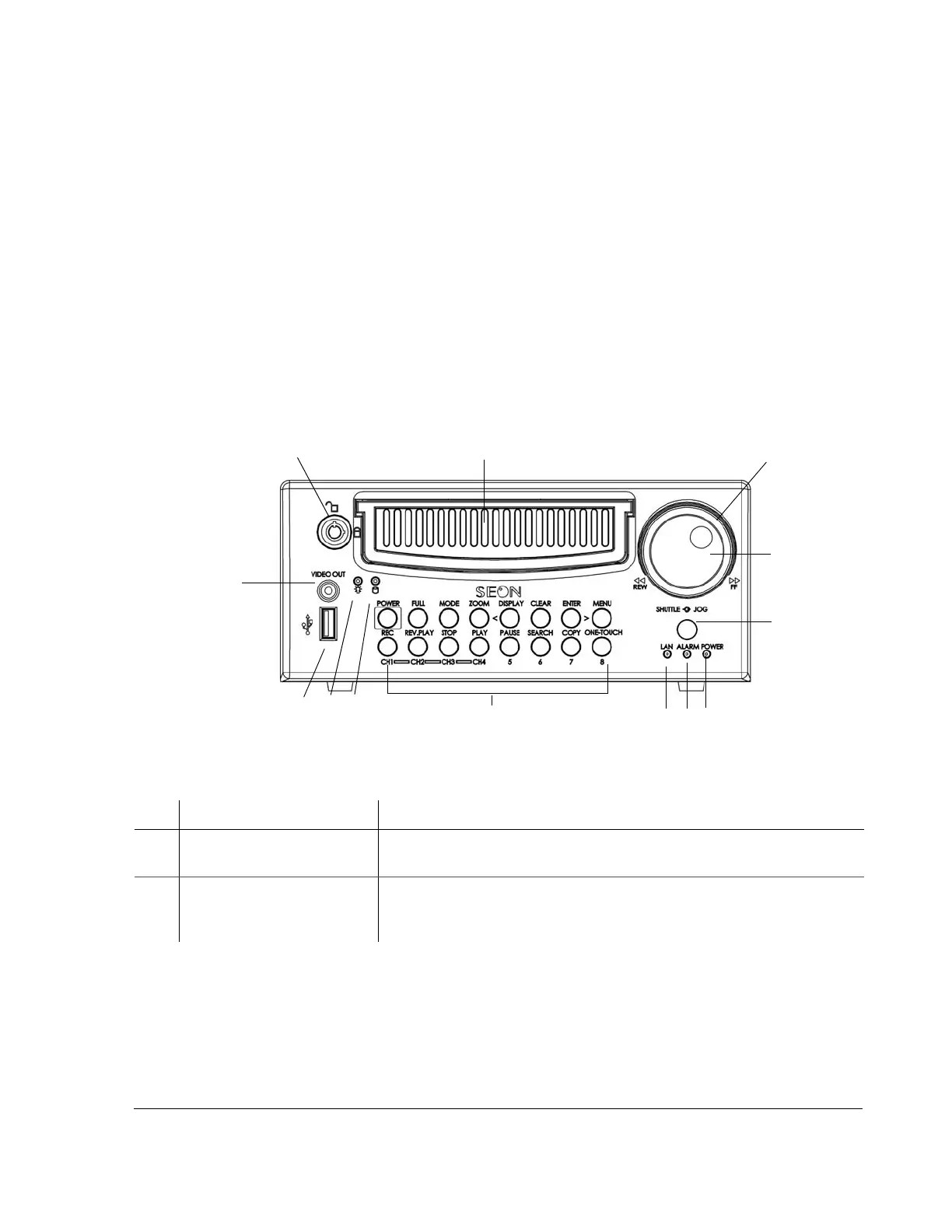
1.3.1. DVR Front Panel Features
The EX4 DVR has important features on the front of the unit such as the hard
drive lock, removable hard drive,
SHUTTLE/JOG wheel, indicator lights, the DVR
buttons for selecting menus and changing settings, the
USB port, and the VIDEO
OUT jack. See Figure 1-1.
Figure 1-1
EX4 DVR front panel
Table 1-1
Front panel features
Item Feature Description
1 Hard Drive lock (unlocked
and locked positions)
Requires the proper key to unlock the hard drive prior to removal and
locking the hard drive during operation.
2 Removable Hard Drive Remove the hard drive for playback at a remote location using the HD
Reader (“4.4. Downloading Video to a PC” on page 4–6), swap to another
DVR, or upgrade to a larger hard drive.
13
5
4
3
2
1
8
7
6
11
1
0
12
9



 To Next Page