M90 Fusion Splicer 2-10 Operating Instructions
Preparations Issue 02/97
Inserting the Optical Fibers into the Fiber Holder
Ensure that you have chosen the right type of fiber guide.
Open the
flaps
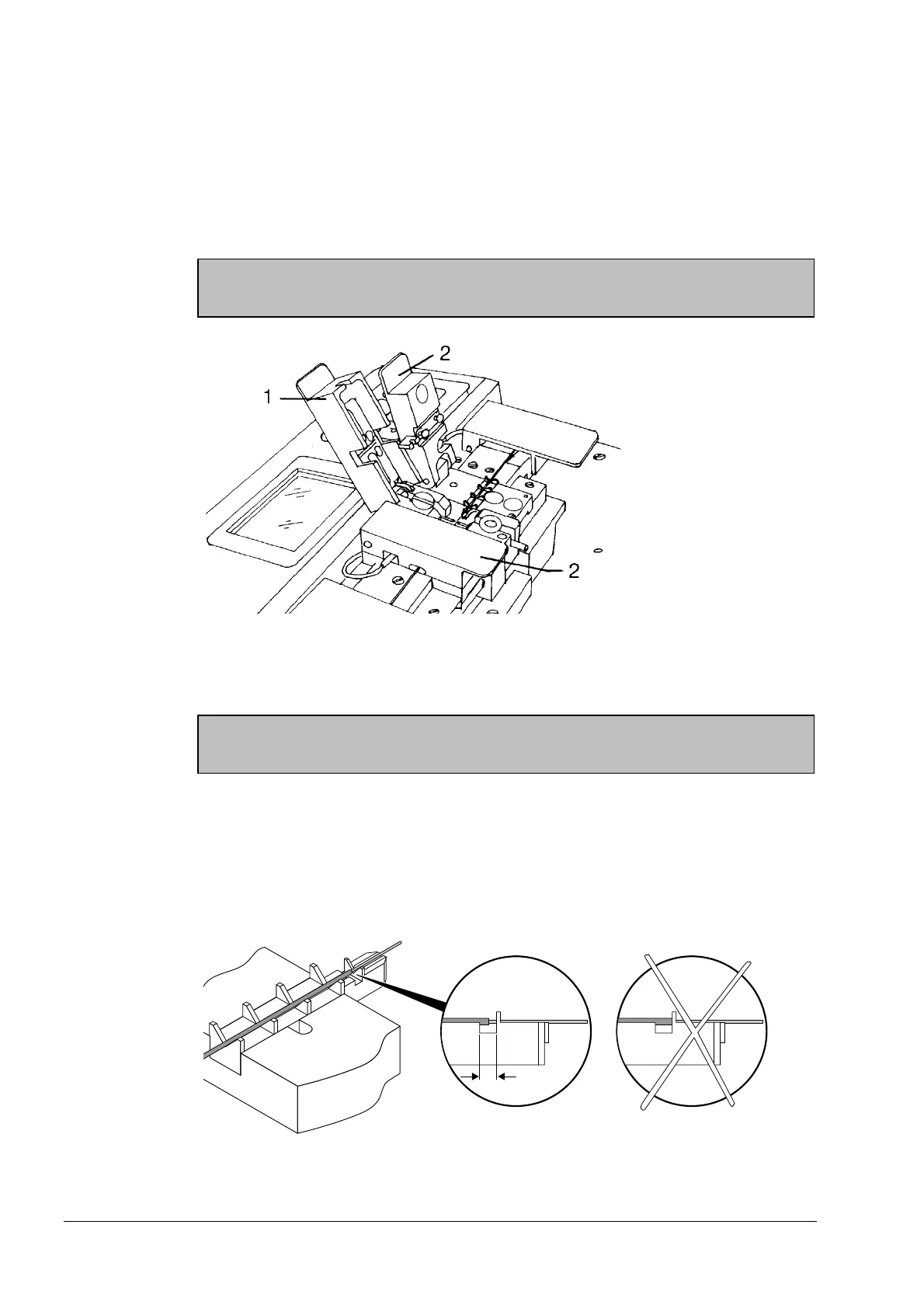
- First open the electrode flap (1).
- Then open the holder flap (2).
Caution:
Open the electrode flap first and then the holder flap!
Opening the Flaps in the Correct Sequence
1 Electrode flap
2 Holder flap
Checking the
fiber guide
Check whether the fiber guide is clean. If not, clean it (see section 7).
Note
Open only the flaps required for the relevant operation at any one time.
Inserting the
fibers
The procedure for inserting the fibers in the fiber guide depends on the fiber guide se-
lected. Note the prescribed cleave lengths.
Fiber guide
250-900 µm
Insert the fiber into the fiber guide so that the coating stripping edge lies within the area
(A) (see figure).
Inserting the Fiber into the Fiber Guide 250-900 µm
Artisan Technology Group - Quality Instrumentation ... Guaranteed | (888) 88-SOURCE | www.artisantg.com



 To Next Page