M90 Fusion Splicer 4-24 Operating Instructions
Splicing Issue 02/97
The
or button can be used to select any desired splice number. The last attenua-
tion value is displayed for the selected splice number.
- The
button overwrites this value with the new attenuation value.
- The
button also saves the new attenuation value under the
same
splice number.
Printing out the
splice values
The printer and splicer used must be set to the same data transmission speed (see
section 3). The splicer's serial interface employs the XON/XOFF protocol. Data trans-
mission is asynchronous with one start bit, eight data bits and one stop bit. The parity
bit is not used. The baud rate can be set to the following values:
9600, 4800, 2400, 1200, 600, 300 and 150 Bd.
The settings are changed by means of the
and buttons.
The value is confirmed with the
button.
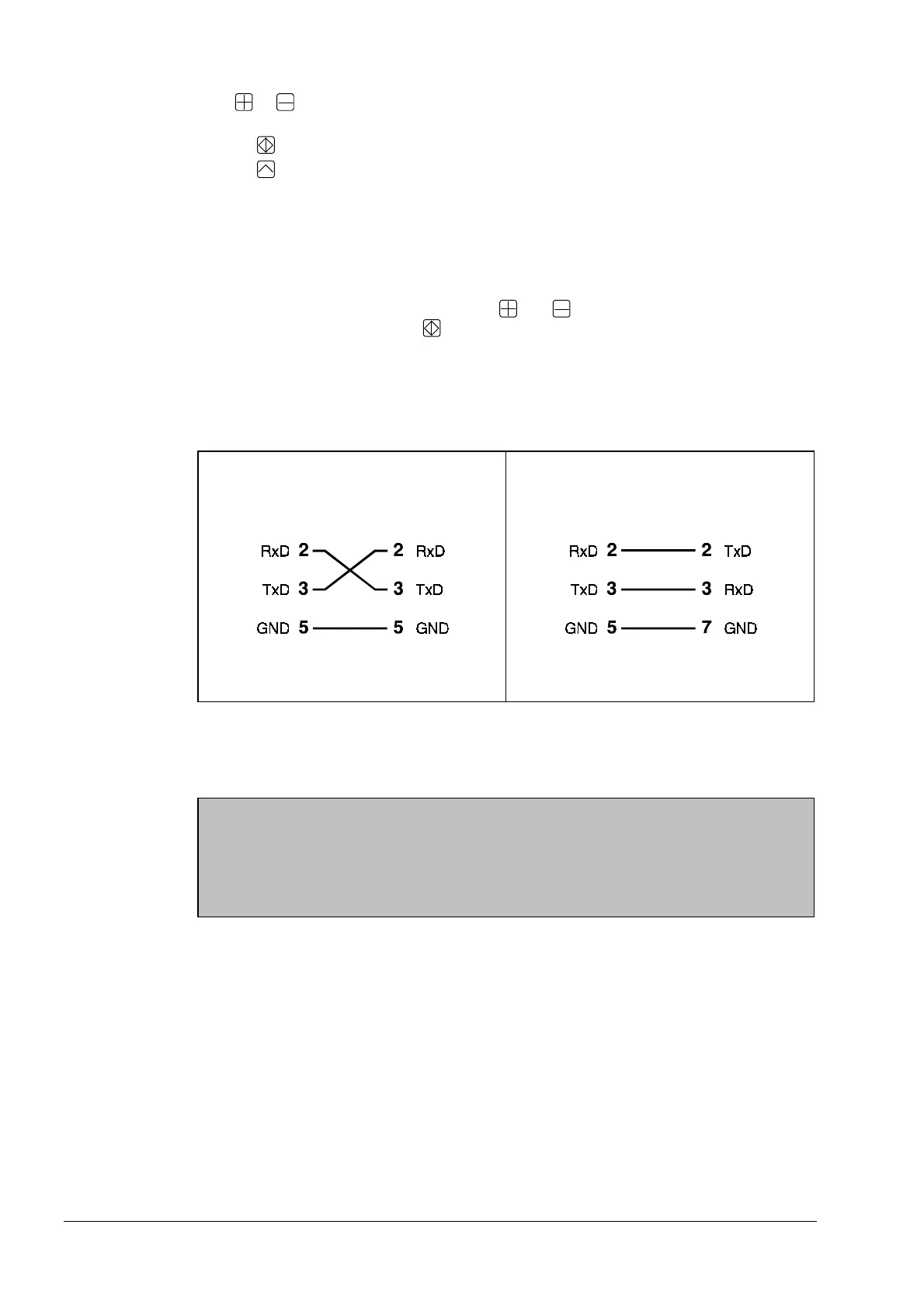
Printer cable RS 232c cables can be obtained from trade outlets as "computer - computer"-
connections.
The cable used must have the following connections:
Wiring of the
printer cable
Fusion Splicer
(9-pin cable plug)
Printer or Com-
puter
(9-pin cable socket)
Fusion Splicer
(9-pin cable plug]
Printer or Com-
puter
(25-pin cable
socket)
Pin Assignment 9 - 9-Pin Pin Assignment 9 - 25-Pin
Removing the Splice
Note
Observe the sequence!
1. Open flaps of LID system.
2. Open electrode flap.
3. Open fiber holder flaps.
Approx. 5 seconds after the flaps are opened, the splicer outputs the message "Insert
fiber, end faces o.k.?" to report that it is once again ready to commence splicing.
All flaps must be opened
and the fibers removed straightway,
since the slide returns
to its home position 5 seconds after the electrode and LID flaps are opened.
Artisan Technology Group - Quality Instrumentation ... Guaranteed | (888) 88-SOURCE | www.artisantg.com



 To Next Page