Using " Memory Stick"- Introduction
You can select either of two image sizes
Still images (DCR-TRV740/TRV840 only): 1152 × 864 or 640 × 480.
(When the POWER switch is set to CAMERA
or VCR, the image size is automatically set to
640 × 480.)
The default setting is 1152 × 864.
(When you record with DCR TRV340, the
still image size is always 640 x 480.)
Moving pictures: 320 × 240 or 160 × 112
The default setting is 320 x 240.
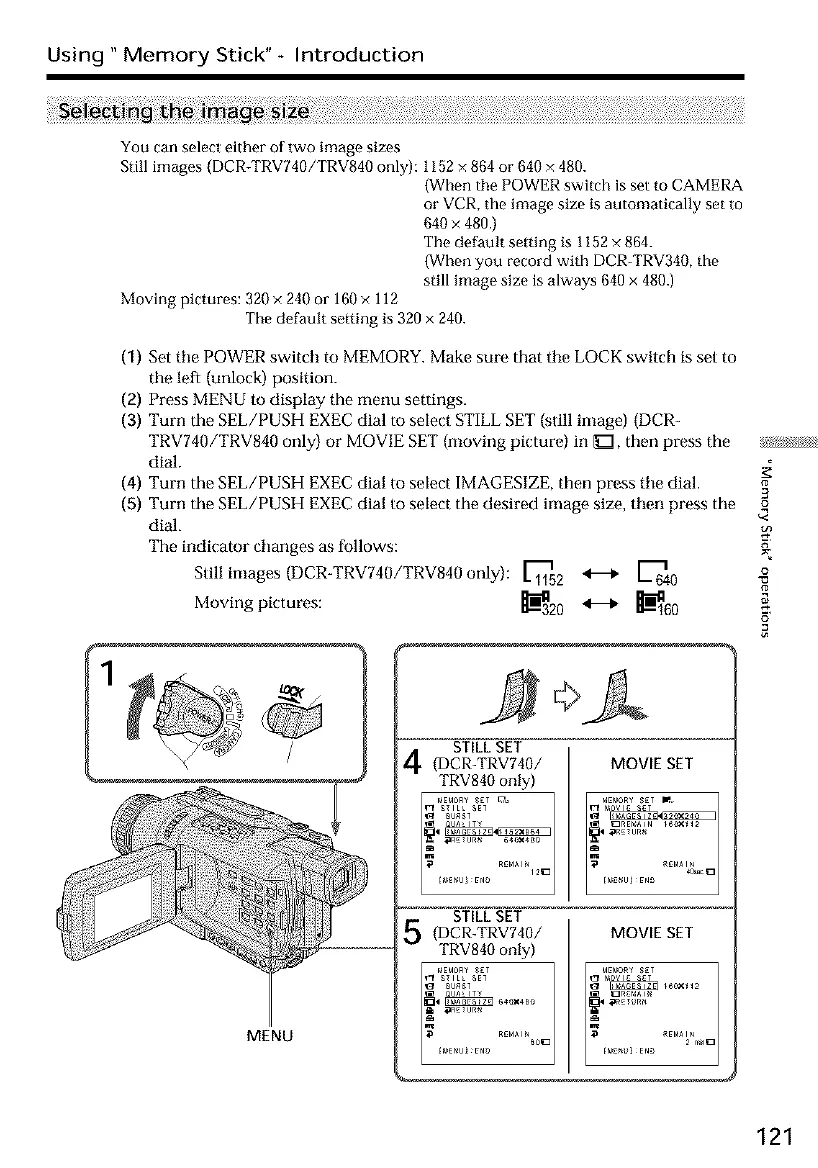
(1) Set tile POWER switch to MEMORY. Make sure that tile LOCK switch is set to
the left (unlock) position.
(2) Press MENU to display the menu settings.
(3) Turn the SEL/PUSH EXEC dial to select STILL SET (still image) (DCR-
TRV740/TRV840 only) or MOVIE SET (moving picture) in _Z], then press the _x5_?_i;
dial.
(4) Turn the SEL/PUSH EXEC dial to select IMAGESIZE, then press tile dial.
(5) Turn the SEL/PUSH EXEC dial to select the desired image size, then press the £
dial.
The indicator changes as follows:
Still images (DCR-TRV740/TRV840 only): _2 _ _640
Moving pictures: _20 _ _-_160 _
o
STILL SET
(DCR-TRV740/ MOVIE SET
TRV840 only)
STILL SET
(DCR-TRV740/ MOVIE SET
TRV840 only)
MENU
121













 To Next Page