Frame by frame recording
- Frame recording
You can make a recording with a stop-motion animated effect using frame recording.
To create this effect, alternately move the subject a little and make a frame recording.
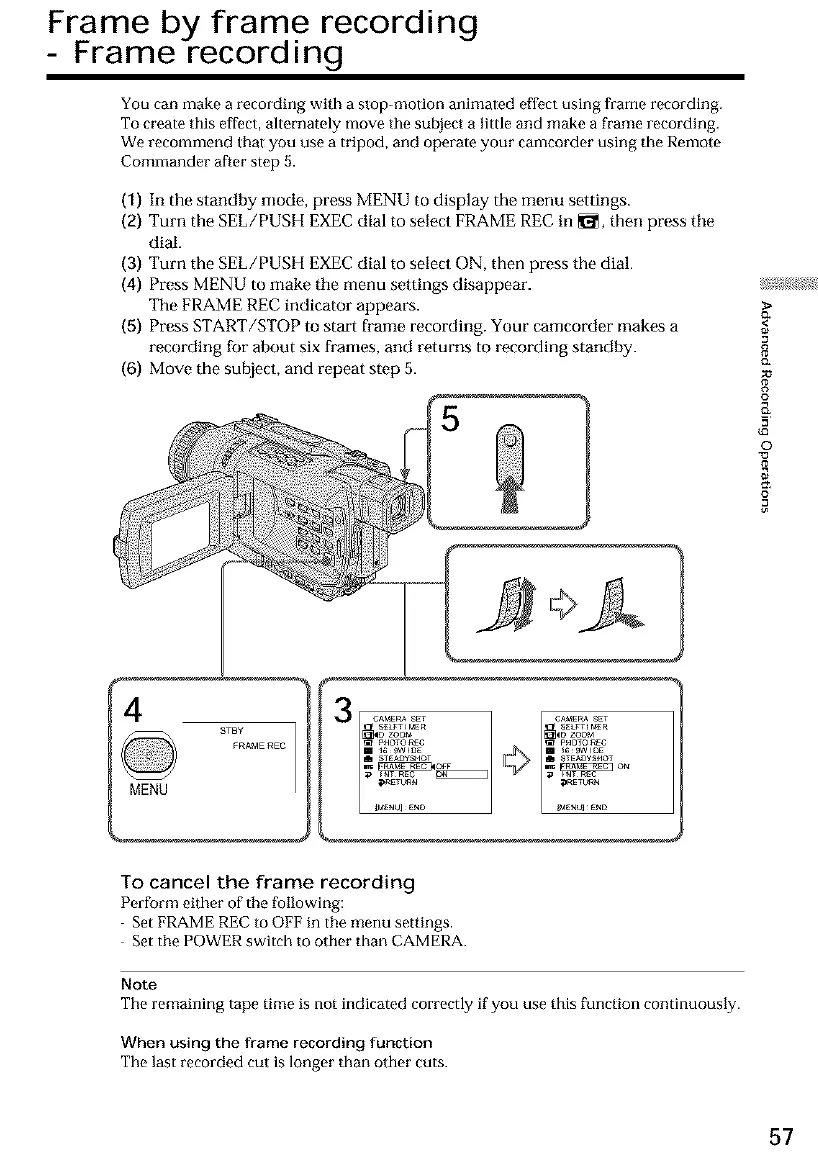
We recommend that you use a tripod, and operate your camcorder using the Remote
Commander after step 5.
(1) In the standby mode, press MENU to display the menu settings.
(2) Turn the SEL/PUSH EXECdial to select FRAME RECin _1_,then press tile
dial.
(3) Turn the SEL/PUSH EXECdial to select ON, then press the dial.
(4) Press MENU to make tile menu settings disappear.
The FRAMEREC indicator appears.
(5) Press START/STOP to start frame recording. Your camcorder makes a
recording for about six frames, and returns to recording standby.
(6) Move the subject, and repeat step 5.
4
8TBY
FRAME REC
MENU
To cancel the frame recording
Perform either of tile following:
Set FRAME REC to OFF in tile menu settings.
Set tile POWER switch to other than CAMERA.
Note
The remaining tape time is not indicated correctly if you use this function continuously.
When using the frame recording function
The last recorded cut is longer than other cuts.
(3*
<
8
o*
g
o
(D
©
-13
=o
57













 To Next Page