Enlarging recorded images
- Tape PBZOOM
You can enlarge moving and still images recorded on tapes.
Besides the operation described here, your camcorder can enlarge still images recorded
on" Memory Stick" s (except DCR_TRV240) (p. 166).
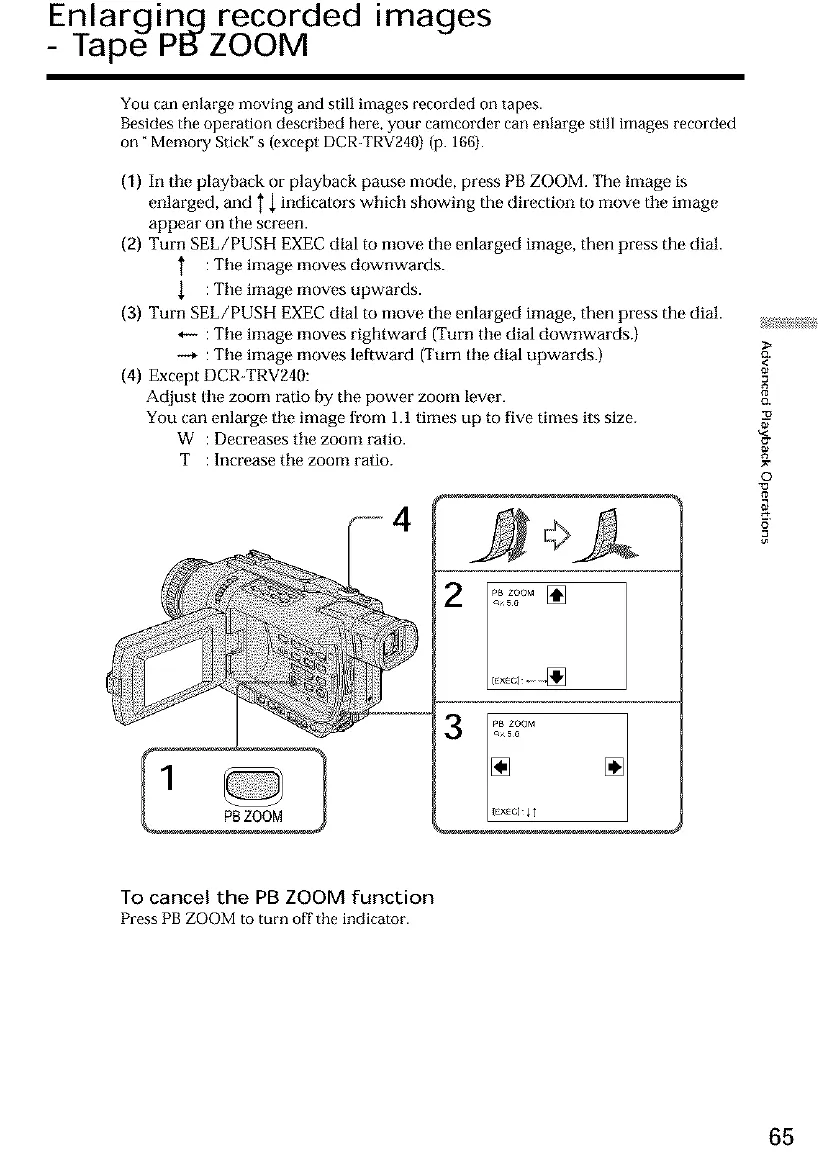
(1) In tile playback or playback pause mode, press PB ZOOM. The image is
enlarged, and T { indicators which showing the direction to move tile image
appear on the screen.
(2) Turn SEL/PUSH EXEC dial to move the enlarged image, then press the dial.
} :Tile image moves downwards.
{ :Tile image moves upwards.
(3) Turn SEL/PUSH EXEC dial to move the enlarged image, then press the dial.
_- :Tile image moves rightward (Turn tile dial downwards.)
-_ :Tile image moves leftward (Turn tile dial upwards.)
(4) Except DCR-TRV240:
Adjust tile zoom ratio by the power zoom lever.
You can enlarge tile image from 1.1 times up to five times its size.
W : Decreases tile zoom ratio.
T : Increase tile zoom ratio.
2 []
Ex_c]_
{3,
<
8
o_
©
o
To cancel the PB ZOOM function
PressPBZOOM to turn off' the indicator.
65













 To Next Page