Making your own titles
You can make up to two titles and store them in your cameorder. Each title can have up
to 20 characters.
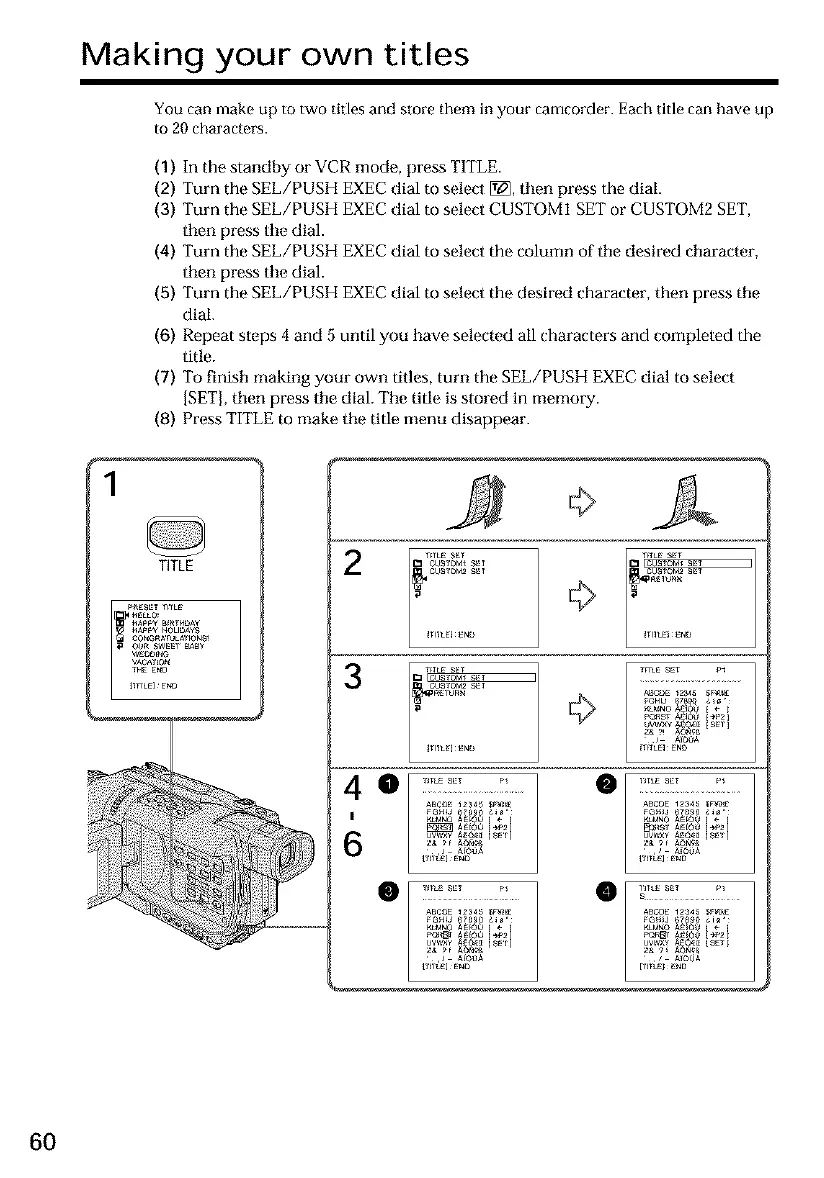
(1) In the standby or VCR mode, press TITLE.
(2) Turn the SEL/PUSH EXEC dial to select [_, then press the dial.
(3) Turn the SEL/PUSH EXEC dial to select CUSTOM1 SET or CUSTOM2 SET,
then press the dial.
(4) Turn the SEL/PUSH EXEC dial to select the column of tile desired cbaracter,
then press the dial.
(5) Turn the SEL/PUSH EXEC dial to select the desired character, then press tile
dial.
(6) Repeat steps 4 and 5 until you have selected all characters and completed the
title.
(7) To finisb making your own titles, turn the SEL/PUSH EXEC dial to select
[SET], tben press tile dial. The title is stored in memory.
(8) Press TITLE to make tile title menu disappear.
1
TITLE
A
2
3
,rTLE SE_
CUSlOM*_I ¸
CUSlOM2 _1 ¸
,riLE _N_
O lrrLE S_T P_
ABCOE 12_4_ $_
!
I LE]_E_a3
J A_00A
60













 To Next Page