Recording images from a tape as still
images
- Except DCR-TRV240
Your camcorder can read moving image data recorded on a tape recorded in ttle
Digital8 [_ system, and record it as a still image on a "Memory Stick."
Your camcorder can also capture moving image data through ttle input connector and
record it as a still image on a" Memory Stick."
Before operation
• Insert a tape recorded in the Digital8 D system into your camcorder.
• Insert a" Memory Stick" inlo your camcorder.
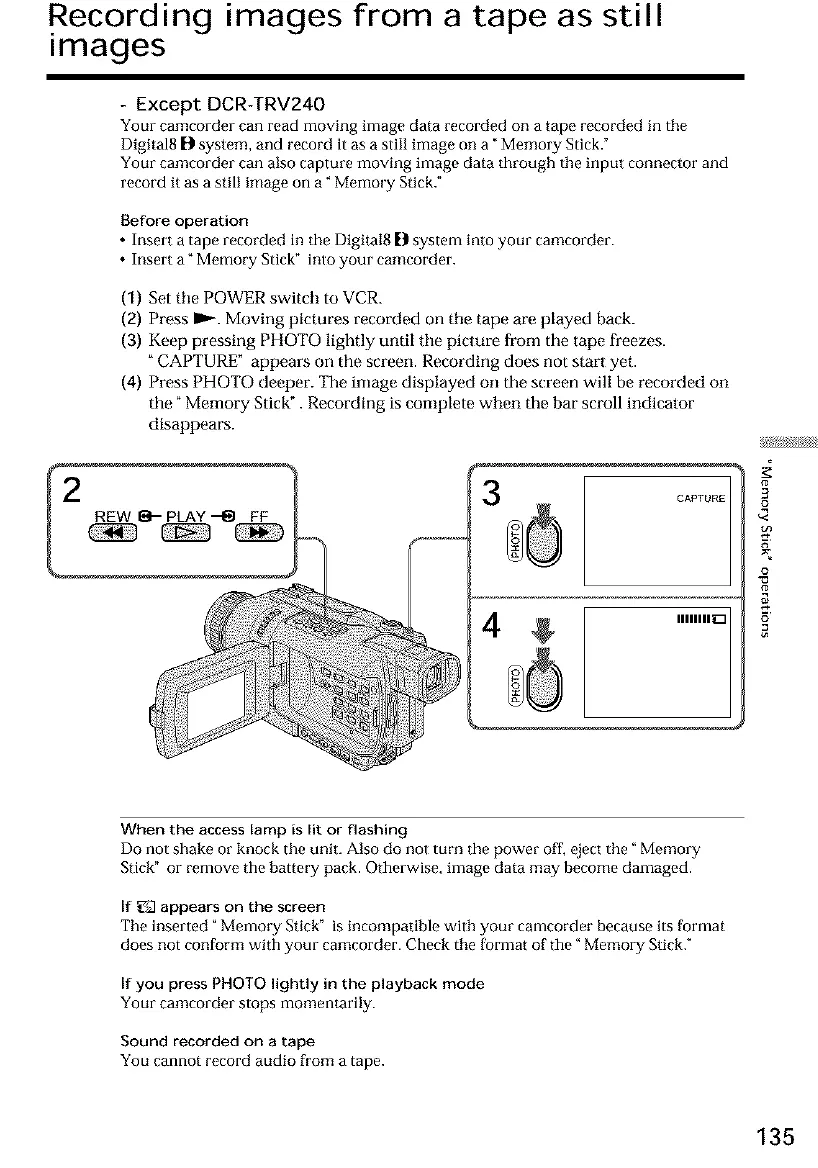
(1) Set tile POWER switch to VCR.
(2) Press m_,,-.Moving pictures recorded on tile tape are played back.
(3) Keep pressing PHOTO lightly until tile picture from the tape freezes.
"CAPTURE" appears on the screen. Recording does not start yet.
(4) Press PHOTO deeper. The image displayed on the screen will be recorded on
the" Memory Stick". Recording is complete when the bar scroll indicator
disappears.
CAPTURE
IIIIIIIID
#
3
o
When the access lamp is lit or flashing
Do not shake or knock the unit. Also do not turn the power off, eject the" Memory
Stick" or remove the battery pack. Otherwise, image data may become damaged.
If _2 appears on the screen
The inserted" Memory Stick" is incompatible with your camcorder because its format
does not conform with your camcorder. Check ttle format of the" Memory Stick."
If you press PHOTO lightly in the playback mode
Your camcorder stops momentarily.
Sound recorded on a tape
You cannot record audio from a tape.
135













 To Next Page