Identifying parts and controls
2O8
LCD screen and Viewfinder
[]
[] -----,
[]
[]
..... ]
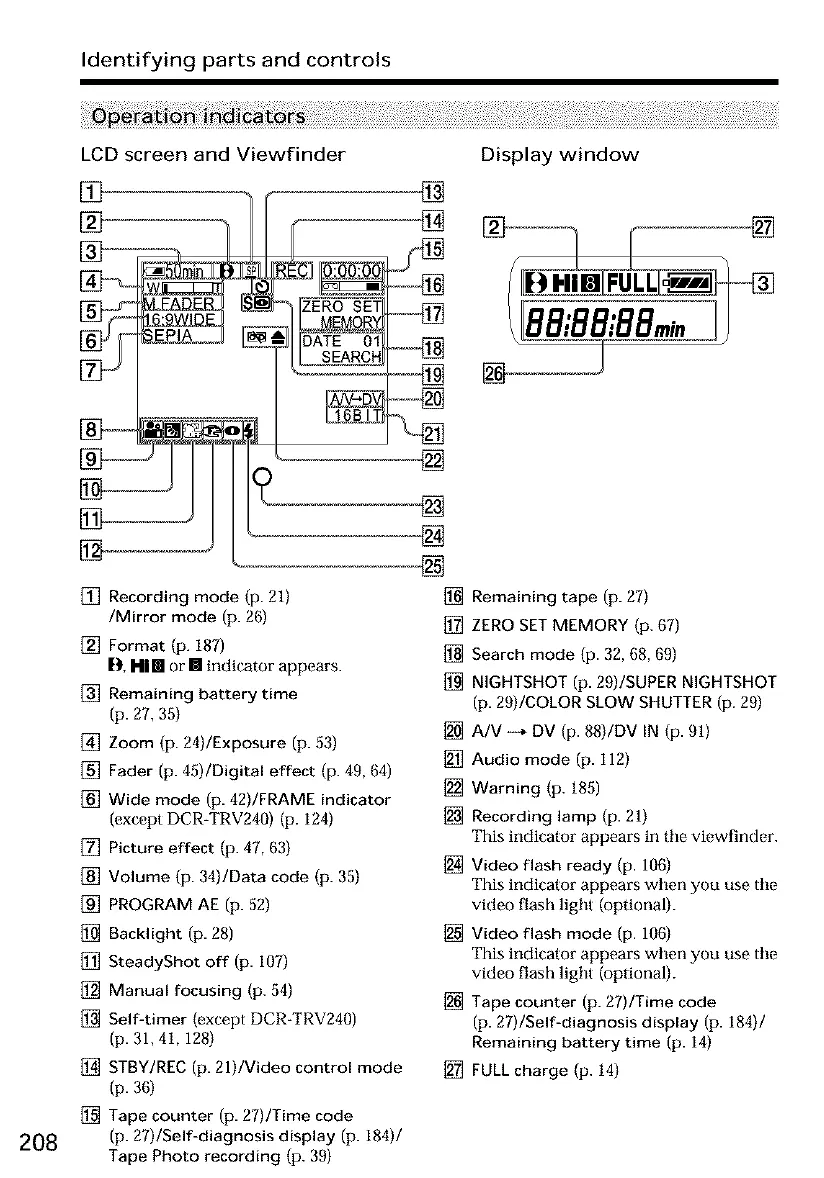
[] Recording mode (p. 21)
/Mirror mode (p. 26)
[] Format (p. 187)
[]1, I-II III or [] indicator appears.
[] Remaining battery time
(p. 27, 35)
[] Zoom (p. 24)/Exposure (p. 53)
[] Fader (p. 45)/Digital effect (p. 40, 64)
[] Wide mode (p. 42)/FRAME indicator
(except DCR-TRV240) (p. 124)
[] Picture effect (p. 47, 63)
[] Volume (p. 34)/Data code (p. 35)
[] PROGRAM AE (p. 52)
[] Backlight (p. 28)
[] SteadyShot off (p. 107)
[] Manual focusing (p. 54)
[] Self-timer (except DCR-TRV240)
(p. 31, 41,128)
[] STBY/REC (p. 21)/Video control mode
(p. 36)
[] Tape counter (p. 27)/Time code
(p. 27)/Self-diagnosis display (p. 184)/
Tape Photo recording (p. 39)
[]
[]
[]
Display window
[] Remaining tape (p. 27)
[] ZERO SET MEMORY (p. 67)
[] Search mode (p. 32, 68, 69)
[] NIGHTSHOT (p. 29)/SUPER NIGHTSHOT
(p. 29)/COLOR SLOW SHUTTER (p. 29)
[] A/V --* DV (p. 88)/DV IN (p. 91)
[] Audio mode (p. 112)
[] Warning (p. 185)
[] Recording lamp (p. 21)
This indicator appears in tile viewfinder.
[] Video flash ready (p. 106)
This indicator appears when you use tile
video flash light (optional).
[] Video flash mode (p. 106)
This indicator appears when you use tile
video flash light (optional).
[] Tape counter (p. 27)/Time code
(p. 27)/Self-diagnosis display (p. 184)/
Remaining battery time (p. 14)
[] FULL charge (p. 14)













 To Next Page