Step 1 Preparing the power supply
Use the battery pack after charging it for your camcorder.
Your eamcorder operates only with the" InfoLITHIUM" battery pack (M series).
See page 189 for details of" InfoLITHIUM" battery pack.
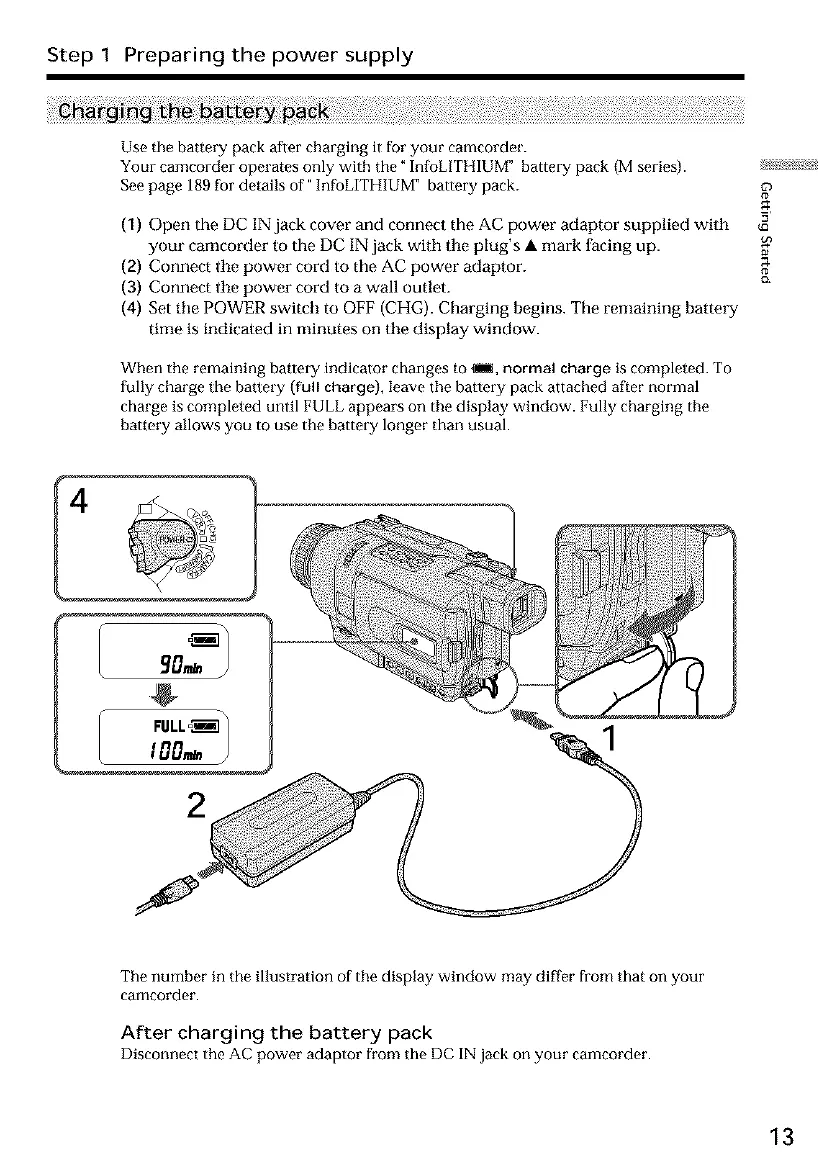
(1) Open the DC IN jack cover and connect the AC power adaptor supplied with
your camcorder to the DC IN jack with tile plug's • mark facing up.
(2) Connect the power cord to the AC power adaptor.
(3) Connect the power cord to a wall outlet.
(4) Set tile POWER switch m OFF (CHG). Charging begins. The remaining battery
time is indicated in minutes on tile display window.
When the remaining battery indicator changes to _im, normal charge is completed. To
fully charge the battel_y (full charge), leave the battery pack attached after normal
charge is completed until FULL appears on the display window. Fully charging the
battery allows you to use the battery longer than usual.
12.
4
The number in the illustration of the display window may differ from that on your
camcorder.
After charging the battery pack
Disconnect the AC power adaptor from the DC IN jack on your camcorder.
13













 To Next Page