Writing a print mark - PRINT MARK
- Except DCR-TRV240
You can specify a recorded still image to print out by writing a print mark. This
function is useful for printing out still images later.
Your camcorder conforms to the DPOF (Digital Print Order Format) standard for
specifying still images to print out.
Before operation
Insert a" Memory Stick" into your camcorder.
(1) Set the POWER switch to MEMORY or VCR. Make sure that tile LOCK switch
is set to the left (unlock) position.
(2) Play back the still image you want to write a print mark on.
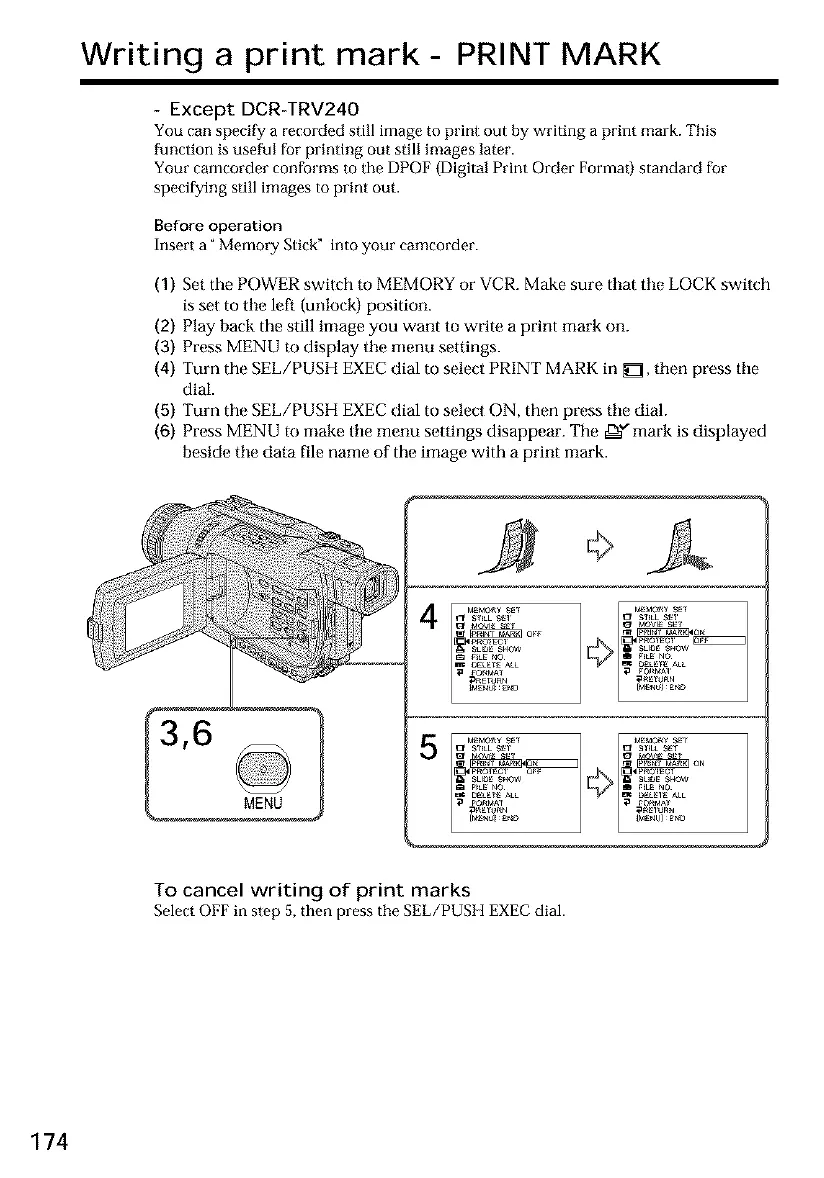
(3) Press MENU to display the menu settings.
(4) Turn the SEE/PUSH EXEC dial to select PRINT MARK in _ZI, then press tile
dial.
(5) Turn the SEE/PUSH EXEC dial to select ON, then press tile dial.
(6) Press MENU to make tile menu settings disappear. The ,e_" mark is displayed
beside tile data file name of the image with a print mark.
To cancel writing of print marks
Select OFF in step 5, then press the SEE/PUSH EXEC dial.
174













 To Next Page