Recording still images on " Memory
Stick" s - Memory Photo recording
- Except DCR-TRV240
You can record still images on" Memory Stick" s.
Before operation
Insert a" Memory Stick" into your camcorder.
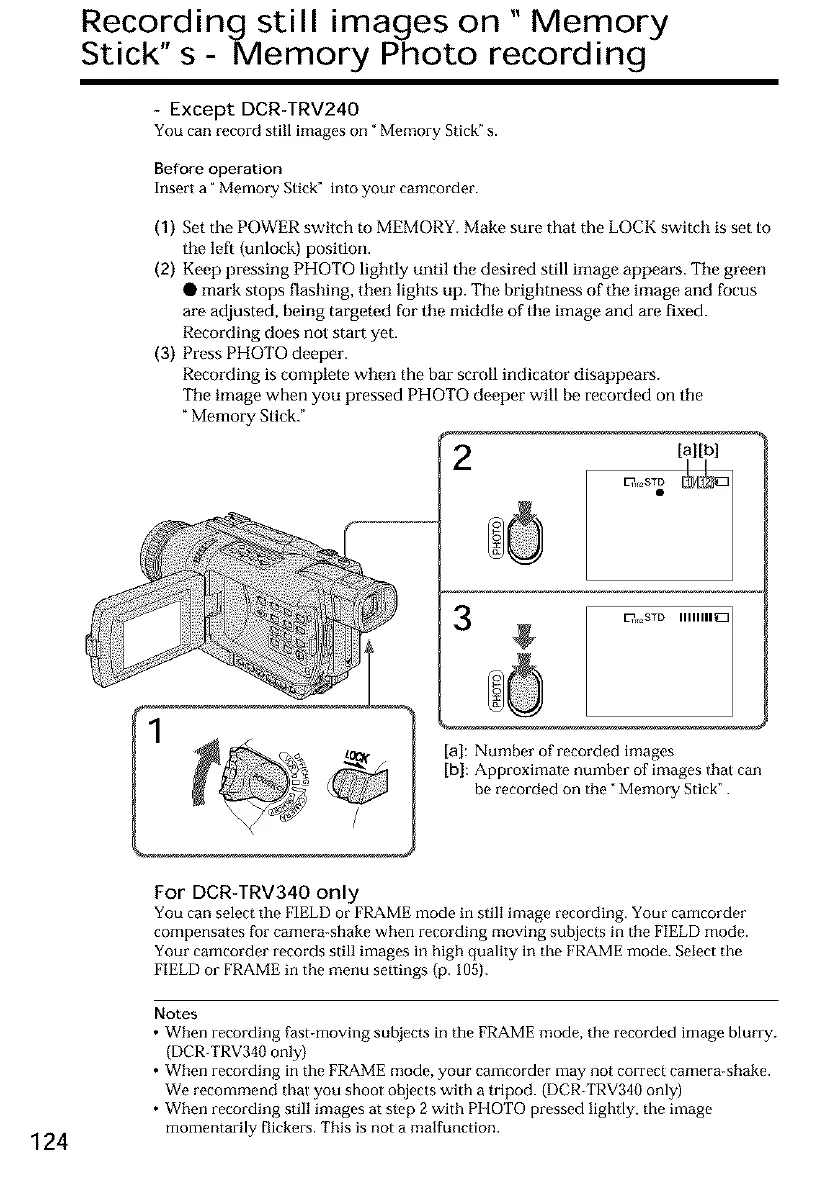
(1) Set the POWER switch to MEMORY. Make sure that the LOCK switch is set to
tile left (unlock) position.
(2) Kee f) pressing PHOTO lightly until the desired still image appears. Tile green
• mark stops flashing, then lights up. The brighmess of the image and focus
are adjusted, being targeted for tile middle of tile image and are fixed.
Recording does not start yet.
(3) Press PHOTO deeper.
Recording is complete when the bar scroll indicator disappears.
Tile image when you pressed PHOTO deeper will be recorded on tile
"Memory Stick."
/
E?, ,2STD IIIIIIII _
[a]: Number of recorded images
[b}: Approximate number of images Ihal can
be recorded on tile "Memory Stick".
For DCR-TRV340 only
You can select tile FIELD or FRAME mode in still image recording. Your camcorder
compensates for camera-shake when recording moving subjects in tile FIELD mode.
Your camcorder records still images in high quality in the FRAME mode. Select the
FIELD or FRAME in the menu settings (p. 105).
124
Notes
• When recording fast-moving subjects in the FRAME mode, the recorded image blurry.
(DCR-TRV340 only)
• When recording in the FRAME mode, your camcorder may not correct camera-shake.
We recommend that you shoot objects with a tripod. (DCR-TRV340 only)
• When recording still images at stop 2 with PHOTO pressed lightly, the image
momentarily flickers. This is not a malfunction.













 To Next Page