Recording still images on a tape - Tape Photo recording
- Except DCR-TRV240
You can record still images on tapes with the self-timer.
You can also use the Remote Commander for this operation.
Before operation
Set PHOTO REC to TAPE in the menu settings. (The default setting is MEMORY.)
(p. 105)
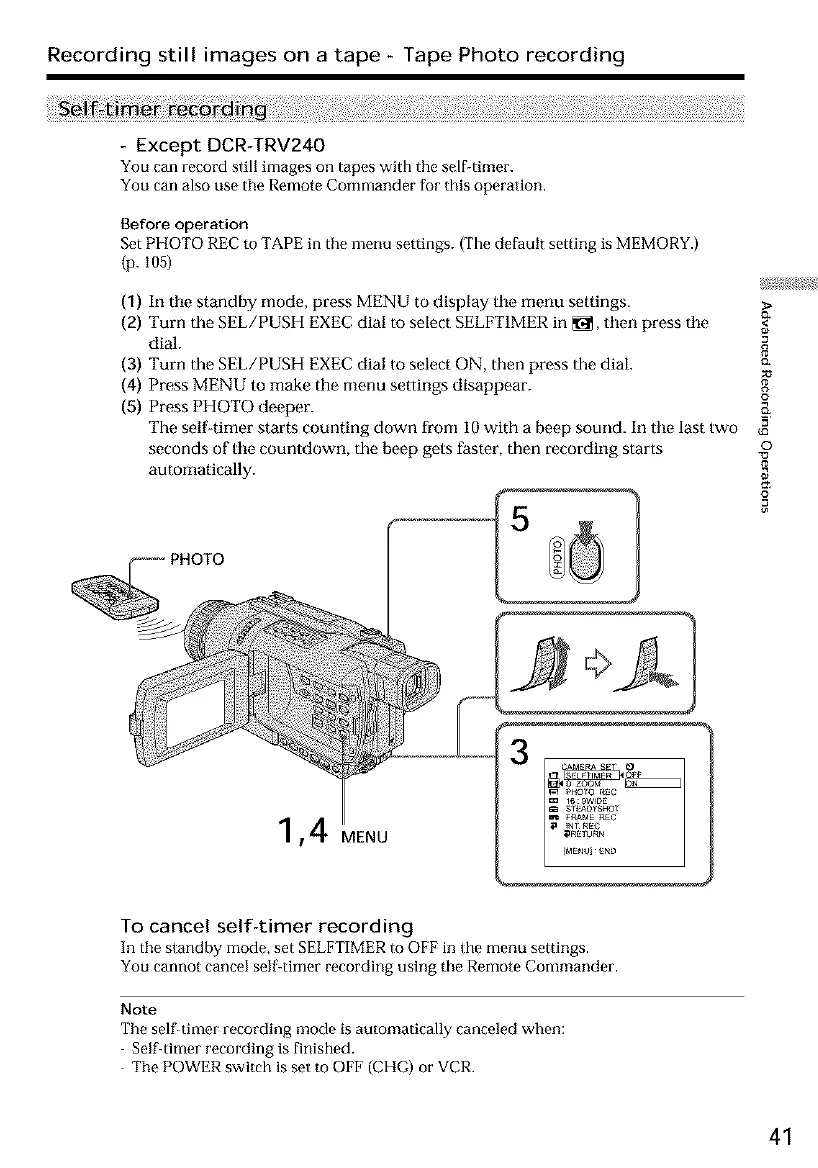
(1) In tile standby mode, press MENU to display tile menu settings. >
(2) Turn the SEL/PUSH EXEC dial to select SELFT1MER in _, then press tile <_
dial.
(3) Turn the SEL/PUSH EXEC dial to select ON, then press the dial. c_
(4) Press MENU to make the menu settings disappear. _,
(5) Press PHOTO deeper.
The self-timer starts counting down from I0 with a beep sound. In tile last two
seconds of tile countdown, the beep gets faster, then recording starts o
automatically.
,4 MENU
To cancel self-timer recording
In the standby mode, set SELFTIMER to OFF in the menu settings.
You cannot cancel self-timer recording using the Remote Commander.
Note
The self-timer recording mode is automatically canceled when:
Self-timer recording is finished.
The POWER switch is set to OFF (CHG) or VCR.
41













 To Next Page